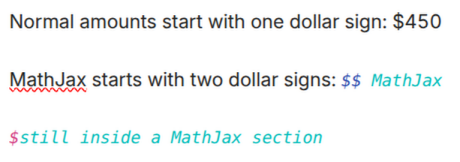
I’m trying to type a simple dollar sign into my notes (in Live Preview mode.) The dollar sign disappears when cursor is away, and the remainder of the following text is a different color (green or black.) I’ve searched help, but most or all of the results deal with using inline math, not avoiding it. Does anyone know how to fix this ? I’ve never encountered a note taking app where I can’t type a common character, what am I missing ?
What I’m trying to do
example: " the total is $450."
Things I have tried
I’ve tried putting it in a code block, enclosing the dollar sign in backticks, disabling live preview mode ,and a bunch of other suggestions from Claude (LLM). The only thing that’s worked is to manually past a wide unicode dollar sign character (non-ascii), but that’s time consuming.