Trying to fix the showing of extra brackets in external links that have brackets in link title

What I’m trying to do

I am trying to fix the []() links to not show the “link brackets” if the link text has brackets.

Things I have tried

This achieves what I’m trying to do, but not without side effects:

.markdown-source-view.is-live-preview div:not(.cm-active) > span.cm-formatting-link.cm-hmd-barelink {
  display: none;
}

.markdown-source-view.is-live-preview .cm-hmd-barelink {
  text-decoration: var(--link-decoration) !important;
}

Mostly this is fine, but it breaks the indenting in lists where these links appear. If the link doesn’t start the list item, then the indenting works just fine. The workaround that I have is I have a templater template that reformats the link to an html link, and then the issue disappears. But I’m still trying to see if there is a possible solution for this.

Anyone have any ideas how I could make this work?

Nevermind, apparently asking helps. I figured it out. This seems to work without breaking anything else (at least anything I can see).

.markdown-source-view.is-live-preview div:not(.cm-active) > span.cm-formatting.cm-formatting-link.cm-hmd-barelink.cm-link {
  color: transparent;           
  display: inline-block;   
  width: 0;  
}

.markdown-source-view.is-live-preview .cm-hmd-barelink {
  text-decoration: var(--link-decoration) !important;
}

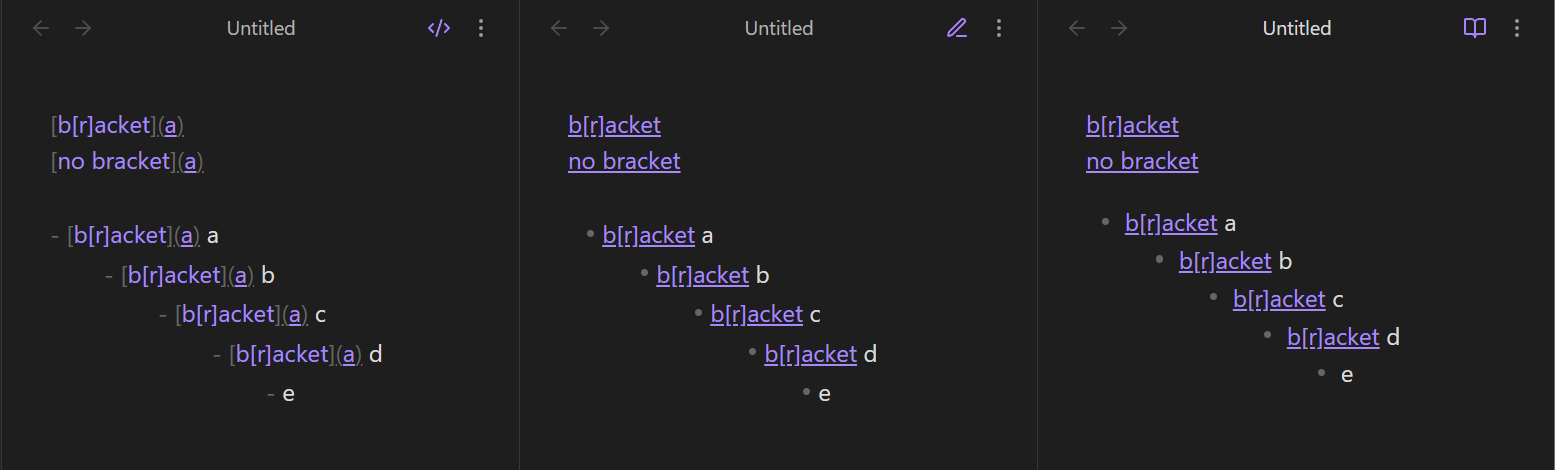
Do you mean a link such as [b[r]acket](a)?

For those, your CSS appears to work fine in lists:

In what way is it “breaking” for you?

The issue remains that markdown links with square brackets in the display text are hoverable but not clickable in the editing views, except when pressing Ctrl/Cmd. I wouldn’t expect the CSS to fix that.

Oh good! Never mind my comment then :slight_smile:

There is a bug report about that behavior, if you’d like to share your workaround there: (live preview) Extra bracket in external links when the link text has a bracket itself.

EDIT: Or maybe the workaround is theme specific? It’s not working for me in the default theme (with various other snippets, so I guess insights try in a test vault).

I disabled all plugins and snippets and theme (which in my dev vault only includes colors anyway). And it works for me. I will post it to the bug report with the info on what I tried.

I had an interesting result: it worked on one of my laptops and not the other. The one it didn’t work with had an older installer. It worked with installer version 1.9.12 and also the newest installer version.
Ah! I usually test on mobile, but my desktop installer is pretty old so maybe I tested there.