tldr: looking for advice for how to easily track counts, dates, etc around consumables (perishables like food, other consumables like light bulbs, etc).
for years now i’ve been using text/markdown files in folders (on *nix desktop) to keep track of physical things, their locations, etc. (eg folder per room in the house, then the kitchen folder has a text file for the fridge details plus a pdf of the owner’s manual, etc)
as i’ve switched to using my phone more, i’ve started synching that folder structure to the phone, and separately have started using obsidian, and then realized that i could just make that existing folder root part of my obsidian vault, and that has been great. i’ve started cleaning up the contents by adding some tags, with the intent of replicating some basic tracking solutions i’ve found people describing online. (i apparently can’t include links to those in forum posts here? they are all basically just tagging with item type, eg #inventory/hiking, plus a dataview query to list those in a table)
what would be even more useful than that sort of dashboard, though, is if i could use obsidian for tracking my consumables and perishables. ideally i’d want something where i could eg after buying groceries, log each item and a count as i put it in the fridge, and it would automatically track the purchase date, and then also i could optionally tag it as a type of item like bananas or milk or whatever, and maybe even also add an explicit use-by date or tag with attributes like “unripe” or “overripe”. and then (and this is the part i am having the most conceptual trouble with) i would want some easy sortable way to see the current inventory and counts and to quickly increment/decrement those counts.
(eventually i would want to be able to have things like implicitly calculated dates based on types and attributes, like if i entered unripe bananas on june 1st, i could define rules so it would be able to show those as having an implicit expiration date of maybe june 10th, and also i would want to be able to have multiple entries for the same type of thing, so i could have 6 bananas that expire on june 10th and 3 bananas that expire on june 8th.)
anyone have any experience (or even just ideas) with something like this? i have a lot of experience as a dba and in product managment and managing app development teams, so i know exactly how i’d design and even architect out an app to do this, plus lots of perl backend work and a tiny bit of js troubleshooting, but i have no actual app dev experience and am brand new to obsidian so i have no idea where to start or if this is even possible.
Things I have tried
search for inventory tracking, pantry tracking, consumables tracking, increment, counter, on web, in obsidian docs and forum, and in plugins. didn’t find anything beyond the basic solutions described above.
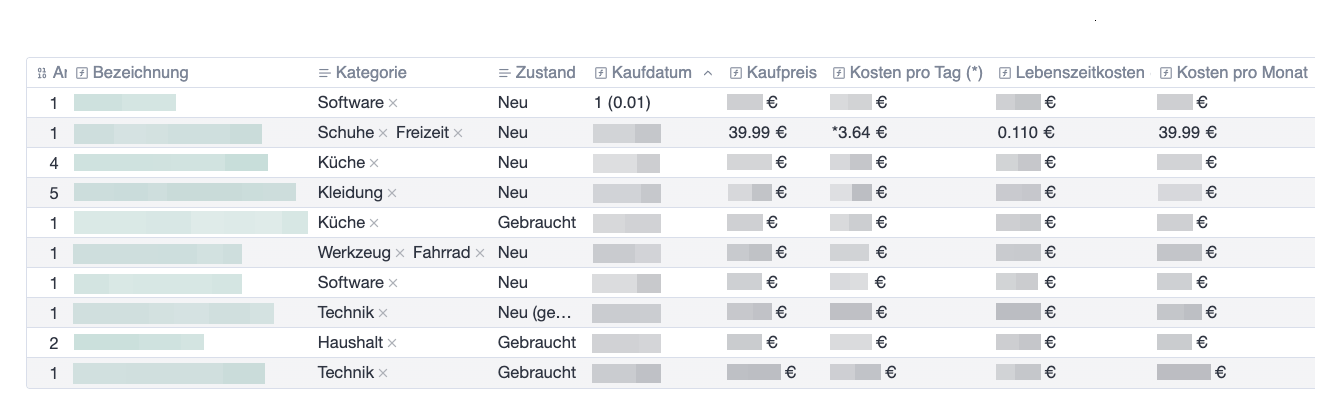
I am doing something similar with all the things I own. I use properties in combination with the bases plugin. This gives me a good overview where I can sort, filter etc. all my things (see image 1). To add/remove things I am using Templater scripts which are activated with meta bind buttons (see image 2).
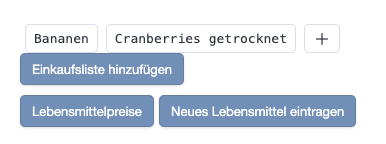
EDIT: Another example also using the Meta Bind plugin is the search I am using for my grocery shopping list. I use an inline suggester field to search through my grocery notes and add the respective groceries to my list.
nice! looking at the bases and templater plugins, those seem pretty straightforward. after looking at the docs for meta bind, though, i’m a little confused about how to use meta bind buttons + templater for this. i see examples of using a button to replace itself with a template, but nothing obvious about how to use templates to do things like adjust properties in the yaml (which i’m assuming is where the count would be kept?). do you have an example of how to do that?
(if you’d be willing to share your config for that grocery list builder, that would be amazing, as that was going to be the next thing i was going to tackle if i could get the consumable tracking working.)
oh wait, i now see in the meta bind docs an example of increment/decrement buttons under the Update Metadata action; i was looking for things mentioning updating properties, not metadata. it looks like with that action, i wouldn’t even need templater plugin?
It was a project to get familiar with the different options, so it might not be the most elegant solution today. This is just to give you an idea. Feel free to ask if you need more information.
I’m using Dataview to retrieve all file names for my groceries and then pass that list to a Meta Bind inline suggester. In that suggester, I add the groceries, which are stored in a property.
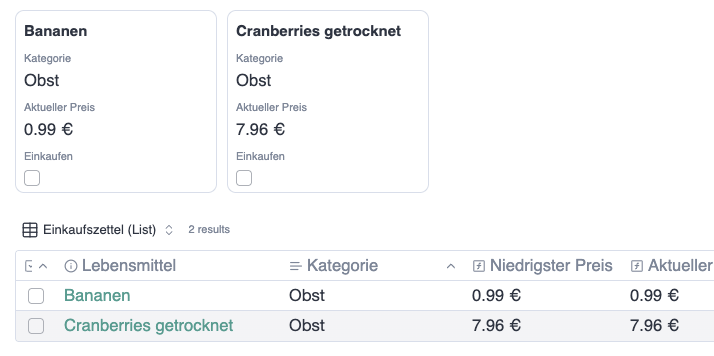
Next, I have a button that runs a Templater script. The script reads the grocery list from the property, sets the Einkaufen property to true in the respective grocery notes, and then resets the list property. I can then display all groceries I want to buy in a base using a filter on the Einkaufen property.