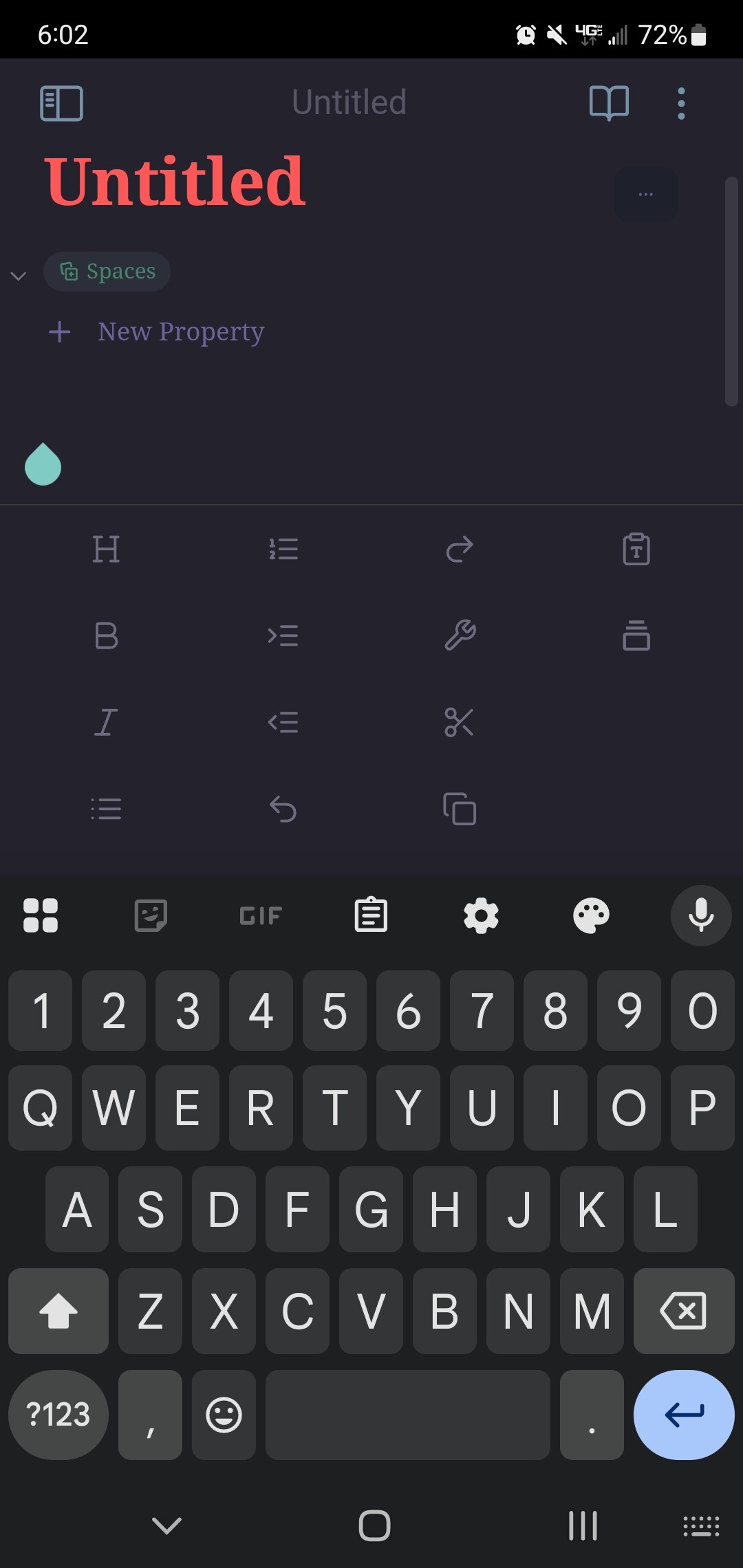
I want to hide the mobile toolbar on my Android phone as it consumes 1/3 of the screen and leaves only a few lines to enter text in portrait mode, and leaves no space in landscape mode.
Things I have tried
I have searched “mobile toolbar”, “mobile toolbar android”, “toolbar”, etc. No one else seems to have my problem.
I have also tried to configure the toolbar in the mobile app, but I cannot find any options to make it smaller or hide it.
I have the same problem on my Samsung Galaxy S22+
It’s so big i could type anymore.
A quick fix to still be able to use the app I remove all the icons from the toolbar.
Now at least I can use the app, but missing the toolbar options of course.
Did have the same problem in WhatsApp to, maybe that helps.
When typing and then wanting to add emoticons, the toolbar gets verry big to, but you can still type there.
Reset all the settings of the Samsung Keyboard I’m using in Android.
At first it didn’t help but some how, maybe resetted more or different setting of the keyboard somehow, but now it works.
But if I want to select a emoticon again, now you get a hovering remove button, that was the part that you didn’t get to see before the wrong toolbar.
Maybe Obsidian needs a changes for this in the interface to support this??
Because Obsidian still shows the big toolbar when you add a icon to it.