Disclaimer
Is this project open source? Yes
Is this project completely free? Yes
Is this project vibe-coded beyond the author’s ability to comprehend how it works? No
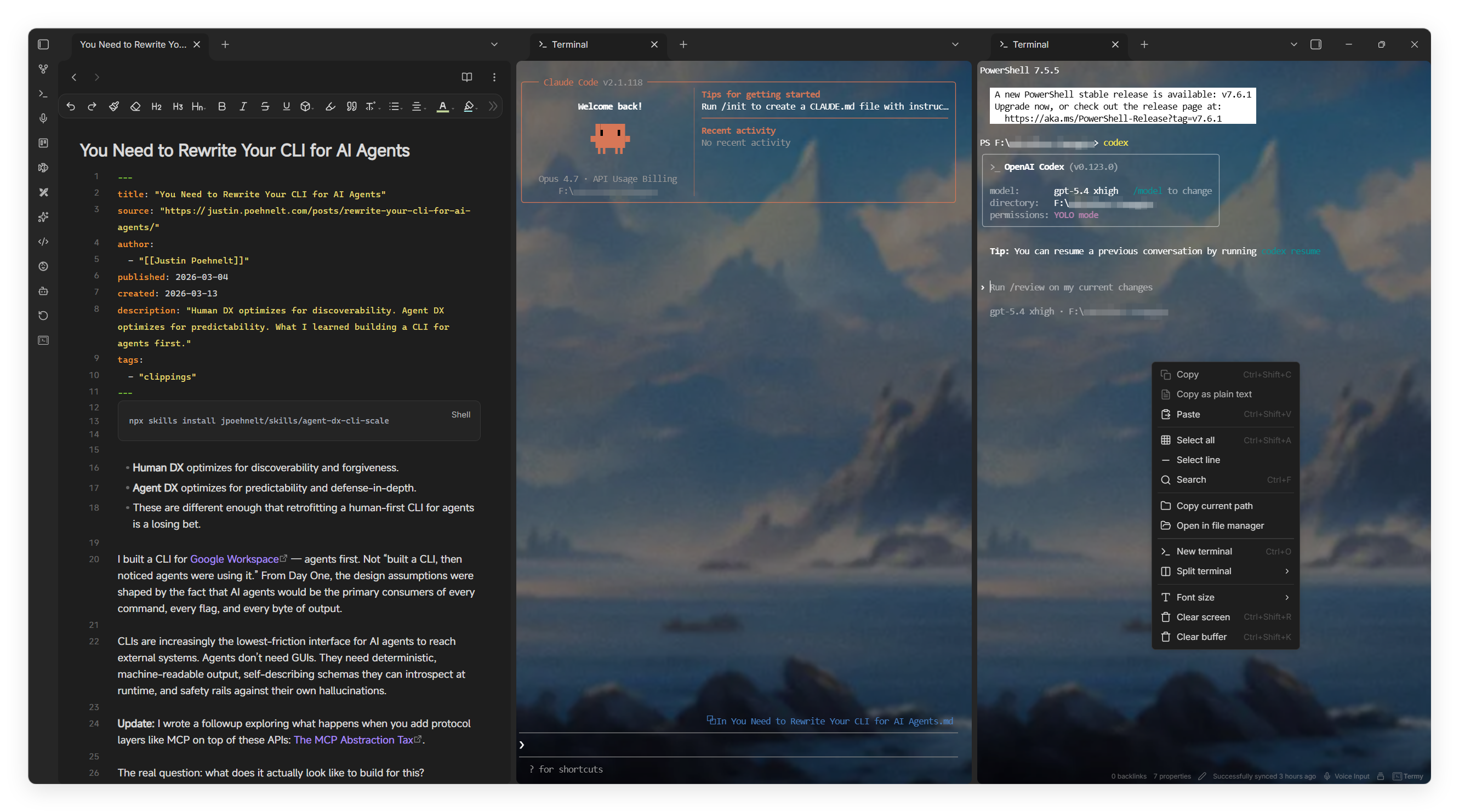
Hi everyone, I’d like to share an Obsidian plugin I’ve been working on: Termy.
Termy is a desktop-only terminal workspace plugin for Obsidian. It provides full terminal emulation inside Obsidian with a native Rust PTY backend, split panes, reusable workflows, file-aware drag and drop, and optional AI CLI context integrations.
Repository: https://github.com/ZyphrZero/Termy
The main design goal is to make the terminal feel like part of the Obsidian workspace instead of a separate external window.
Why I built it
I use Obsidian as a project knowledge base, but I also spend a lot of time in terminals: running scripts, launching CLI tools, working with local files, and using AI coding CLIs.
Switching between Obsidian, an external terminal, and AI CLI sessions became a bit fragmented, so I wanted a plugin that could:
- run a real local shell inside Obsidian
- keep terminal sessions close to project notes
- send selected note content or file paths into the terminal
- make terminal output paths clickable back into Obsidian
- launch repeatable workflows from the status bar or command palette
Main features
Native Rust PTY backend
Termy uses a native Rust binary for the PTY backend.
This means users do not need to install an extra Node.js, Python, or bridge runtime just to run the terminal backend. The plugin talks to a bundled native server binary, which then connects to the local shell.
This is also why the plugin is desktop-only.
Real terminal experience
The terminal frontend is based on xterm.js, with support for:
- Windows, macOS, and Linux desktop environments
cmd, PowerShell, PowerShell Core, WSL, Git Bash,bash,zsh, or custom shell paths- multiple terminal sessions
- horizontal and vertical splits
- terminal search
- copy and paste
- prompt navigation
- font resizing
- clearing screen or scrollback buffer
- configurable terminal placement rules
Terminals can open in the current tab, a new tab, left/right tab groups, split panes, or a new window.
Workflow launcher
Termy includes a reusable workflow system.
A workflow can contain one or more actions, including:
- terminal commands
- Obsidian commands
- external links
Workflows can be launched from:
- the status bar menu
- the command palette
- automatically registered workflow commands
Each workflow can control whether it appears in the status bar, opens a terminal automatically, runs in a new terminal instance, or renames the target terminal tab.
Obsidian-aware interactions
Termy can interact with the current Obsidian context:
- send the current editor selection to the active terminal
- send the current note content to the active terminal
- send the current note path to the active terminal
- drag text, files, and folders into the terminal
- click file references in terminal output to reopen matching vault files or external paths
- open the bundled changelog from settings or the command palette
AI CLI integrations
Termy also includes optional integrations for AI CLI workflows.
For example:
- Claude Code sessions can receive active Obsidian file and selection context
- Codex CLI can use a local MCP server named
termy-context - context snapshots can include the active file, current selection, open files, and vault/workspace information
These integrations are optional, but they are useful if you already use Obsidian as a planning or project context layer while working with AI coding tools.
Installation
Termy is not currently listed in the official Obsidian Community Plugins registry.
You can install it with BRAT:
- Install BRAT:
https://github.com/TfTHacker/obsidian42-brat - Choose Add beta plugin
- Enter
ZyphrZero/Termy - Install and enable Termy from Settings → Community plugins
Or install manually from GitHub Releases:
https://github.com/ZyphrZero/Termy/releases
Extract the release files into:
.obsidian/plugins/termy/
Then reload Obsidian and enable the plugin.
Current status
The plugin is actively developed and still evolving. Feedback, bug reports, and suggestions are very welcome.
Repository: https://github.com/ZyphrZero/Termy
Issues: https://github.com/ZyphrZero/Termy/issues
If you try it, I’d be especially interested in feedback around:
- shell compatibility on different platforms
- terminal behavior compared with your usual terminal
- whether the workflow launcher feels useful
- AI CLI context workflows
- packaging / installation experience
Thanks for reading!