Templater Parsing Error - error message cites Calendarium

What I’m trying to do

So I’ve been working on some templates for my DND notes with Templater. Currently I was working on a template for a note for when we meet/hear about a new clan, but I’m getting a Template Parsing error when I try to create a new note from the template (both right click → ‘Create new note from Templater template’ and the ‘ctrl + shift + c’ hotkey I set up.
It’s specifically this template that’s doing this, I have another template for plot notes that still works. Even stranger, when I look at the console to see what’s failing the error chain is reporting a series of errors in the javalent Calendarium plugin I have installed.
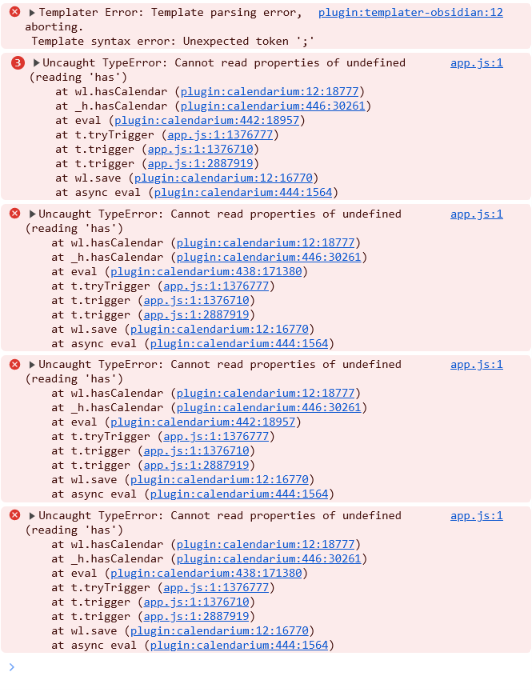
I do have couple of Calendarium events that are tied to my plot notes, but I have note parsing off and nothing pointing from Calendarium to where I’m storing the notes this template is generating, so I’m just really confused.

Things I have tried

I looked at posts here and on the githubs for Templater and Calendarium to see if what other people encountering this did. The parsing errors reported here and on the Templater repo were most commonly caused by either syntax errors or an edge case that would error out if the template was only creating frontmatter but no body. I combed through my code and tightned up my syntax ass much as I could, tested, then added some content to the body of the template and tested again. I got the exact same error both times.
I’ll post the template code below. Any help would be appreciated.

<%*
let title = tp.file.title;

let name = await tp.system.prompt("What is the clan name?");
let plural = null;
let i = (await tp.system.suggester(["Yes", "No"], [true, false], false, "Is the plural different from the singular?");
if (i) {
  let plural = await.system.prompt("What is the plural?");
}
let villain = await tp.system.suggester(["Yes", "No"], [true, false], false, "Are they bad guys?");

if (title.startsWith("Untitled"))
{
  title = "The " + name + " Clan";
} await tp.file.rename(title);

tp.file.move("/Organizations/");
%><% "---" %>
tags:
- Organization
<%* if (villain) { %>
- Villain
<%* } %>
aliases:
- <% name %>
<%* if (plural != null) { %>
- <% plural %>
- "The " + <% plural %>
<%* } else { %>
- "The " + <% name %>
<%* } %>
<% "---" %>

Members:
- 

I’m seeing a few issues with your template.

First, this line has two opening ( but only one ), you can either remove the first ( or add an additional ) before the ;.

Before:

let i = (await tp.system.suggester(["Yes", "No"], [true, false], false, "Is the plural different from the singular?");

After:

let i = await tp.system.suggester(["Yes", "No"], [true, false], false, "Is the plural different from the singular?");

Second, this line isn’t correct, await. isn’t valid syntax, and it’s missing the tp. namespace.

Before:

let plural = await.system.prompt("What is the plural?");

After:

let plural = await tp.system.prompt("What is the plural?");

Third, your move isn’t being awaited which will cause errors and is missing the file name, tp.file.move both moves and renames the file at once, so we can also remove the tp.file.rename entirely.

Before:

if (title.startsWith("Untitled"))
{
  title = "The " + name + " Clan";
} await tp.file.rename(title);

tp.file.move("/Organizations/");

After:

if (title.startsWith("Untitled"))
{
  title = "The " + name + " Clan";
}

await tp.file.move("/Organizations/" + title);

The template started working for me after these three changes. I don’t have Calendarium installed so no idea if those errors will be resolved or not with these changes.

Calendarium is probably a red herring. The real issue is usually in the generated frontmatter. In your template, look at the alias lines:

aliases:
- <% name %>
<%* if (plural != null) { %>
- <% plural %>
- "The " + <% plural %>
<%* } else { %>
- "The " + <% name %>
<%* } %>

If name or plural contains a YAML special character (colon :, quote ", square bracket, etc.), the line becomes invalid YAML and Obsidian/Templater choke. The error can bubble up into Calendarium because it re-reads the note metadata.

Quick way to confirm: after Templater runs, paste the generated note into a browser-only front matter checker that shows the exact broken line. It can also auto-fix the common issues (quote special chars, add missing ---, trim trailing whitespace) without uploading anything: YAML Frontmatter Validator & Fixer — Validate and Auto-correct Obsidian / Hugo / Jekyll (Free, Private)

(Disclosure: I built that tool — posting it because it helps isolate whether the problem is the generated frontmatter or Calendarium itself.)