Hi all,
quite new to Obsidian so forgive me if I miss the obvious.
I regularly generate a markdown file that lists all my flagged emails in Outlook as tasks. The idea is to consolidate, in Obsidian, tasks from notes and tasks from emails. The task includes the first lines of the email body for better context. To maintain readability I try to enclose each task in a callout (collapsed by default) so I only see the actual ‘task line’.
Typically a task looks like this:
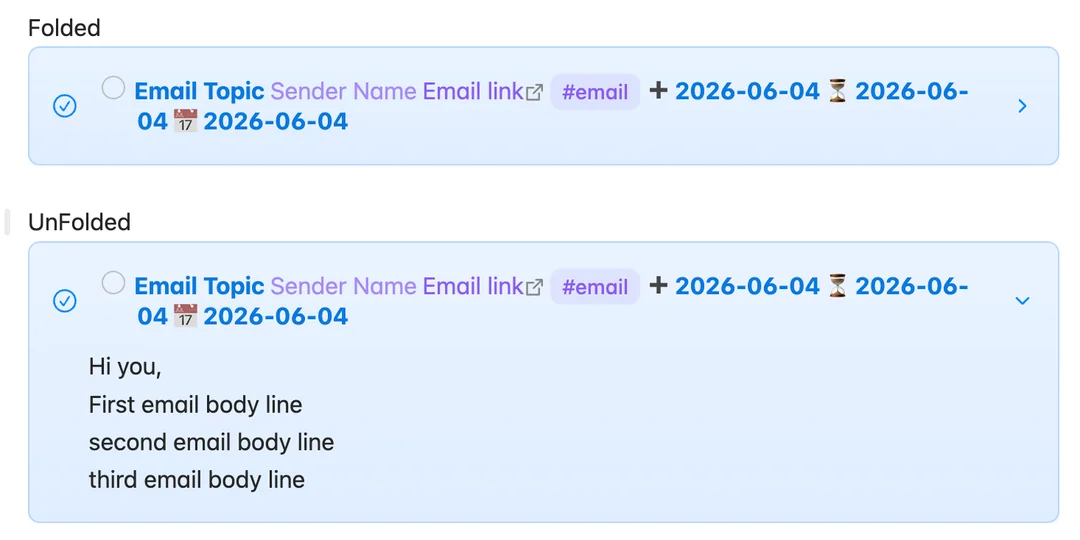
>[!todo]- - [ ] Email Topic [[Sender Name]] [Email link](https://outlook.office365.com/owa/?ItemID=xxx) #email ➕ 2026-06-04 ⏳ 2026-06-04 📅 2026-06-04
> Hi you,
> First email body line
> second email body line
> third email body line
Now this works as expected in terms of presentation:
BUT unfortunately these tasks are ‘not seen’ by TASKS or dataview TASK queries.
Is there maybe some other way to achieve what I’m looking for; i.e. tasks with expandable “comment” lines, collapsed by default and that remain visible to queries ?
So what i understood: You get a markdownfile from outlook. The title of the email itself is a task. And possibly there are tasks within the mail. Besides you have tasks within other tasks in obsidian. And you want to have one place where all these different tasks are shown.
Firstly: If i throw your code-example into my vault i can check it without any issues. So there might be some configuration problem. There is something regarding this in the tasks-documentation. Try that.
Other than that: I answered to this Post. I gave an example for dataviewjs and callouts with tasksboxes there. While there are checkboxes and they do work the “supplemental information” from your email will be ommited there. The callout is implemented in a way (at least on my machine, don’t know about the example), that the link to the exact line is given. So when pushing the link your markdownfile with the email is opened and you can see it there. Also you can filter checkboxes based on due or scheduled days. Which is nice.
That said: If you have a way to export each email as a separat task I’d strongly suggest using Obsidian Bases. Its a database that can be configured rather freely.You can add views that show just completed files or open files. You can filter it and turn it into a table with a lot of different columns that are in each markdownfile. So you’d give each email its own file, define a checkbox in the frontmatter and can check it in the database. Also the team is working on a kanban and calendar view!
Hi,
thanks for your answer.
Regarding the 1st part of your answer, my actual workflow is, when I go through emails in Outlook:
if an email needs attention but I can’t immediately reply, I flag the email in Outlook (with a due date)
once having checked all new emails, I run a javascript that does a sort of 2-way sync between outlook and 1 single markdown file located within my vault, called “flagged emails” :
1st round : If a task in the MD file is marked as done; I unflag the corresponding email in Outlook
2nd round : A flagged email in outlook that is not yet in the MD file is added to that MD file as a new task (following the scheme I put in the opening message here).
As to what is (not) working:
My code snippet is working fine and does exactly what I wnat; I can expand and collapse the task, I can check it as done and click on the internal link and the external link.
However, the task is not seen in a query like:
```dataview
TASK
WHERE !fullyCompleted
SORT due ASC
GROUP BY due
```
I suspect that this is due to the fact that the actual ‘task line’ does not start with - but rather with the callout code > [!todo]- only then followed by the - .
If I move the actual task line to the callout “body”, rather than the callout header (so task line actually starting with > - ) then the task is seen by the query but I do lose the visibility of the task “header” if the callout is collapsed.
Hope that makes sense.
Now, what I didn’t consider, is generating one file per flagged email and I didn’t consider Bases. Those are clearly options I’ll need to look into.
As I do a forth and back sync, I’ll see how this could work.
Today, to identify if an email aldready “exists in Obsidian” (do I need to add it or not), I only need to check if the email messageID is present in this one single markdown file. I need to change my logic here to go through all the markdown files in a “Email Tasks” folder within the Vault.
Also I’d need to name each MD in a unique way (hash of messageID). Feasible but that would give quite fancy MD file names.
Anyway, thanks for the answer and pushing some suggestions. I’ll work on that approach.