What I’m trying to do
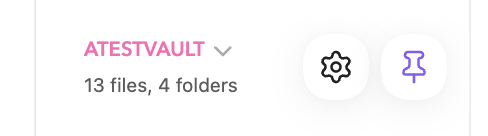
Hi, I’d like to edit the font size and style of the Vault name / picker at the bottom of the left sidebar on mobile, mainly iPadOS.
Things I have tried
.nav-folder.mod-root > .nav-folder-title {

}
- Also, ‘Hider’ plugin’s ‘Hide Vault name‘ doesn’t work (even on a new vault with no special setting).
Any idea?
Specs
iPadOS 26.5 | Obsidian 1.12.7
It will depend on what font your choose (if it’s installed on the iPad or not) and the specific section you are looking for, but you could try something like this to start:
.is-tablet .workspace-drawer-header-name-text {
    font-family: 'Avenir Next';
    font-size: 0.9em;
    color: hotpink;
}
That works, thanks!
Do you also know the selectors for the other elements of that area (files/folders status, buttons)? And eventually the background of each when there’s one (as the bottom of the header name can sometimes be hidden for eg). Not critical but would be fun to know, whenever you have the time! Thanks again.