Before opening a new bug report, please search the forum for duplicates and follow the Troubleshooting Guide.
- Developer issues with the API should go here
- Themes and Custom CSS issues should go here
- Translations issues/improvements should be posted here
- Obsidian Clipper Bugs should be posted here
- Obsidian Importer Bugs should be posted here
- For Linux, we only accept bug reports that are reproducible with our AppImage or Snap package under Gnome or KDE.
Once you’ve done the above, delete everything above this line.
Steps to reproduce
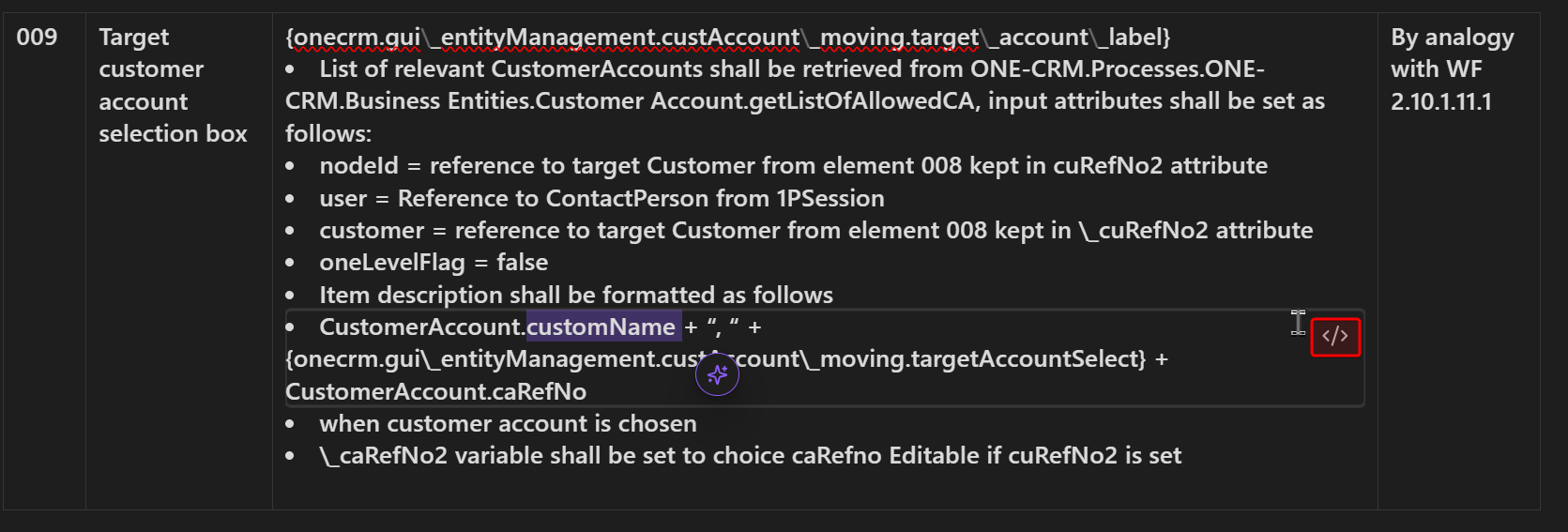
Create table with conten in cells wchich require formating, I found the only way how to format it by using
Examle:
| 009 | {onecrm.gui_entityManagement.custAccount_moving.target_account_label}
| — | ------------------------------------- | ------------------------------------------------------------------------------------------------------------------------------------------------------------------------------------------------------------------------------------------------------------------------------------------------------------------------------------------------------------------------------------------------------------------------------------------------------------------------------------------------------------------------------------------------------------------------------------------------------------------------------------------------------------------------------------------------------------------------------------------------------------------------------------------------------------------------------------------------------------------------------------------------- | ------------------------------ |
When trying to edit this kind of indented text inside a cell, the only workaround is to place the cursor at the very beginning of the text block and navigate right using the arrow keys to reach the desired part (e.g., the 5th line). Or when double click on specific line I have to click on </> to switch that line to edit mode.
It appears that while the text is visually rendered across multiple lines, only the first line acts as editable. For instance, if I select ‘customer = reference to target Customer’, which visually acts as the 3rd bullet point, I am entirely unable to edit it.
Did you follow the troubleshooting guide? [Y/N]
Please, follow the Troubleshooting Guide before answering Yes.
Expected result
I expect that I am able to edit selected text also when html
Actual result
It is not possible to edit selected text.
Environment
SYSTEM INFO:
Obsidian version: 1.12.4
Installer version: 1.6.7
Operating system: Windows 11 Home 10.0.26200
Login status: logged in
Language: en
Catalyst license: none
Insider build toggle: off
Live preview: on
Base theme: adapt to system
Community theme: none
Snippets enabled: 4
Restricted mode: off
Plugins installed: 6
Plugins enabled: 5
1: Git v2.38.0
2: Excalidraw v2.20.6
3: Hotkeys for templates v1.4.3
4: Omnisearch v1.28.2
5: YOLO v1.5.1.4
RECOMMENDATIONS:
Custom theme and snippets: for cosmetic issues, please first try updating your theme and disabling your snippets. If still not fixed, please try to make the issue happen in the Sandbox Vault or disable community theme and snippets.
Community plugins: for bugs, please first try updating all your plugins to latest. If still not fixed, please try to make the issue happen in the Sandbox Vault or disable community plugins.