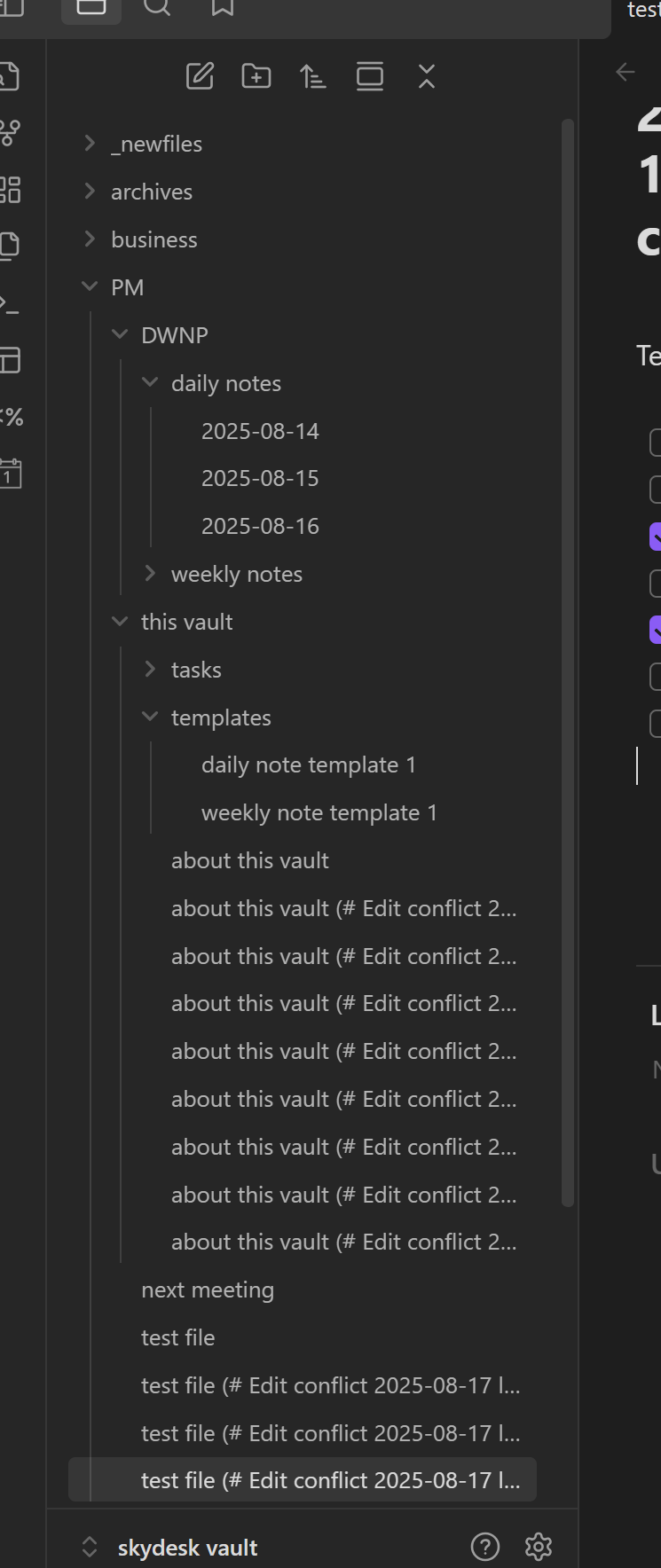
This is a sync bug so the sandbox vault is irrelevant.
The vault is synced between at least 3 devices. I can access 2.
Steps to reproduce
- open obsidian
Did you follow the troubleshooting guide? [Y]
Is the sandbox vault synced between 3 different devices? Thought not.
Expected result
- sync to work as described
Actual result
I get multiple versions of different files - for example, the file “test file.md” is replicated, unchanged, with new filenames like:
test file (# Edit conflict 2025-08-17 lid3dpC #) (# Name clash 2025-08-17 69e4p8C #) (# Name clash 2025-08-17 837wnkC #) (# Name clash 2025-08-17 7elyweC #) (# Name clash 2025-08-17 chshk0C #) (# Name clash 2025-08-1 (# Name clash 2025-08-17 so2ddlC #)
I’ve deleted the files, and they return. Up to 8 duplicates of one file.
Obsidian is unusable like this, so without a resolution we’ll find a better service.
Environment
SYSTEM INFO:
Obsidian version: v1.8.10
Installer version: v1.8.4
Operating system: Windows 11 Home 10.0.26100
Login status: logged in
Language: en
Catalyst license: none
Insider build toggle: off
Live preview: on
Base theme: adapt to system
Community theme: none
Snippets enabled: 0
Restricted mode: off
Plugins installed: 12
Plugins enabled: 12
1: Buttons v0.9.9
2: Calendar v1.5.10
3: Dataview v0.5.68
4: Templater v2.14.1
5: Fold Properties By Default v1.0.8
6: Hotkeys++ v0.2.7
7: Natural Language Dates v0.6.2
8: Tag Wrangler v0.6.4
9: Periodic Notes v0.0.17
10: Outliner v4.9.0
11: Better Word Count v0.10.1
12: Tasks v7.21.0
RECOMMENDATIONS:
Community plugins: for bugs, please first try updating all your plugins to latest. If still not fixed, please try to make the issue happen in the Sandbox Vault or disable community plugins.