I want to put the attachments in a separate folder outside the vault folder. This simplifies sync and backup frequency due to the difference of folder sizes.
Proposed solution
For example, D:\Obsidian-attachments\my-vault-name
or ..\Obsidian-attachments\my-vault-name (relative path)
Hmm, drag & drop + [Ctrl] doesn’t work for me.
If I try that with a folder, nothing happens. If I do it with a file, the file is copied to my Obsidian vault.
I think “linking folders” isn’t really what I mean, or maybe Obsidian doesn’t understand it that way.
Are you familiar with Visual Studio Code?
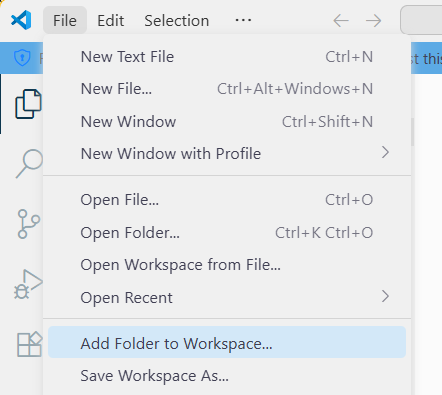
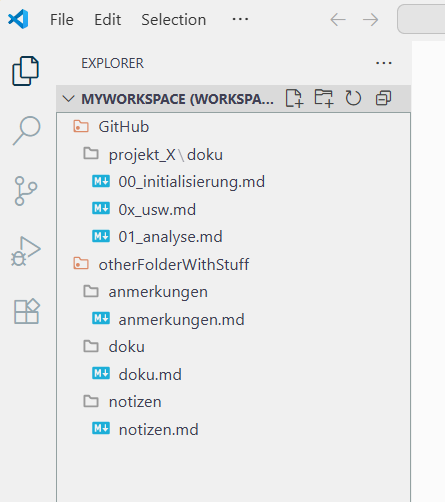
When I initialize or use a workspace in VSC, I can add various folders from my computer. The trick is that I can edit the files in the added folders, but the folder isn’t copied to another location. I can edit the files in their original location.
The “GitHub” folder originates on drive D:, and the “otherFolderWithStuff” folder originates on drive E:. But I can use both as if they were in a “vault,” called a workspace in VSC.
The folders in my workspace are only linked to it, but not copied, and can be located anywhere on my computer.
I’d like to see this kind of functionality in Obsidian, so I can comfortably edit my project documentation without having to create a vault for each project, with all its settings, plugins, etc. If Obsidian could do this similarly to VSC, then I could create an Obsidian vault for all project documentation, edit and write it optimally, but leave the documentation in the project folders. Completely without overhead, since many projects are also synchronized via GitHub, and the .obsidian file simply has no place there. If I create a separate Obsidian vault for each project, I’d always have to jump through the vaults, which is impractical.
However, I also believe that this isn’t what the thread starter means.