Steps to reproduce
Be a noob and think the “desktop” can be your vault three years ago, and uninstll/reinstall in hope it no longer use the desktop as vault and try to index the 118go of data of the 50968 files that the software “everything” and “wizztree” can index in less than 500ms.
Did you follow the troubleshooting guide? [Y/N]
Diagonally, my time is valued, letting this topic titeled “stuck on loading vault” opened would have avoid duplication and frustration on both end [AND ALLOWING ME TO LINK THE ORIGINAL TOPIC WOULD ALSO BE USEFULL INSTEAD OF ADDING MORE FRUSTRATION]
Expected result
A way to not have this issue in the first place
Actual result
Stuck on loading vault
Environment
ctrl+p didn’t gave me the windows info, what do you want ? my version ? my gpu ? my blood infos ?
Additional information
I wished to be more civil, but feeling like i have to fight your architecture, here is the link :
https://forum.obsidian.md/t/stuck-on-loading-vault
1 Like
Also i cannot close obsidian, i have to kill the task because it filled the cpu with instruction about indexing the vault.
1 Like
Welp there is no ticket system, i’m not even sure i want to use obsidian anymore,
“bump” i guess 
hello. sorry for not responding earlier. I do remember your thread and we recently introduced an escape hatch for your case.
- download and reinstall obsidian using the latest version from the website.
- restart your computer
- from your browser, or anywhere you can run url, do:
obsidian://choose-vault.
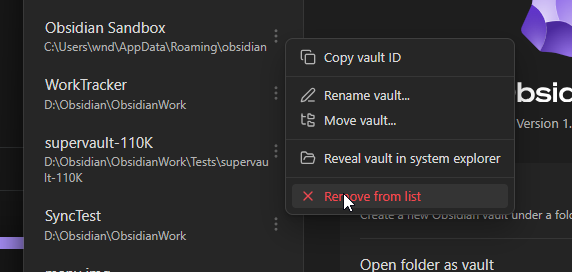
- the vault selector will appear.
- access the context menu of your vault and click “remove from list”