Steps to reproduce
- Go to MacOS system settings and search “language input methods”
- Add US and Latin America as input sources
- Under “all input sources” select “Automatic by language” for “Spelling”
- Open sandbox vault in obsidian app
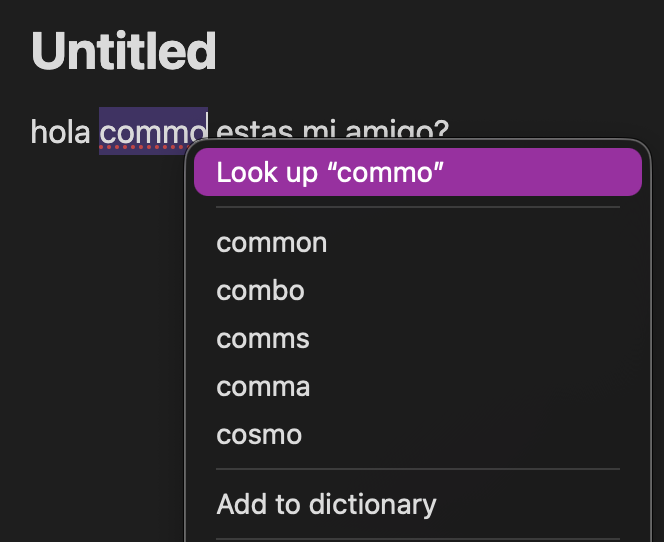
- Type “Hola commo estas mi amigo?”
- The correct language is detected and “commo” is underlined
- Right click on the incorrect word and all the suggestions are in English
Did you follow the troubleshooting guide? Y
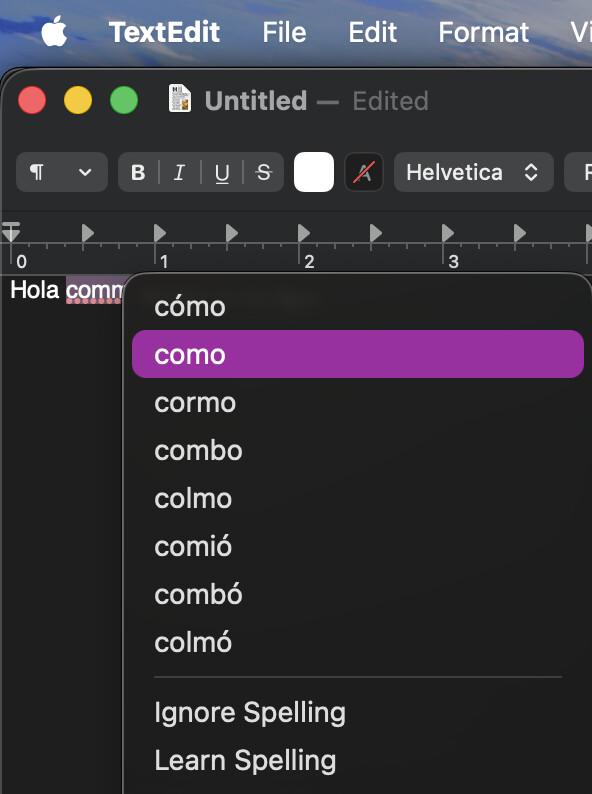
Expected result - Suggestions should be in the same language used to underline incorrect words.
Actual result - Spanish is used to determine which words are spelled incorrectly, but english is used for the suggestions
Environment
SYSTEM INFO:
Obsidian version: v1.10.3
Installer version: v1.7.7
Operating system: Darwin Kernel Version 25.1.0: Mon Oct 20 19:34:03 PDT 2025; root:xnu-12377.41.6~2/RELEASE_ARM64_T8112 25.1.0
Login status: not logged in
Language: en
Insider build toggle: off
Live preview: on
Base theme: adapt to system
Community theme: none
Snippets enabled: 0
Restricted mode: on
RECOMMENDATIONS:
none
Additional information
Screenshot from TextEdit where it’s working:
Screenshot from Obsidian Sandbox Vault: