SYSTEM INFO:
Obsidian version: 1.13.4
Installer version: 1.7.7
Operating system: Windows 11 Home China 10.0.26200
Login status: not logged in
Language: en
Insider build toggle: off
Live preview: on
Base theme: adapt to system
Community theme: none
Snippets enabled: 0
Restricted mode: on
RECOMMENDATIONS:
none
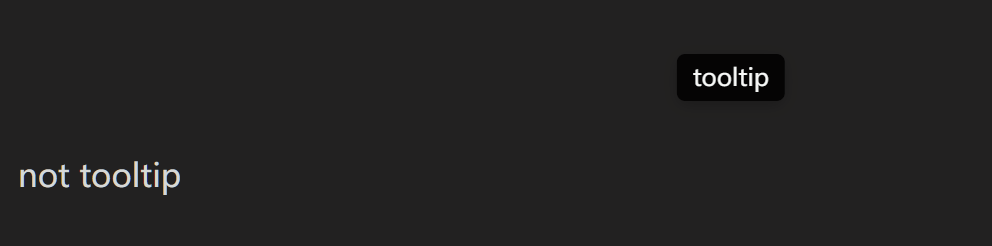
It doesn’t matter where the styling is defined—a CSS snippet, a theme, Obsidian’s app.css—they all get rendered, as they should (in my opinion), when you call their class.
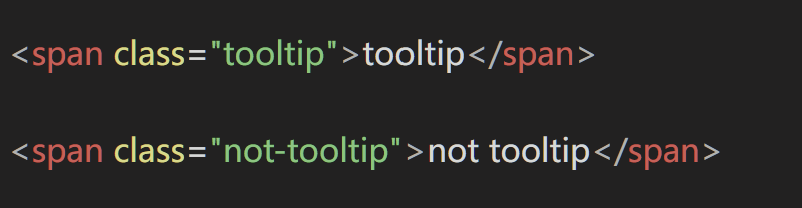
i dont think styles defined in obsidian’s css should be rendered bc the editor shouldnt be scoped together if you know what i mean? like for example, if i make a user title span (<span class="user-title">user title span</span>) here in the forum, it doesnt get rendered as a little badge, bc the editor has different scoping. like some donut-scoping thing preventing the ui style from leaking into the editor. i think it should be a bug when a text editor has certain words you cant write without it leading to unexpected behavior
but regardless, is there a way to prevent it from rendering like that while still keeping the tooltips in the app ui? im writing pages for a website and cant really change the class to anything but “tooltip” either.
If that doesn’t match your surrounding text, it’s probably due to other snippets, a theme, or plugins. You would just have to look into which styles need to be set and to what values. (Or open a help thread with the details so folks can look into it with you).