Steps to reproduce
-
Start a sandbox vault session
-
Create a new note
-
Insert this markdown text into the note:
| Unicode points | Text | # of chars | Actual width (in a monospace font) | What obsidian thinks | | :----------------------- | :--- | :--------- | :--------------------------------- | :------------------- | | 006F 006F 006F 006F | oooo | 4 | 4 (max) | width = 4 | | 006F 006F 0301 006F 006F | oóoo | 5 | 4 | width = 5 (max) | | 006F 0301 | ó | 2 | 1 | width = 2 | | 00F3 | ó | 1 | 1 | width = 1 | | 006F 0308 0301 | ö́ | 3 | 1 | width = 3 | | 00F3 0301 | ö́ | 2 | 1 | width = 2 | | 006F 0361 006F | o͡o | 3 | 2 | width = 3 | -
Force Obsidian to reformat the table (e. g. by editing the table’s header)
-
Switch to source mode
-
Notice how the table columns become misaligned
Did you follow the troubleshooting guide? [Y/N]
YES
Expected result
Obsidian would not consider characters with no width (combining diacritics, SHY, etc) when counting widths of table cells thus making vertical lines aligned correctly.
Actual result
Obsidian measures cell widths and aligns table columns by the number of unicode code points, making ugly formatting in source mode.
Environment
SYSTEM INFO:
	Obsidian version: v1.11.5
	Installer version: v1.9.12
	Operating system: Windows 11 Home Single Language 10.0.26200
	Login status: not logged in
	Language: ru
	Insider build toggle: off
	Live preview: on
	Base theme: adapt to system
	Community theme: none
	Snippets enabled: 0
	Restricted mode: on

RECOMMENDATIONS:
	none
Additional information
This is what happens when Obsinian formats the table given above:
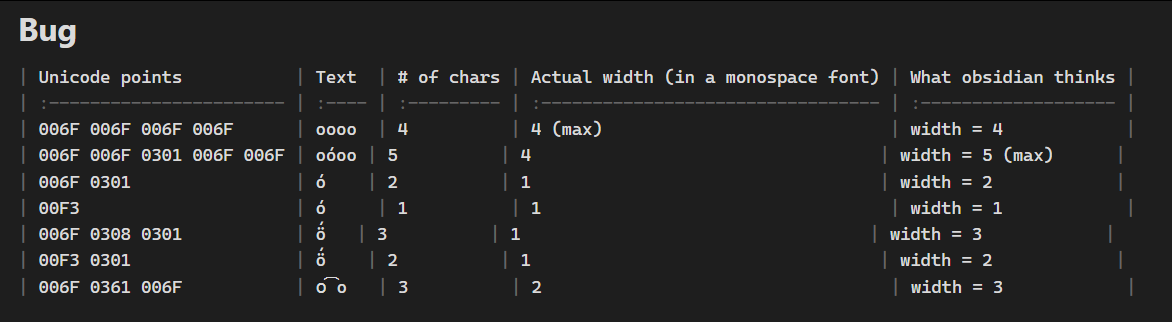
Additonally, in the screenshot you can see how U+0361 is rendered incorrectly