Steps to reproduce
Some of the mathjax v4 symbols included in Obsidian v1.14 don’t look like they should.
In Obsidian 1.14.2 och higher, type into a note these two lines:
$\iint\quad\oiint\quad\oiiint$
$\displaystyle\iint\quad\oiint\quad\oiiint$
Did you read and follow the Troubleshooting Guide ? [Yes]
Expected result
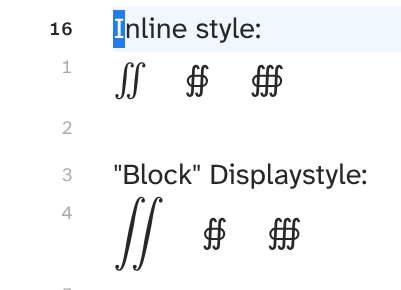
Both \oiint and \oiiint should look like \iint. The mathjax website has a live demo that can show what the above math code is supposed to look like exactly.
Actual result
The mathjax code will display something like the second screenshot (see additional information section). It looks like the rendering does not have the necessary glyphs for the new mathjax symbols, and is thus falling back to another font (the symbols in the first screenshot (1.13.7 installer) look like unicode even). Mathjax v4 uses mathjax-newcm as the default font, but Obsidians DOM shows it landing on trying to use “MJX-TEX-ZERO” (courtesy of “purple penguin” in insider-desktop-release).
Environment
SYSTEM INFO:
Obsidian version: 1.14.3
Installer version: 1.14.3
Operating system: #1 SMP PREEMPT_DYNAMIC Sun Aug 23 16:15:11 UTC 2026 7.1.10-200.fc44.x86_64
Login status: logged in
Language: en
Catalyst license: insider
Insider build toggle: off
Live preview: on
Base theme: dark
Community theme: Baseline 3.2.12
Snippets enabled: 9
Restricted mode: off
Plugins installed: 28
Plugins enabled: 14
1: Spaced Repetition v1.15.4
2: Various Complements v11.4.2
3: Templater v2.25.1
4: TaskNotes v4.13.6
5: Linter v1.33.0
6: Vim Motions v1.3.1
7: Tabout Continued v1.2.0
8: Insert no preview v1.0.2
9: QuickAdd v2.29.0
10: Notebook Navigator v3.4.3
11: Tab Shifter v2.0.4
12: Style Manager v0.5.0
13: Omnisearch v1.31.0
14: Latex Suite v1.13.3
Distro Name: Aurora (bootc fedora)
Distro Version: fedora 44
Desktop Environment: KDE
Installation method used: Appimage
Additional information
First screenshot from v1.14.2 (1.13.7 installer) showing the mathjax code in inline and blockmath style:
Second screenshot from v1.14.2 (1.14.2 installer) showing the mathjax code in inline and blockmath style:
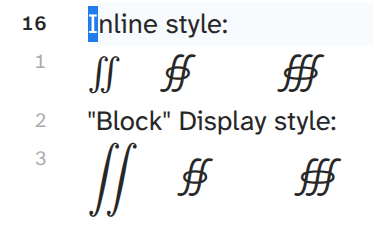
NOTE: I included \iint in the pictures since it is available in previous Obsidian versions (using mathjax v3) and because it shows how these symbols are supposed to look.