Scrolling unusable when document has transclusions - large jumps, up/down and infinite jump loops with (Viewport failed to stabilize, Measure loop restarted more than 5 times)

Steps to reproduce

Open large document and scroll.

Forcing a scroll in the second half of the document by pulling on the thumb seems to make it worse.

Scroll the document for a few hundred lines.

Click on a heading.

do a search with results in a large document

click on search results.

Did you follow the troubleshooting guide? [Y/N]

Yes.

Expected result

1

Scrolling content should be continuous.

2

Clicking on headings should position cursor

3

Clicking on search results should open search results

Actual result

1

Scrolling jumps, often by hundreds or thousands of lines.

Scrolling, effectively loops through a few hundred

2

Clicking on headings causes jumps too.

3

Clicking on search results causes jumps .

Environment

SYSTEM INFO:
	Obsidian version: 1.12.5
	Installer version: 1.11.7
	Operating system: Darwin Kernel Version 25.4.0: Wed Feb 25 21:03:15 PST 2026; root:xnu-12377.100.630.501.3~2/RELEASE_ARM64_T6000 25.4.0
	Login status: logged in
	Language: en
	Catalyst license: vip
	Insider build toggle: on
	Live preview: on
	Base theme: adapt to system
	Community theme: none
	Snippets enabled: 0
	Restricted mode: on
RECOMMENDATIONS:
	none

Additional information

There were some seriously broken rendering issues introduced with the latest (or one of the latest releases) that completely breaks scrolling and navigation in larger documents that contain embedded elements (e.g. images).

They all seem to be related to some async rendering issues.

It doesn’t reproduce on synthetic documents (generated), nor on large homogenous documents like ā€œWar and peaceā€. It seems to be caused by other elements like images.

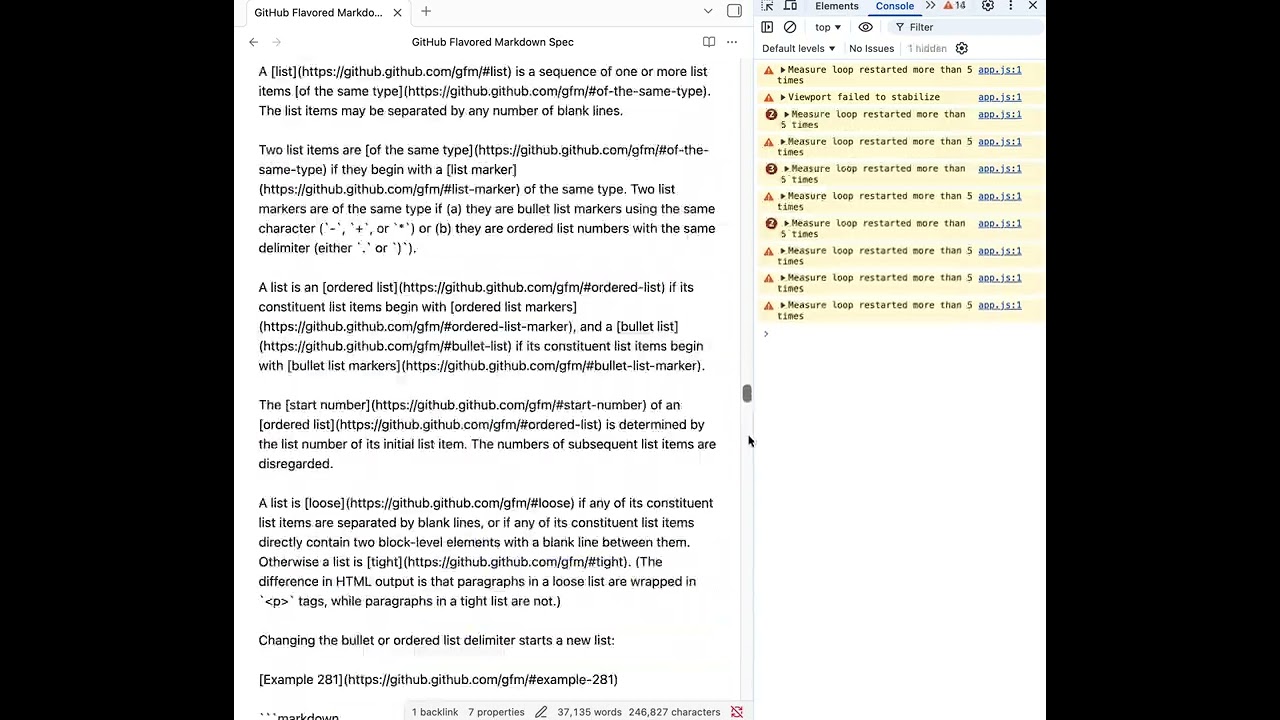
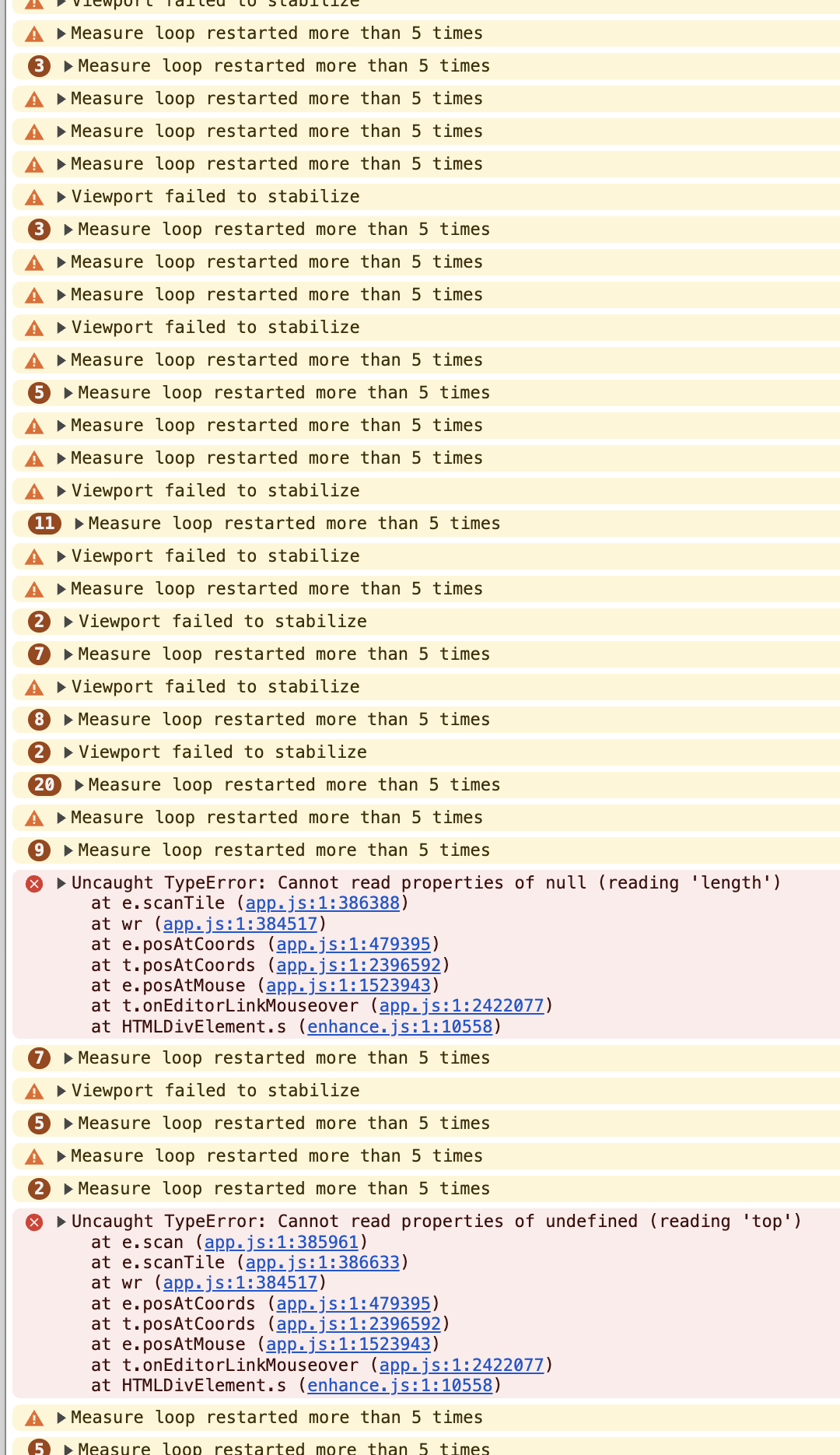
Console logs show.a number of errors which seem related

app.js:1 Measure loop restarted more than 5 times
Viewport failed to stabilize
Uncaught TypeError: Cannot read properties of null (reading 'length')
    at e.scanTile (app.js:1:386388)
    at wr (app.js:1:384517)
    at e.posAtCoords (app.js:1:479395)
    at t.posAtCoords (app.js:1:2396592)
    at e.posAtMouse (app.js:1:1523943)
    at t.onEditorLinkMouseover (app.js:1:2422077)
    at HTMLDivElement.s (enhance.js:1:10558)
Can you attach or dm me a document where this happens?

A screen recording of this happening in the sandbox vault would also help.

Unfortunately, I can’t attach the document, I’ll try to generate one that reproduces the behavior.
I’ve done extensive testing yesterday, disabling embeds, etc. through CSS which seems to help.

I didn’t post the report yet, because it’s not yet clear if/what gets cached at the leaf/tab level on CSS updates, and not 100% enabling/disabling CSS properties are isolated without tab reopening.

This said - this is what I tried

/*/* 1. Nuke all embeds and images */
.internal-embed,
.markdown-source-view.mod-cm6 .cm-embed-block,
.markdown-source-view.mod-cm6 img {
    display: none !important;
}

/* 2. Disable scroll anchoring */
.cm-scroller {
    overflow-anchor: none !important;
}

/* 3. Nuke layout transforms */
.workspace, .workspace-leaf, .markdown-source-view {
    transform: none !important;
}

/* 4. Force aggressive line wrapping */
pre.CodeMirror-line, .cm-line {
    overflow-wrap: anywhere !important;
}

/* 5. Force absolute geometry stability on all links in Live Preview */
.markdown-source-view.mod-cm6 .cm-hmd-internal-link,
.markdown-source-view.mod-cm6 .cm-link,
.markdown-source-view.mod-cm6 .external-link {
    line-height: inherit !important;
    font-size: inherit !important;
    padding: 0 !important;
    margin: 0 !important;
    border: none !important;
    vertical-align: baseline !important;
    display: inline !important; /* Prevents inline-block vertical shifts */
}*/

I don’t see much jumping, it’s mostly smooth as far as I can tell, but can trigger the console errors scrolling quickly using this file. Scrolling ā€œnormallyā€ with the trackpad or mouse scroll wheel doesn’t show any errors. m2 MacBookAir, Obsidian version: 1.12.5, Installer 1.12.5


I used Obsidian clipper to clip https://github.github.com/gfm/ and put it in the Sandbox vault.

GitHub Flavored Markdown Spec.md (241.8 KB)


I rarely work with files this size in my own vaults and haven’t noticed anything myself recently with scrolling in Live preview (desktop Obsidian).

Thanks @ariehen

I clipped it too and it works perfectly. I only saw a couple of warnings too.
However, it’s also a very simple doc - it’s just text with code blocks. No images, tables and no embeds.

By comparison the behavior I’m describing causes these logs.
I can’t upload videos - I have one with the scrollbar that jumps up to %10 while scrolling both up and down while scrolling down.
What’s challenging is that it seems to be impacted by some caching.
At this point most of my larger files are unusable. IDK what to do as I can’t seem to be able to rollback Obsidian either.

@WhiteNoise it seems to be caused by embeds ![]. They are mostly images but also transclusions. I haven’t figured if it’s only one of them causing it, but seems to happen on both large and small files, so probably something that can be reproduced synthetically.

It seems to be caused by transclusions.

I removed transclusions (and excalidraw embeds, although I was testing this in restricted mode) but can probably be reproduced in sandbox with transclusions

@WhiteNoise here’s a here’s a reproduction set

transclusion scroll.zip (66.5 KB)

I reused some large files I embedded from, IDK if the size of the target file matters.

If you open transclusion.md and

  • scroll through it you’ll notice the scroll bar jumping.
  • do a search and yielding results in transclusion.md
    • click search results doesn’t get the right text into view (or sometimes render a white screen)
  • clicking a heading, after scrolling, or navigating from search results can cause another error and jump
    • app.js:1 Uncaught TypeError: Cannot read properties of null (reading ā€˜length’)
      at e.scanTile (app.js:1:386388)
      at wr (app.js:1:384517)
      at e.posAndSideAtCoords (app.js:1:479516)
      at Object.get (app.js:1:406124)
      at e.select (app.js:1:403332)
      at e.move (app.js:1:401856)

Again, all these seem related and I only saw them with the latest (possibly one of the latests releases) so seem a regression tied to something that was introduced or dependency that was updated recently.

Thank you

Live preview scrolling is also super broken for me right now. This document is only markdown and 1500 words. I’m scrolling relatively slowly with a trackpad. See the scrolling bar on the right constantly changing sizes and jittering. Dropbox

@WhiteNoise can this be caused by the pre-rendering in the direction of scroll in conjunction with eviction of rendered stuff in the opposite direction.

Based on how it jumps both up and down, it looks like those are the effect of calculations resulting from asynchronous rendering. So scrolling get’s pushed up/down based on how these async renderings finish. Also guessing there’a one async rendering that triggers a subsequent one for the embed/transclusion.

However, as these use to work, it must be a recent change in how this is done that messed it up.

@clehene I can reproduce your problem. I am investigating where the regression happened.

@https.em I have looked at your screen recording and I am not sure there is a problem or it’s the same problem outlined in this thread. Please, open separate thread and make sure your follow the Troubleshooting Guide and the bug report template. Thanks.

2 Likes

As suspected, I was able to downgrade and it doesn’t reproduce in 1.12.4.