Steps to reproduce
- Create Note in subfolder
- Delete subfolder
- Go to “File recovery: Open local history”
- Find the note that was delete
- Click restore.
- Nothing happens.
Did you follow the troubleshooting guide? [Y/N]
Tested in sandbox. Debug info is from my usual vault.
Expected result
I expected the parent directories to be created or a feedback that something has gone wrong.
Actual result
Nothing.
Environment
SYSTEM INFO:
Obsidian version: v1.10.6
Installer version: v1.7.6
Operating system: Windows 11 Pro 10.0.26200
Login status: not logged in
Language: en
Insider build toggle: off
Live preview: on
Base theme: light
Community theme: none
Snippets enabled: 1
Restricted mode: off
Plugins installed: 3
Plugins enabled: 3
1: Advanced Tables v0.22.1
2: Pixel Perfect Image v1.0.17
3: Text Format v3.1.0
RECOMMENDATIONS:
Custom theme and snippets: for cosmetic issues, please first try updating your theme and disabling your snippets. If still not fixed, please try to make the issue happen in the Sandbox Vault or disable community theme and snippets.
Community plugins: for bugs, please first try updating all your plugins to latest. If still not fixed, please try to make the issue happen in the Sandbox Vault or disable community plugins.
Additional information
1 Like
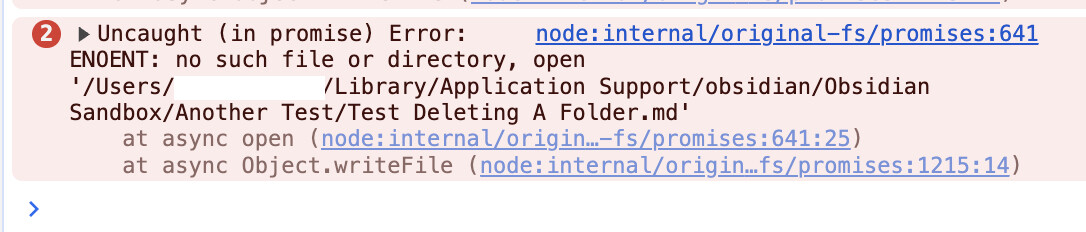
I can reproduce this problem. MacOS Sandbox, Obsidian 1.10.6 installer 1.9.14. Console error below.
It seems to depend where the note was created.
I just tested in the Sandbox vault and it works if the note was created outside of the folder.
- Create a folder.
- Create a note in the root folder.
- Move the note inside the folder.
- Make a few edits. Wait for there to be file history.
- Delete the entire folder.
When I click “Restore”, it puts it in the root of the Sandbox vault.
It fails if the note was originally created in the deleted folder.
- Create a folder.
- Right-click to create a note inside that folder.
- Make a few edits. Wait for there to be file history.
- Delete the entire folder.
When I click “Restore”, the operation is unresponsive. No feedback in the GUI. The file is not recreated. The “Copy” button still works.
And an error occurs in the console:
1 Like
I just did two another tests:
- Make a test folder
- Right-click and add a note inside that folder
- Make edits and wait until there is file history
- Move the note into the root folder
- Delete the subfolder
- Then delete the note
- Then try to restore the note. It still fails.
Another test:
- Make a test folder
- Right-click and add a note inside that folder
- Make edits and wait until there is file history
- Move the note into the root folder
- Delete the subfolder
- WAIT to make sure there is time for file history. Waiting doesn’t do anything. Until an edit is made on the file, File Recovery still thinks it is inside the folder. If the folder is deleted now, it will fail. If you right-click to show file history, it will show the note as having the deleted subfolder path.
- Make some edits to the file and wait. Now File Recovery knows it is in the root folder. Now Restore will work.
1 Like