Title
Community Plugins search/sort: “Recently released” does not appear to sort by release date
Bug description
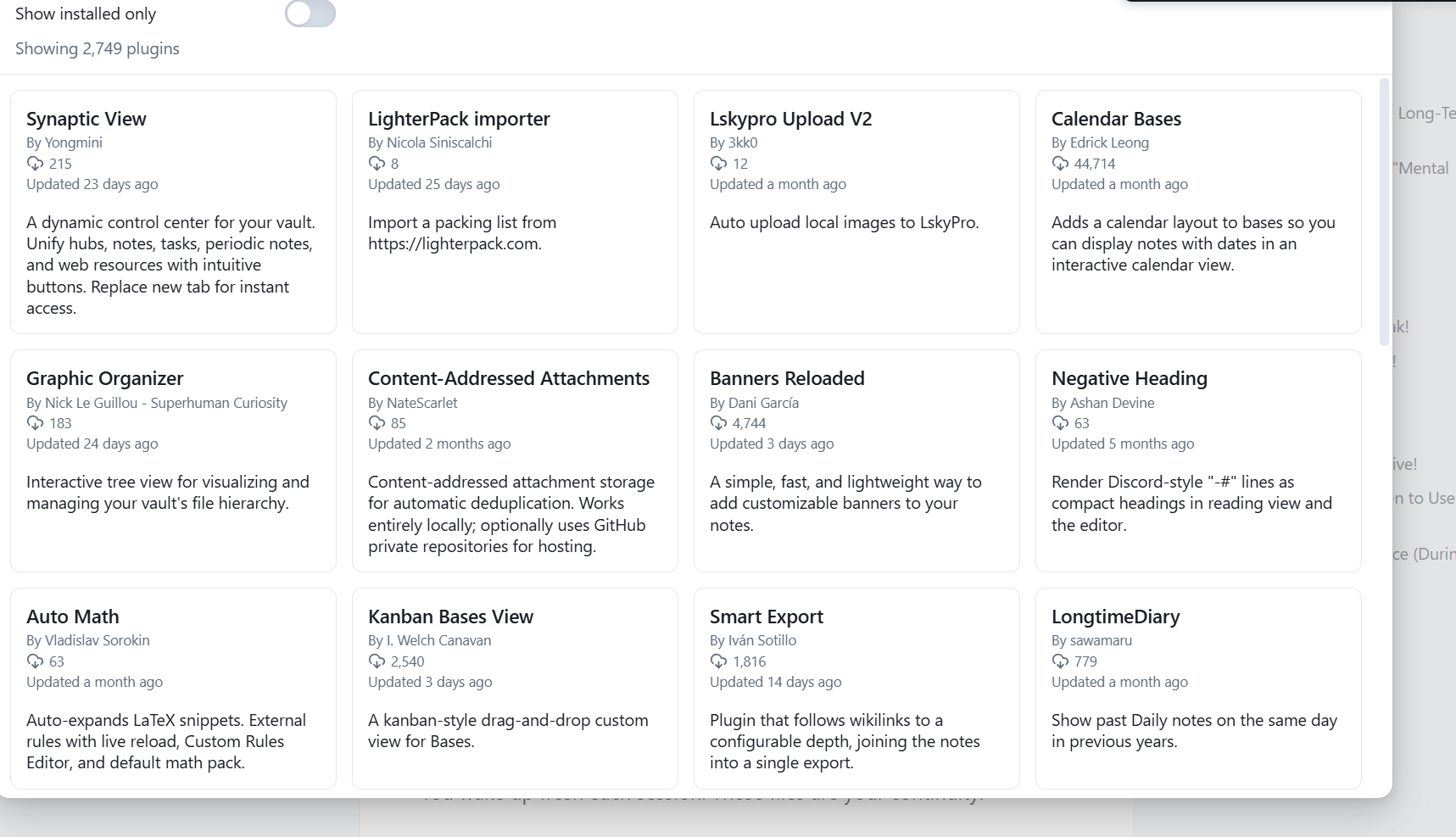
In Settings → Community plugins → Browse, selecting the “Recently released” sort option does not appear to order plugins by their actual release date.
Based on the plugin list shown after applying the filter, older plugins and/or plugins with older update timestamps still appear near the top. This makes the “Recently released” filter seem incorrect or misleading.
Steps to reproduce
-
Open Obsidian.
-
Go to Settings → Community plugins → Browse.
-
Open the sort dropdown.
-
Select “Recently released”.
-
Review the plugin list order.
Expected result
Plugins should be sorted by release date, with the most recently released plugins shown first.
Actual result
The list does not appear to reflect actual recent releases. It seems to show plugins in an order that may be based on something else, such as update date, stale metadata, or another sorting field.
Why this is a problem
The current behavior makes it hard to discover newly released plugins and reduces trust in the filter label. If the sort is intentionally using something other than release date, the label may be misleading.
Possible causes
-
The filter may be sorting by last updated instead of first release date
-
The UI label may not match the backend sort field
-
Plugin metadata for release date may be missing or not handled correctly
Environment
-
Platform: [Windows]
-
Obsidian version: [Catalyst]