Disclaimer
Is this plugin open source? Yes
Is this plugin completely free? Yes
Is this plugin vibe-coded beyond the author’s ability to comprehend how it works? No
Community Directory:https://community.obsidian.md/plugins/recallflow-ai
RecallFlow AI — An AI-powered Obsidian plugin for flashcards and FSRS-based spaced repetition.
Hello everyone! I’m excited to share an Obsidian plugin I’ve developed. It supports both desktop and mobile devices and is now officially available in the community plugin directory. The goal of this plugin is to transform your Obsidian vault into an intelligent, automated system for long-term retention and active recall, allowing you to enjoy an efficient “drill-and-practice” experience right alongside your note-taking. I hope you find it useful!
Key Features:
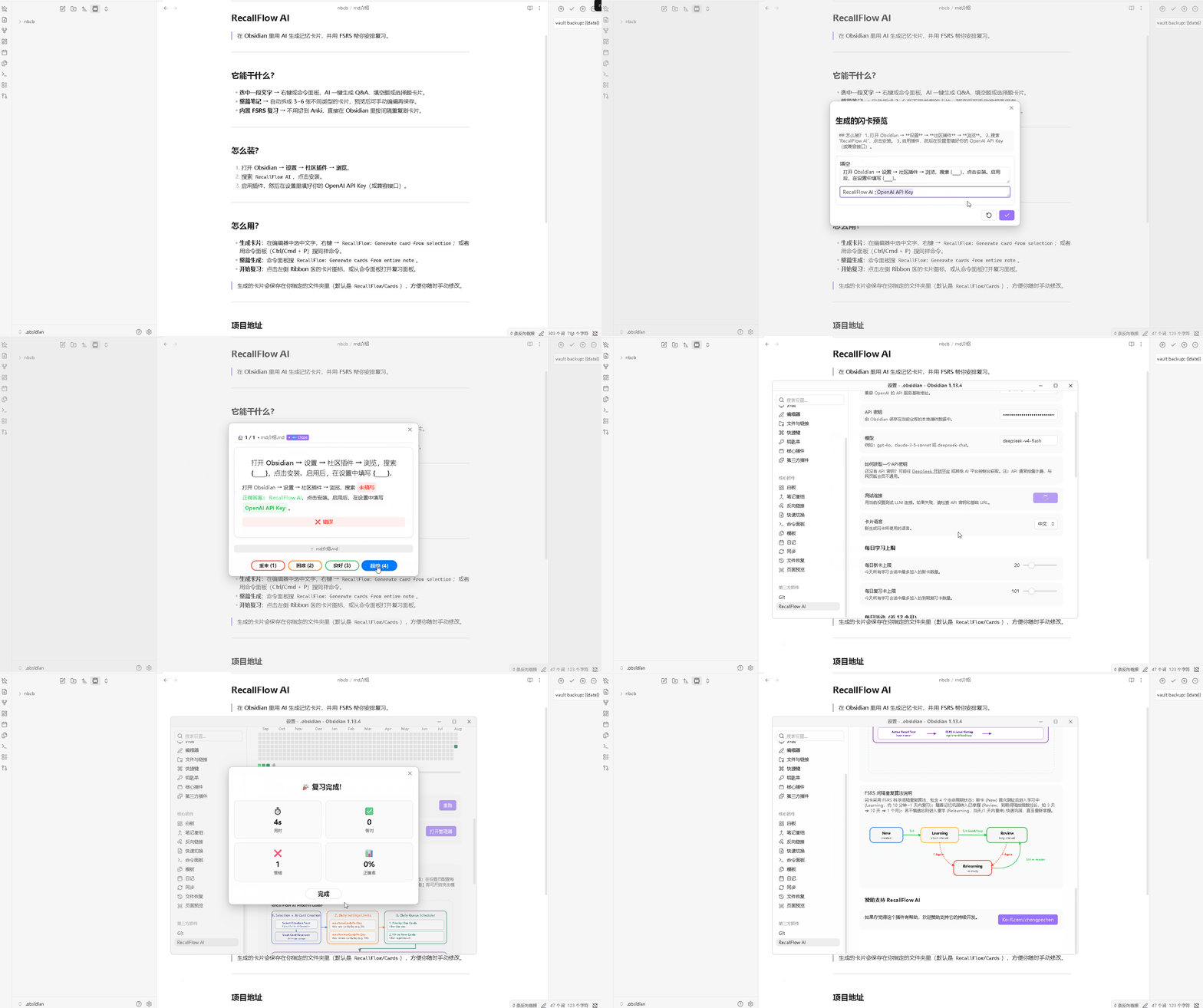
- One-click AI flashcard generation: Simply select any text in the Obsidian editor and right-click to invoke an LLM; it instantly distills the content and generates structured flashcards. If you aren’t satisfied with the preview, you can regenerate the card or customize it directly.
- Built-in cutting-edge FSRS 4 algorithm: Unlike the traditional SM-2 algorithm, FSRS predicts forgetting curves more accurately based on memory “stability” and “difficulty,” significantly reducing unnecessary repetitive reviews.
- Native FSRS state lifecycle management: Fully supports the card state workflow—New → Learning → Review → Relearning—and includes a dedicated card management panel.
- “Cramming” mode support: Got an exam or interview coming up? Enable CRAM mode to practice cards you’ve already reviewed today without affecting your FSRS algorithm data or disrupting your long-term review schedule.
- Visual learning dashboard: Features a built-in GitHub-style contribution heatmap to intuitively visualize your daily review activity and memory retention progress.
- Daily queue scheduling control: Customize daily limits for new cards (maxNewCardsPerDay) and reviews (maxReviewCardsPerDay) to prevent review overload.
Privacy and API: Supports local LLM execution via Ollama by default, keeping data 100% private and local; also supports configuration with any OpenAI-compatible cloud API (e.g., DeepSeek, Claude, OpenAI). It handles API keys locally and collects no personal telemetry data.
Installation: Settings → Community plugins → Browse → Search for “RecallFlow AI”
I would appreciate feedback on three things: whether the initial installation and configuration (Ollama/API) went smoothly; whether the AI-generated cards and FSRS queue scheduling meet your expectations; and whether you encountered any errors or bugs while using the plugin or its UI/UX.
Thanks for reading!