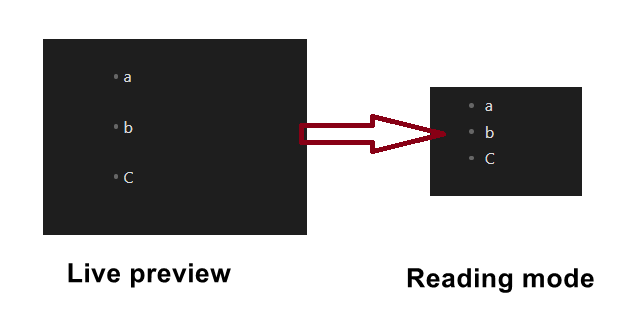
Why does Live Preview keep the empty lines while Reading Mode collapses them?
If Live Preview can display them properly, what prevents Reading Mode from doing the same?
Splitting two separate lists seems like a very basic and fundamental use case : does Reading Mode intentionally not support this, or could it be considered as a future improvement?
I really like your second idea (first idea would add a spurious/undesired separation line, if I’m correct).
So if I constantly alternate between “-” and “+” markers, I can have as many split lists as I wish ?
E.g. :
- Idea A1
- Idea A2
- Idea A3

+ Idea B1
+ Idea B2
+ Idea B3

- Idea C1
- Idea C2
- Idea C3
If it’s correct, I think it can be an acceptable workaround (until Reading mode implements split lists, which seems like a necessity at some point, since this discreptancy between Live Preview and Reading Mode is difficult to grasp from a user standpoint) ! I had absolutely no idea we could do this, thanks !
EDIT : Mmm, also you have to constantly remember, well did I use “+”, “-” or “*” last time ? All in all, if split list could work, it would be much more practical.
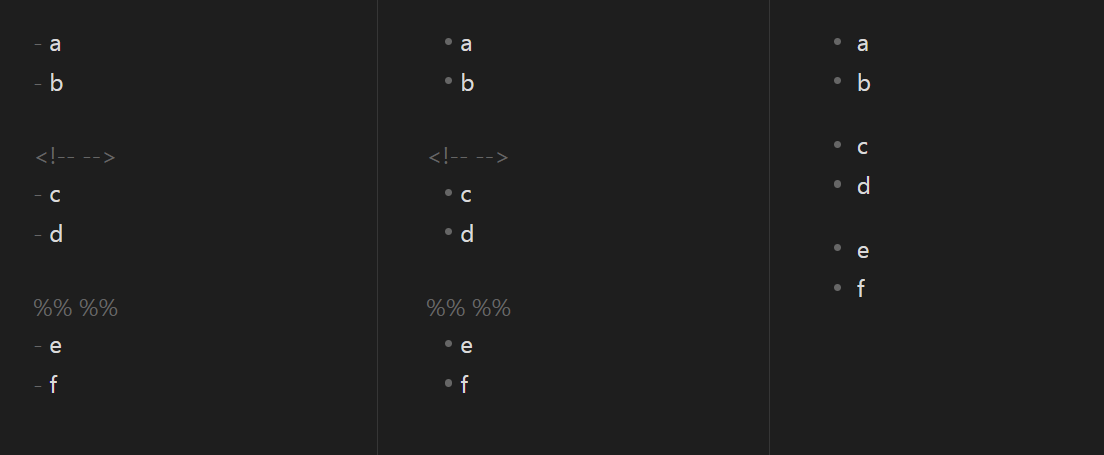
Yeah, when Markdown was originally designed there were no “live preview” type apps for it, so when you were editing it was always obvious which marker you used. I would put an extra blank line(s) between the lists to mark their separation (they won’t appear in reading view), and then if I need to remember, the farthest I have to go to check is the previous list item.
Not sure if this helps, but another way to break a loose list is to insert a blank comment, which is invisible in Reading and leaves the line spacing you’re trying to achieve. But you do see the comment in the editing views.