Steps to reproduce
- copy any web-based image url and paste using markdown link format. here’s a sample
https://forum.obsidian.md/uploads/default/original/3X/2/6/26fd792a2dd1412e4c0e4cd6868911aa4ba3654e.png - replace the alt text with a number to resize the picture e.g.
 - observe the image size in Live Preview (obey the sizing) vs Reading View (ignore the sizing)
Did you follow the troubleshooting guide? [Yes]
Expected result
The image resizing should apply to Reading View as well. I put a size 400 but it’s only applied to Live Preview.
Actual result
Image resizing did not apply to Reading View. On related note, I tested on different scenarios i.e.
- web image using markdown link
 - local image using wikilink
![[Pasted image 20230611180457.png|400]] - local image using markdown link

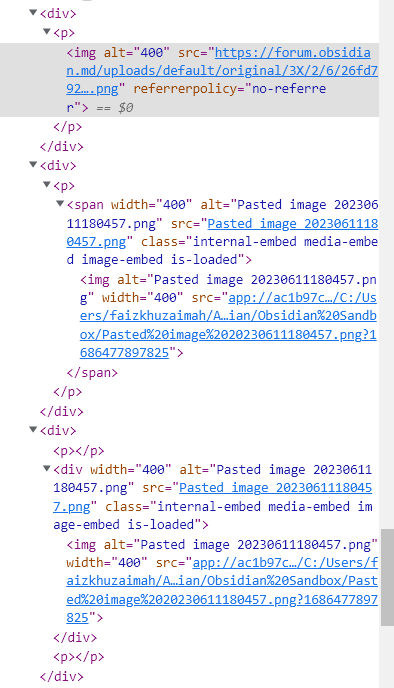
and here is the resultant html – we can see that web image using markdown link doesn’t capture width in Reading View (but it does in Live Preview)
Environment
SYSTEM INFO:
Obsidian version: v1.3.5
Installer version: v1.3.5
Operating system: Windows 10 Enterprise 10.0.19045
Login status: logged in
Catalyst license: insider
Insider build toggle: on
Live preview: on
Legacy editor: off
Base theme: dark
Community theme: none
Snippets enabled: 0
Restricted mode: off
Plugins installed: 0
Plugins enabled: 0
RECOMMENDATIONS:
none
Additional information
this seems to be somewhat related but i’m not sure