Disclaimer
Is this project open source? Yes
Is this project completely free? Yes
Is this project vibe-coded beyond the author’s ability to comprehend how it works? No
Community Directory: Readability Compass
Readability Compass - know the reading level of your notes - feedback welcome!
Write at the level your readers need and know it while you write, not after they’ve given up.
You know the feeling: you wrote a careful explanation for a broad audience, reread it twice … and you still can’t say whether the people you wrote it for will actually follow it. Word counters tell you how much you wrote, never how hard it reads. The readability tools that do exist speak English-only formulas, or dump thirty raw numbers on you without a verdict. So you guess. And your readers pay for the guess.
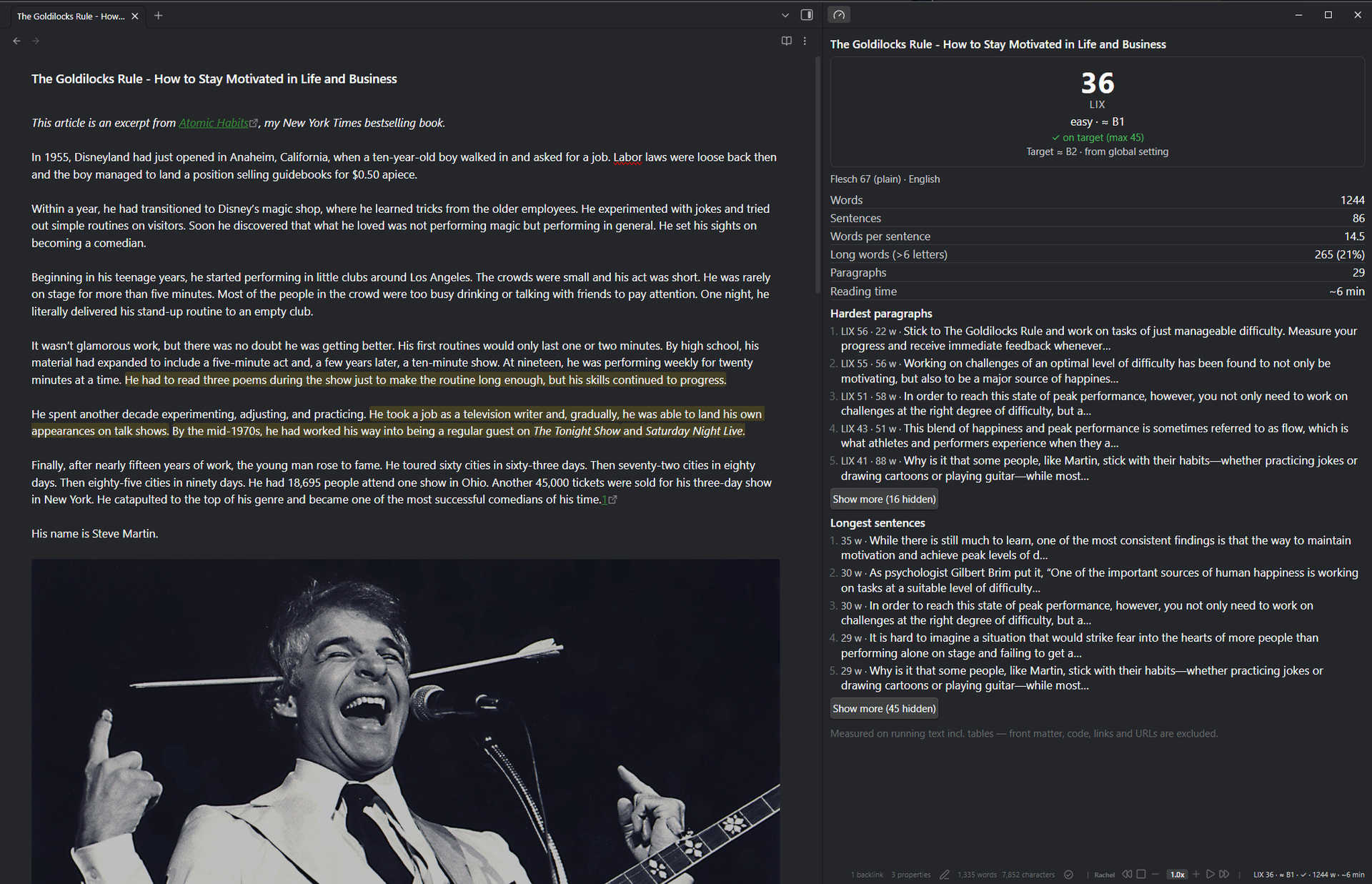
Readability Compass replaces the guess with a signal, right where you write. It measures your note with LIX. A readability score built only on sentence length and the share of long words, so it needs no syllable guessing or word lists and works in any language that separates words with spaces. Then it holds that score against the target band you choose (≈ CEFR B1, B2, C1, or your own ceiling) and gives you the one verdict that matters, permanently, in the status bar: on target, or not.
(Why “Compass”? A compass doesn’t walk for you. It tells you, at a glance, whether you’re still heading where you meant to go. Your writing stays yours; the plugin only keeps you honest about the direction.)
→
Try it in 60 seconds — free, everything local
- Install & enable: Community plugins → search for Readability Compass.
- Pick your audience in the settings: ≈ B1, B2, C1, or a custom LIX ceiling.
- Write. The status bar keeps score:
LIX 42 · ≈ B2 · ✓ · 351 w. Click it whenever you want the why.
That’s the whole entry fee. No account, no API key, nothing ever leaves your machine.
What you get
- Status bar, always on: score, band, target check and word count, with configurable segments. Select text and it scores the selection (the beloved better-word-count trick — and it measures everything you selected, tables and code included).
- A target that follows the note: set a different band per folder or per tag (
blog/⇒ ≈ B1,docs/⇒ ≈ B2), override per note withreadability-target:in the front matter, or derive it from adiataxis:type. The status bar and panel always show which target applies, and why. - Side panel, the why behind the verdict: score card, the published Flesch variant for your language, counts, your hardest paragraphs (by LIX) and your longest sentences — click one and you jump straight to the culprit. You decide how many entries the lists show.
- Score a folder or a selection of notes: right-click in the file explorer: one combined score, a per-note list sorted hardest-first, and the longest sentences across all of them — click to open that note at that sentence.
- See the problem while you type (optional): long sentences get a subtle background tint (the threshold follows your target band), long words a dotted underline: the two ingredients of the score, visible in the sentence you are writing.
- Notes that are tables (question banks, glossaries) can opt in to measuring table text, globally or per note.
What Readability Compass is not
A compass, not a co-author:
- Not a grammar or spell checker. It measures and points; it never rewrites. (LanguageTool and Harper own that ground.)
- Not an AI writing assistant. No suggestions, no rephrasing, the writing stays yours.
- Not a statistics dashboard. Vault-wide word counts and writing streaks are other plugins’ turf; this one answers a single question: can your readers follow you?
Why trust the score?
- Only running text counts. Front matter, code blocks, inline code, tables, link URLs, images, HTML and tags are stripped before measuring — without losing positions, so jump-to-sentence lands exactly.
- One published, inspectable formula:
LIX = words/sentences + 100 × long_words/words(long word: > 6 letters), with the classic bands. The CEFR labels are an indication of the audience a text suits, not a certified level — and the plugin says so. - A second opinion where one exists: when the language is known (auto-detected or fixed), a published Flesch variant is shown alongside — Flesch Reading Ease (en), Flesch-Douma (nl), Flesch-Amstad (de), Fernández-Huerta (es), Kandel-Moles (fr), Flesch-Martins (pt). Their syllable counts are heuristic; LIX stays the main score.
- Honest about limits: scores hide below a minimum word count (default 40) because short texts score erratically; sentence splitting is punctuation- and line-based; LIX is not meaningful for CJK text, and keyword-style notes (slide decks) score deceptively high — turn on the long-word marking to see why.
Privacy
Nothing leaves your machine. Every score is computed locally: no network calls, no telemetry, no account. Works on desktop and mobile.
Feedback welcome!
I’d love to hear how it works for you, especially:
- Does the LIX band match your own feel for a text’s difficulty in your language?
- Are the ≈ CEFR labels helpful, or would you rather see the raw bands only?
- Do the target profiles fit how you organise your vault — folders, tags, or
diataxis:-style front matter? - Which language should get its Flesch variant next? There’s a
one-click language request for that — adding one is a single entry in the language registry. - Any bugs or rough edges you run into?
Feel free to open issues on GitHub or reply here. Readability Compass is free and GPL-3.0; if it keeps your writing on target, you can buy me a coffee.
GitHub: maxonamission/obsidian-readability-compass
License: GPL-3.0, free and open source