Steps to reproduce
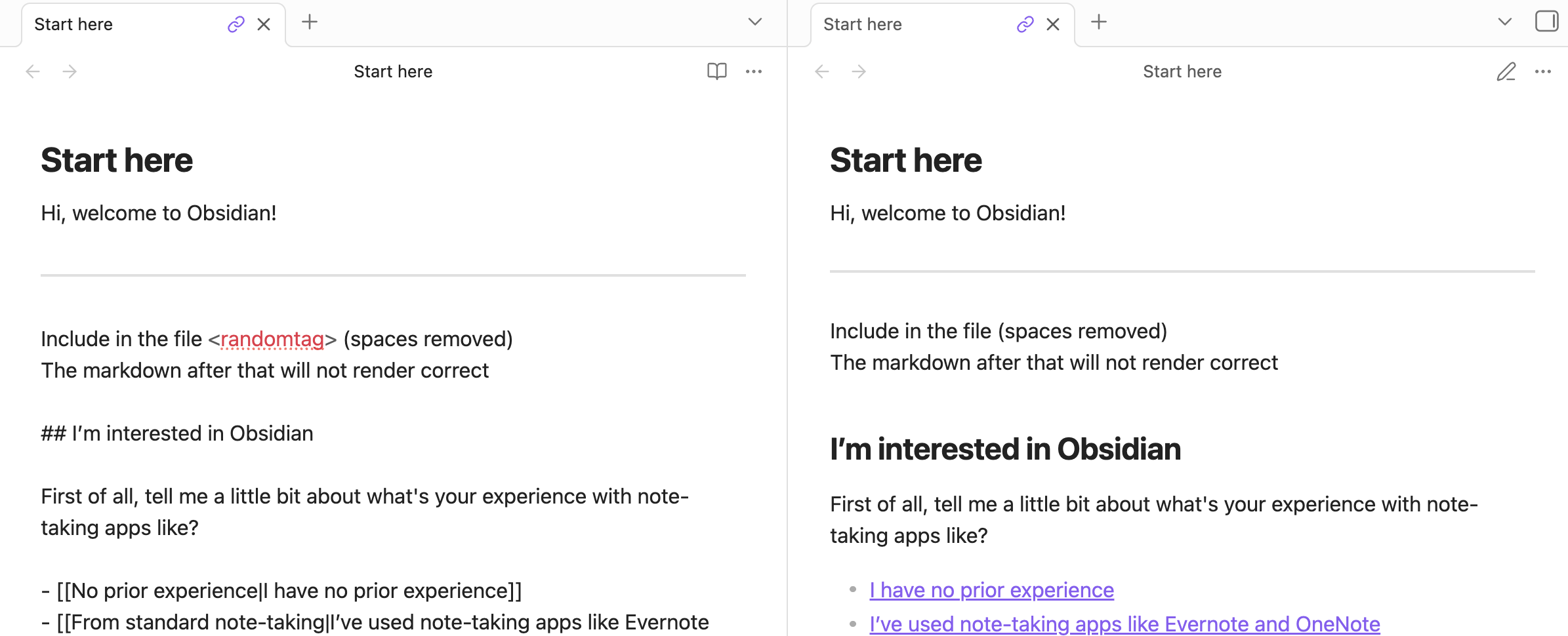
Include in the file < random_tag > (soaces removed)
The markdown after that will not render correct
Expected result
It renders correctly like at https://markdownlivepreview.com/
Actual result
You see the subsequent tags
Environment
Windows 11, Obsidian Desktop
Additional information
N/A
The markdown rendering following the unclosed tag looks fine in Obsidian’s reading view as well:
live preview | reading view
The editor (source mode and live preview) thinks you are opening an HTML tag that’s not closed. You can
- mark it as inline code
Include in the file `<randomtag>` (spaces removed)
- put it in a fenced code block
 ```
 Include in the file <randomtag> (spaces removed)
 ```
- escape the opening < with a
\Include in the file \<randomtag> (spaces removed)
- close the “tag”
Include in the file <randomtag></randomtag> (spaces removed)
Also, looks like you posted a similar report a few years ago 
system
Closed
3
This topic was automatically closed 28 days after the last reply. New replies are no longer allowed.