Disclaimer
Is this project open source? Yes
Is this project completely free? Yes
Is this project vibe-coded beyond the author’s ability to comprehend how it works? No
Community Directory:https://community.obsidian.md/plugins/quick-tray
Hi everyone,
I built a desktop plugin called Quick Tray.
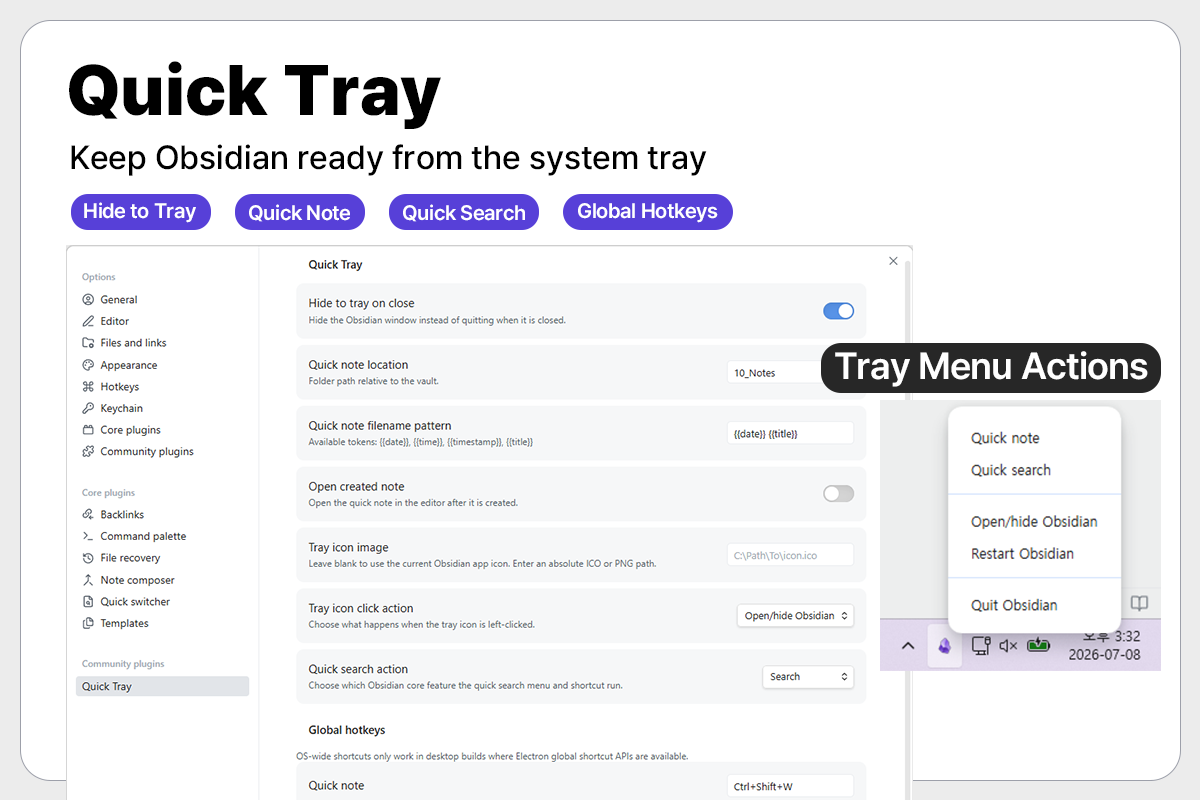
Quick Tray keeps your workspace available from the Windows system tray, so you can hide the main window instead of fully quitting and quickly bring it back when needed.
Main features
- Hide the window to the Windows system tray when closing
- Show a tray icon and tray menu
- Left-click tray action can be configured:
- Open/hide the app
- Create a quick note
- Open quick search
- Tray menu actions:
- Quick note
- Quick search
- Open/hide
- Restart
- Quit
- Configurable global hotkeys
- Quick note folder and filename pattern settings
- Optional custom tray icon path
- English and Korean UI support
Why I made it
I wanted a lightweight way to keep Obsidian ready in the background without waiting for the app and sync state to reload every time I need to capture a note or search something.
Links
- Community plugin:
https://community.obsidian.md/plugins/quick-tray - Repository:
https://github.com/GOODJINC/obsidian-quick-tray
Feedback and feature suggestions are welcome, especially around Windows tray behavior, global shortcuts, and quick note workflow.
Thanks!