Thanks, this was a great gem to uncover as I try and implement the weekly review stage of my Second Brain/PARA setup!
I noticed that the archive/move script was a little slow, taking several seconds to open up the dialog for selecting a folder, breaking my flow. I checked the code and noticed it built a set of folders recursively.
I simplified the code for my use case, removing the archive folder path, and using the file explorer’s built in move dialog (which is much faster) and a callback to advance.
Hello Ryan and once again thank you for a wonderful plugin!
I was wondering whether it is possible to share something to the log shortcut from the share sheet? Like if I share a Safari-page or a URL and it automatically gets added to the new line.
Yes absolutely - it does. But you can’t choose the formatting like you could if it had been through Shortcuts. But works fine for now! I stick with Lumberjack! thanks again.
Hello!
First: I really like your Shortcut!
But instead of creating a new Fleeting Note, i tried to print your fleeting note directly into my Daily Note. I got the constantly changing path (/Daily/YYYY/MM-MMMM/YYYY-MM-DD-dddd.md) in your shortcut while using the Date-Variable, but the Fleeting not is not outputed there, instead an error message appears „File already exists“. Unfortunately, I‘m not that good with „shortcuts“-App so i dont know if and what i can do to output the text in my daily Note aufter all.
Thanks for sharing - I am struggling with the iOS shortcut to get my notes into the right folder - they are going to the correct vault but when I add the folder name ‘filepath=Inbox’ it just appends ‘Inbox’ to the start of the note. Can you assist?
And one question - would you know how I can capture the webpage title as the name of the note?
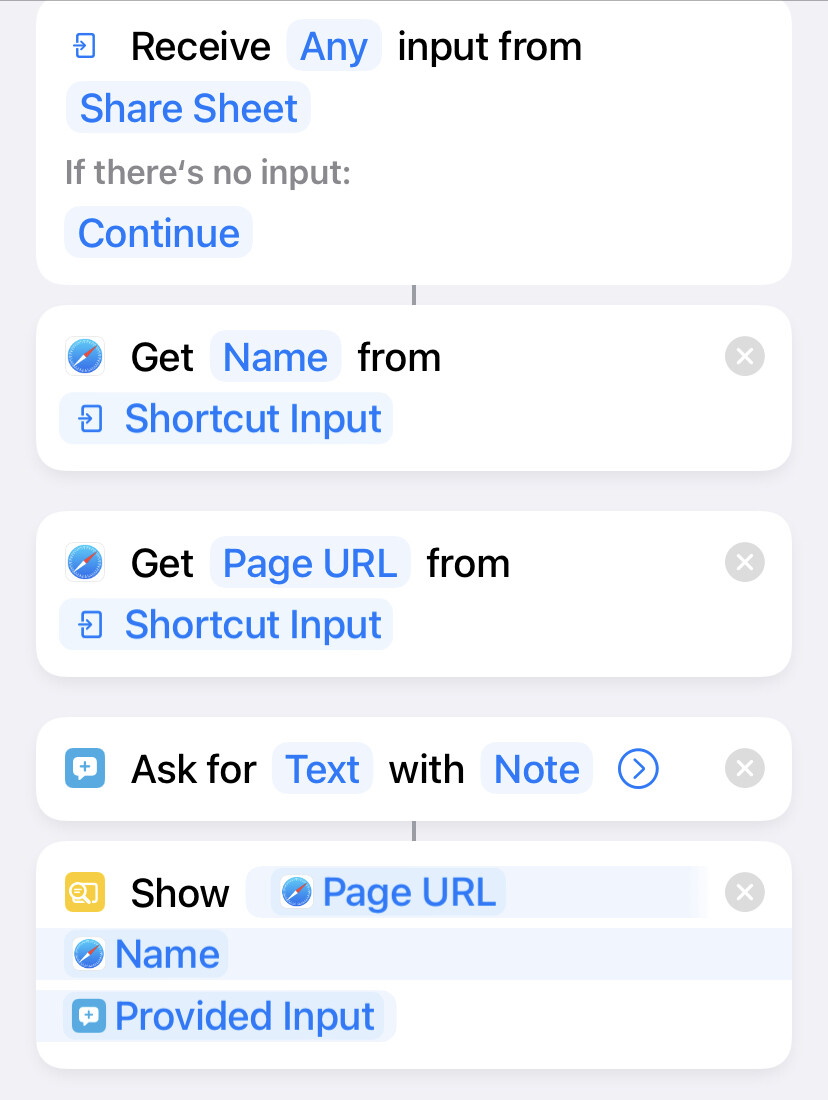
So I have made a shortcut functioning how I want it to but just need some help getting it into obsidian. It gets the webpage name and url, let’s me type a note, but I now want to get it to obsidian vault and specific folder. See image. Any help is really appreciated
You’ll want to build an Obsidian URL, pass it thru the Encode URLs action, then pass the result to the Open URLs action.
In my experience this doesn’t always work when Obsidian has been closed in the background, so I use the Launch App action to launch Obsidian right before opening the Obsidian URL.
 thanks again.
 Thank you!