What I’m trying to do
I use tags for things I want to ask different people. I might have a #raise-with-Emma tag, a #raise-with-Mark tag, and so on. I want to have a note where I can see all the lines which have a tag that starts with #raise-with-.
Things I have tried
Round 1: Obsidian query
- Wildcard in a native query block. (Not supported)
> ```query
> tag: #raise-with-*
> ```
- Regex in a native query block with tag search. (Supposedly supported but doesn’t work with the tag query)
> ```query
> tag: /#raise-with-.*/
> ```
- Regex in a native query block without tag. (Finds instances of the tags inside of search blocks, which renders them useless.)
> ```query
> /#raise-with-.*/
> ```
- Regex in a native query block without tags, looking for values that aren’t in query blocks. (I couldn’t figure out a way to make this work, but I’m not great at regex.)
Round 2: Dataviewjs
I can find all the tags that fit the pattern no problem. It’s what to do with them after that I can’t figure out.
- Find all the lines that each tag appears on and display it. (Couldn’t figure out how to get actual note content.)
- Build an Obsidian query using the tag (displays the query text in a codeblock, doesn’t render a search)
dv.paragraph.("```query \ntag: " + tag + "\n```);
maybe subtags would serve you better? #raise-with/Mark
Hi.
Could Bases work for you?
file.tags.toString().contains("raise-with")
```base
views:
  - type: table
    name: Table
    filters:
      and:
        - file.tags.toString().contains("raise-with")
    order:
      - file.name
      - file.tags

```
Oh yeah, that was another thing I tried! It gets me the files quite nicely, but doesn’t show me the line the tag is in, which is what I really want.
Ooh, I think this is the answer! I’ll try this out and report back.
I believe this should work:
```query
/(?<!```query\n)#raise-with-.*/
```
The part I added is a “negative lookbehind assertion”. It says, “only match #raise-with-.* if it doesn’t follow ```query\n” (\n stands for a newline, as you may know).
Also, a tip for posting code blocks that contain code blocks: you can do it by adding more backticks (or tildes) to the outer set. (Tildes are an optional alternative which I’m using because they’re easier to type on mobile.)
~~~~
~~~query
/(?<!```query\n)#raise-with-.*/
~~~
~~~~
Tried subtags! They got me closer, but raised a new requirement I still don’t know how to solve. With subtags I can query
```query
tag: #raise-with
```
and get all the right results. But they’re all jumbled together. I’d like to be able to group by person/subtag.
I think search doesn’t offer that kind of control. You might have to go the dataview route. If the items are task list items, you could also investigate task plugins.
I think I’ve got as close as I can get with the following approach:
- Use dataviewjs to get my list of tags
- For each tag, render a span which is a stringified dataview block:
```dataview
TABLE line.text as Line
FROM <tag>
FLATTEN file.lists as line
WHERE contains(line.tags, <tag>)
```
That shows me all the list items with each tag, grouped by tag.
I did also try rendering a query block as a span, but it doesn’t work. The table approach is not as clean or functional as I’d like (doesn’t link me directly to the tag in context) but I think this is the best I can do with the limitation of not being able to render a search query with dataviewjs.
try this out!
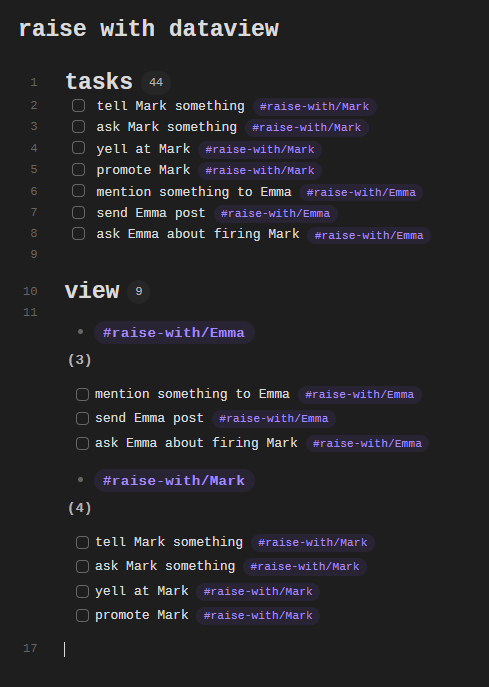
I make a few tasks with the nested tag format.
I then build a dataview that filters only for files with #raise-with tags, then group the tasks by the specific tag.
# tasks
- [ ] tell Mark something #raise-with/Mark
- [ ] ask Mark something #raise-with/Mark
- [ ] yell at Mark #raise-with/Mark
- [ ] promote Mark #raise-with/Mark
- [ ] mention something to Emma #raise-with/Emma
- [ ] send Emma post #raise-with/Emma
- [ ] ask Emma about firing Mark #raise-with/Emma

# view
```dataview
TASK
FROM #raise-with
GROUP BY tags
```
For me it looks like this:
Ooh I like that! I don’t currently format my raise-with’s as tasks, but maybe I should 
Ok, final solution:
- format all my raise-with’s as tasks (wanted to do this anyway for better tracking)
- Use dataviewjs to get my list of tags
- For each tag, render a heading with it and a span which is a stringified dataview block:
```
TASK
FROM <tag>
WHERE !completed AND contains(tags, "<tag>")
```
I ended up keeping the js approach purely because I didn’t like the visuals of grouping by tag. Adding WHERE !completed AND contains(tags, "<tag>") weeded out completed tasks and tasks that are on the same page as the tag in question but don’t contain it.
Much happier with this, thanks!