Thank you very much for the detailed explanation of the practical realization of the concept and idea of Zettelkasten in Obsidian.  I’ve been using your system for a few months now, but I’ve adapted and simplified it a bit to suit my needs.
I saw that you updated the picture on github on note structure and thought I’d ask you. Why did you decide to remove the 4_Reference (Bibliografical) notes folder? 
1 Like
Here’s my why:
-
My first Zettelkasten started with the basic structure from Sönke Ahrens’ book: Provide structure. How do you use Zettelkasten in Obsidian? in 2022. Literature Notes were part of my inbox. Processed notes moved to the Permanent Notes or Bibliographic Notes folder.
-
It was not a good idea for me to have two inboxes. The Literature Notes folder was almost empty. My results from reading are typically Literature Notes, Bibliographic Notes, and Reference Notes (I don’t use a reference system like Zotero), and of course Permanent Notes.
-
Now I have a Literature Notes folder in my Zettelkasten. I have a single inbox. And only one decision: Should I save the idea in Literature Notes (written in the context of the source) or Permanent Notes (written in the context of my own ideas and interests)?
My decision to change took a few months and now some work to adapt my Zettelkasten to the new structure. But I like the new, simplified approach.
4 Likes
Thanks @Edmund! Nice overview! Can you elaborate a little more on Bridge notes and Point notes? I am very curious how you they are set up and how you use them?
I don’t see any trace of those type of notes in your Github Repositories.
Thanks!!
Here is a visual description how I use Point Notes to uncover hidden connections in my Zettelkasten:

The first example „Find two independent ideas. Connect them with a third.“ shows how a Point Note is used as a Bridge Note.
“As you write a new note, which I call a Point Note, the focus shifts from the source material to your own thoughts. This is where you begin taking real ownership of the idea, using the source as support for a thought you’re pursuing; a point you want to make.”
— How to Make Notes and Write by Dan Allosso, S.F. Allosso, p.18
1 Like
Thank you @Edmund! that makes things clear! And how do you integrate this type of note in the note itself? Do you tag a Bridge Note with a Bridge Note Tag? And do you tag a Point Note with a Point Note tag?
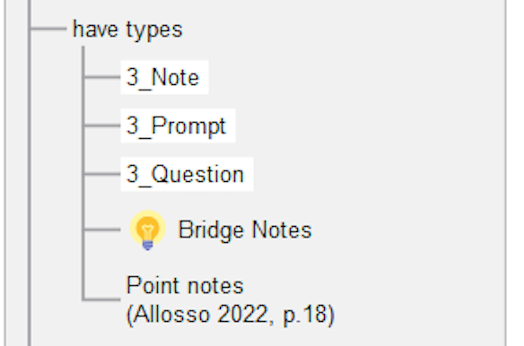
In the ontology map both notes are shown under Have Types, but I guess you dont tag them like that?
Can you explain how you recognize your Point Note or Bridge Note and how does that type of note look like in the note itself?
Thanks!
1 Like
Yes, I use tags to re-find these notes:
tags:
 - type/note
 - type/bridge
 - theme/zettelkasten
 - theme/biology
where you want to re-find notes connecting two themes or those where you made a point
tags:
 - type/note
 - type/point
 - theme/zettelkasten
how does that type of note look like in the note itself?
There is no difference within the note itself. Same structure, same template. It‘s a difference in the content. And we have at least two connecting links for a bridge note. That‘s all. No hidden magic.
1 Like
Woaw  what a great post, thank you.
1 Like
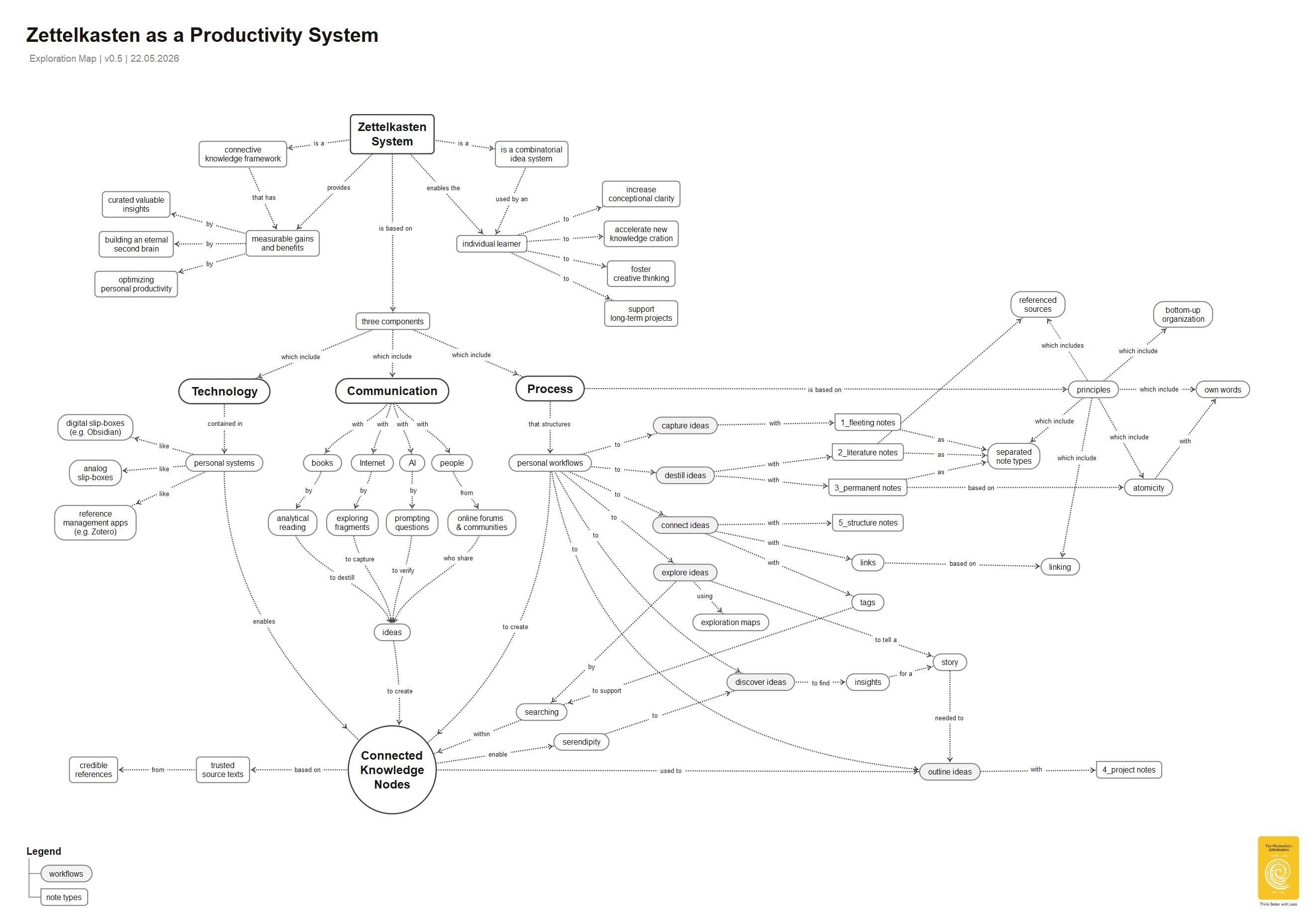
Zettelkasten as a Productivity System
Some visual aids are designed to simplify specific elements of a system, thereby improving our understanding. They look very simple.
Exploration maps like this help us to understand the connections between existing concepts. At first glance, they may seem very complicated. However, they can help us discover hidden insights.
Beautiful maps
1 Like
Thanks, I appreciate that. Was there a part that stood out to you?
Hello Edmund,
Just yesterday I stumbled upon your posts on the topic of Zettelkasten, your images and explanation really helped to better understand the concept. I am not all that experienced with Obsidian.
I was just wondering the following:
I noticed that you do not mention the Bases function of Obsidian (or at least, I have not seen it mentioned in those of your posts that I have read - which are not all that you have written). Is this because you started your vault(s) before this feature existed, and it would be too much hassle to integrate it into your vault and workflow? Or perhaps you think it does not add much value/utility, preferring rather (solely) the use of Dataview?
If I were to start a new vault using the principles (and templates) for Zettelkasten that you described in your posts, would you recommend I take Bases into account somehow? Would they work well with the properties that you use for notes, as you mainly use tags? Could a Base note be considered a type of Structure note?
I would be curious for your thoughts on this.
Thank you for your insightful posts!
P.S. I am not sure whether this Reply would be more suited on your post ‘Use Meta Data. But how?’, but this current post seemed rather comprehensive, so I replied here.
@Obsidibram thank you for asking. Let me give you a visual answer by comparing “Bases” and “DataView”:
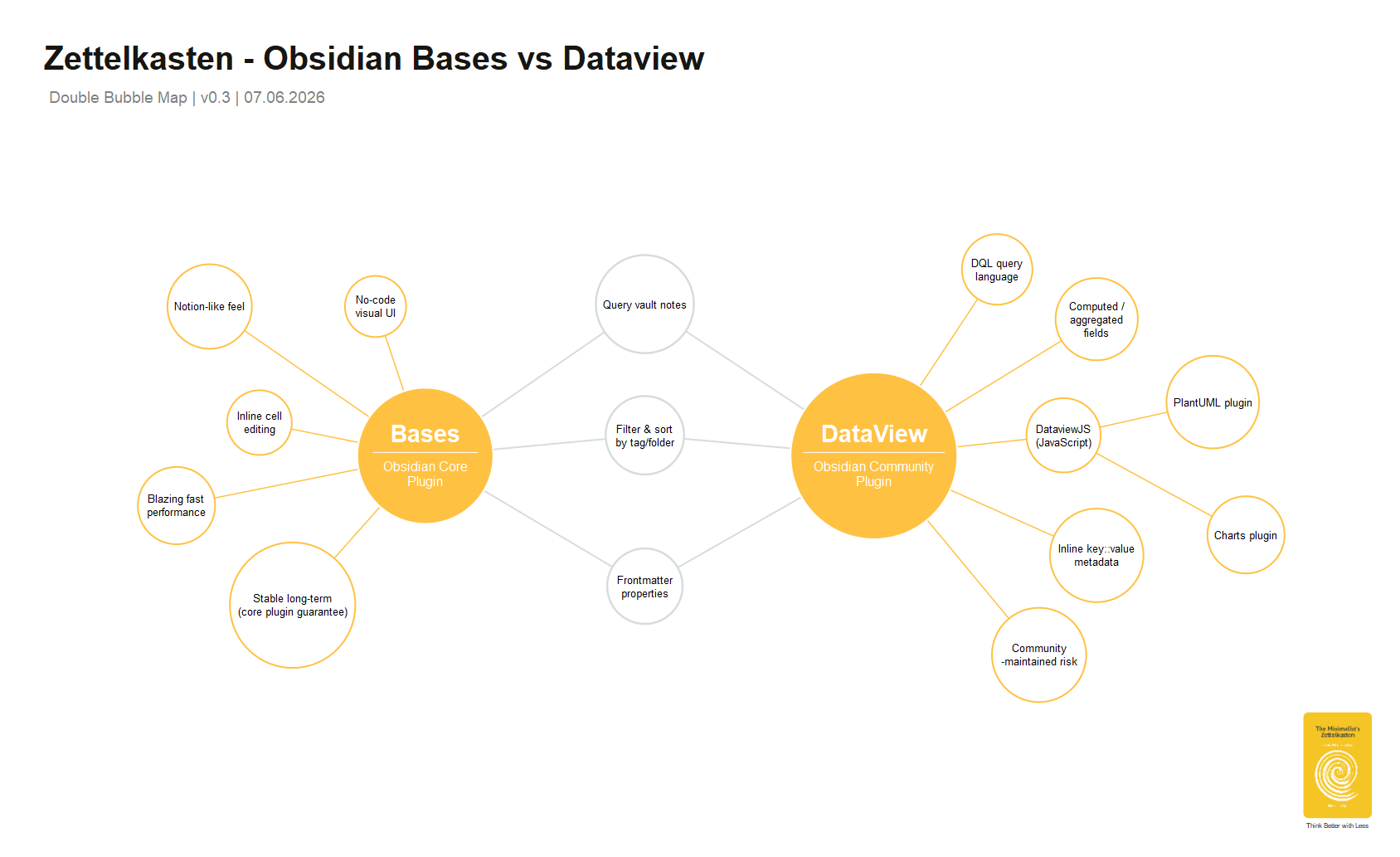
For your Zettelkasten work specifically, Bases would likely handle most day-to-day views (tracking entries by status, tag, or headword alphabet), while DataView remains the tool of choice if you ever want computed fields or cross-note relational queries — say, mapping which entries cross-reference which.
I use both options: Bases for basic structure notes and DataView for advanced ones, although often in combination with PlantUML or the Charts plugin.
I just now noticed your reply.
Thank you for the reflection and visual explanation!
1 Like