I would like to find out how to use the new properties feature in combination with dataview.
I have created a couple of custom tags:
“1” is a text field
“2” is a list field
Both fields contain info: “1” only has one entry, “2” contains multiple entries. For the sake of this example, I will call them: true and false
What I would like to do:
Query my vault for
files that contain “project” in its tags
and also contain the true content within the list field “2”
How would I go about doing that?
I have great difficulty wrapping my head around dataview queries and suffer from added confusion because I am not sure what the additional fields I created are.
Are they actual tags? I assume not because the contents do not pop up in my tags list. But there we go: me and my Dataview noobness …
I will appreciate any help with a gracious bow and utmost gratitude…
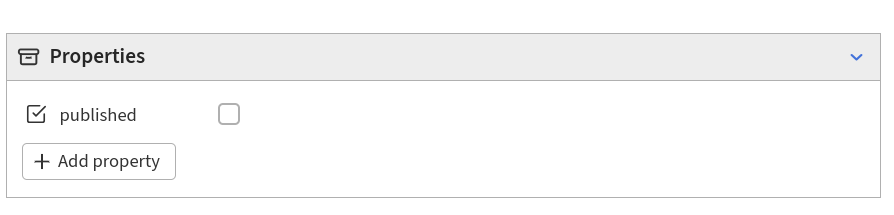
Hi. Properties are just fields in the frontmatter, simply query them by their name. A comment on your usage is that you’re using the wrong type of property; if you want a true/false kind of field, your type should be checkbox --see screenshot below.
E.g.: I have a set of files in a folder named Folder, with a boolean (checkbox) property named “published”:
This query filters the most recently written unpublished (published=false) drafts in Folder:
```dataview
TABLE WITHOUT ID
file.link as "", file.ctime as "Draft started on"
FROM "Folder"
WHERE published = false
SORT file.cday DESC
LIMIT 10
```'
In your case, I am not sure that numbers are valid property names for dataview, as my query stops working if I rename my published to 2. If, instead, you were using tested as a name, then your query would be something like:
```dataview
TABLE WITHOUT ID
file.link as ""
FROM #project
WHERE tested = true
```'
the space becomes a -, so the property “Page Type” would become “Page-Type”.
I should be able to use the line:
WHERE Page-Type = "Landing Page"
but I haven’t had much luck with this, instead you can use the row field: row["Page View"]
Here is a DataView Query that I use where both methods are used:
```dataview
TABLE WITHOUT ID
	file.link as "Title",
	file.mday as "Modified",
	start-date as "Started"
WHERE row["Page Type"] = "Series Overview"
SORT file.mday DESC
```(^.^)
After typing this out, something occurred to me. Maybe DataView has issues with case, so I tried “page-type” instead of “Page-Type” and it worked, so make sure to strip the case from your property name. My new query:
```dataview
TABLE WITHOUT ID
	file.link as "Title",
	file.mday as "Modified",
	start-date as "Started"
WHERE page-type = "Series Overview"
SORT file.mday DESC
``` ┻━┻ ︵ ლ(⌒-⌒ლ)
It’s definitely a matter of preference and style, but I personally prefer to use words and phrases when I can be be the most descriptive, and spaces ease the readability overall lowering the bandwidth needed. It’s a small thing, but for me, it makes it more pleasant to work with (though sometimes it’s not an option).