Properties: Add "time" as a property type

Use case or problem

I would like to ask that “time” (alone) is added to property types, so that it will be possible to measure “duration”. Currently it is possible to use either the “Date” or “Date and Time” properties, why not time also?

Use-case: I want to add my sleep time (08:00 hours or similar) to my daily notes (and duration of other activities I do throughout a day) for the purpose of counting that, like habits. With the Date & Time that’s not possible.

Proposed solution

Add time as a property type option which can then be used either by obsidian or other plugins to track habits.

Current workaround (optional)

I have scoured the internet for the past few days but I am unable to find any good workaround that would not overcomplicate things drastically.

5 Likes

Why not just use a standard text property?

You would then just type “08:00” into this.

That’s certainly one way to do it, but I’m not sure if it’s the right way. My ultimate goal is to add these “times” at the end of the month/year, so that I can see how much I did this or that. When it’s text, I could probably find a way to add these numbers as integers, but I don’t know how to add it as time, so that minutes count up to hours, etc. If you know of a way of doing that, please let me know, I am very curious, thanks!

Oh ok, yeah that’s definitely possible.

I could create a dataview script to display that for you in a note, or a Python script to scrape that data and display this in a console window.

If we did this in Python, we could generate some pretty graph using matplotlib, with durations separated by activity in a pie chart or a bar graph? (or both?)

In dataview, we would be more limited though we could create a table with rows for each activity with their total durations beside them? That’s something you could include in your daily note, though also in those general overview notes.

Send me a PM and we can work something out.

1 Like

Thank you for your suggestion. Adding time as a property type would indeed enhance flexibility for tracking durations and specific times, such as sleep duration or other activities.

1 Like

I would like to second this request. Much of data I keep track of in daily notes is in duration format (sleep duration, time spent reading, studying, exercising, etc), and so I am unable to put it in the frontmatter properties, since durations are not supported. There are many work-arounds, like @Markimus suggested, which maybe is why this doesn’t seem to be a large issue for people, but I am surprised that such a large category of data is excluded from being kept in properties.

Now that properties have such good support, with their own sidebar, and the promise of more built in data-viewing options to come, I would greatly appreciate being able to have durations in the properties as well.

In the meantime, what’s the use-case that having a specific “time” property would give rather than just text? All I can think of is the only difference would be some sort of time-entry popup, which is fairly painful anyway. Text is quick and easy to write.

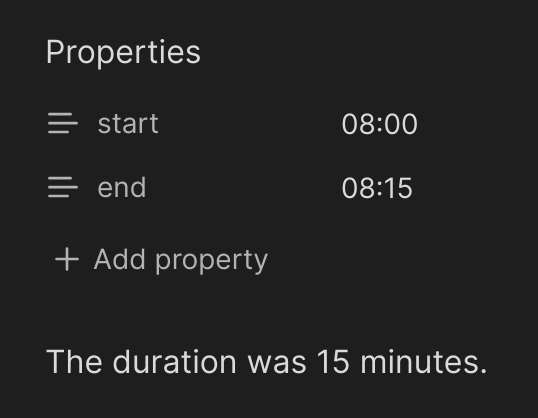
Here’s how you can do durations right now:

image

Which uses an inline Dataview calculation like this:

The duration was `$=moment(dv.current().end, 'HH:mm').diff(moment(dv.current().start, 'HH:mm'), 'minute')` minutes.

For me, (though it might be different for the original poster, since he was asking for “time” in order to measure duration, while I just straight up want duration) the difference is that a duration property is a single data variable with both a number and a “unit”. Dataview accepts durations, and can parse the units of hr, min, day etc properly with integer values in front of them. Some days I read for 10 minutes, others for 5 hours, and it would be most user-friendly for me to have the built-in functioning of Obsidian be able to recognize my data on a property named ReadingTime that I enter as “5hr” and be able to SUM it with “10min” on a different day.

I do use Dataview to sum and track my duration data, but I since cannot use duration fields in frontmatter properties, I have kept duration fields in my notes.

Does that make sense, or did I muddy the waters?

You can also do that too right now using text fields - in fact it’s even easier than times because Dataview automatically parses it into a duration for you:

image

Today I did stuff for `$=dv.current().read_for.plus(dv.current().exercised_for).as('hours')` hours.

Unless I’m not aware of some built-in SUM feature of Obsidian, you’re still going to need to use Dataview or some other Javascript to sum your fields, in which case you can already do that right now.

1 Like

@AlanG Thanks so much for your reply! I didn’t realize that Dataview would understand durations entered as text fields in frontmatter properties. That is really helpful for me currently, as I can move all my fields into front matter.

I guess my more hidden concern with Obsidian itself recognizing my data as a duration is the projected (on the roadmap the developers have provided) Dynamic views using data stored in properties. If my durations are “just text”, then I won’t be able to use that function with them when it is available.

I suppose we’ll just have to see how it works when it does roll out.

Assuming the Obsidian team don’t take that into account, someone will whip up a quick script to find/replace all your text durations with whatever the new property type is. It’s a very easy problem to solve :+1:

1 Like

This topic was automatically closed 28 days after the last reply. New replies are no longer allowed.

Use case or problem

Hi. I had encountered similar idea as mine in archived thread (/t/add-time-as-a-property-type/77699) in which the OP was trying to achieve time measurement/tracking.

With the emergent of ‘bases’, I think this would be a great feature as to filter a certain time duration and at a point of time. For instance, a user wanted to find possible events within a certain time duration, independent from ‘date’ type. The chosen solution achieved this by using ‘text’ type and uses inline calculation method with ‘Dataview’ plugin to calculate the duration, but this is not what I intended to raise. But rather, for ‘file’ and ‘bases’ to have a property type that enable to set and ‘filter’ a time duration, like a time-block (for instance, ‘from 11:30 PM to 1:30 AM’ or even ‘at 11:30 PM’).

Like a routine, an event is done repeatedly where date is unnecessary. For instance, skin care involving acidic product must be done every 2 days in a week in the morning. Without focusing on what day it is, (since this can be achieved using ‘text’ type in both ‘file’ and ‘bases’) the skin care is done at a certain time in the morning. Thus, the user can know that at a certain time in the morning, skin care routine must be done. By using filter in ‘bases’, to my understanding, this cannot be achieved simply through ‘datetime’ type without having to create multiple files of different date of same exact time. The same goes for medication intake, where a user need to track at what time of what medication must be taken.

Proposed solution

It would be a great feature that in ‘bases’, there’s a ‘filter’ to track down of a certain time duration and of at a point in time, regardless of the date, while in ‘file’, a property type ‘Time’ that enables to fill in a point of time ‘HH:mm:ss’ (and later enables implementation of ‘from X to Y’) so that ‘filter’ in ‘bases’ can use the ‘Time’ type to calculate a time window, where using ‘text’ type isn’t possible.

There are three ways I could think of implementing this feature. First is to have ‘Time duration’ type where it is possible to insert ‘from X to Y’ where X and Y is the time ‘HH:mm:ss’. This allows for multiple time duration for a single file. The caveat is that it is not possible to have a point of time (as in at 4:00 PM). Second is to have ‘Time’ type to insert ‘at HH:mm:ss’. This allows for singular time duration for a single file (without creating multiple ‘Time’ type instances). Lastly is to have ‘Time’ type ‘from HH:mm:ss to HH:mm:ss’ where ‘from’ is required and ‘to’ is mandatory. This implementation combines both first and second’s benefits. The only caveat that I could think of is it may be confusing for early user if not mentioned about the mandatory field.

Without redundant amount of files created only to have separate date of same time (or repeating text in a file of time if implement JS), better files filtering can be achieved and easier to calculate time duration besides enabling time-blocking method.

Just like in Google Calendar where you can set at what specific time from and to a certain date, by having this feature to be implemented, similar function can be achieved with file properties in just a single file without having to create multiple instances.
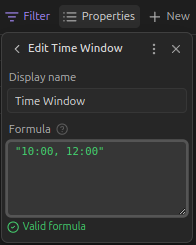
Hi, again. Just wanted to update that, as of now, I implemented the behavior that somewhat resembles my idea inside ‘bases’ using ‘filter’ and ‘properties’ and my limited JS knowledge.

formulas:
  Time Window: '"10:00, 12:00"'
  Time Window Start: number(date(today().toString() + " " + formula["Time Window"].split(", ", 2)[0])) - number(date(today()))
  Time Window End: number(date(today().toString() + " " + formula["Time Window"].split(", ", 2)[1])) - number(date(today()))
  Event Time Start: number(date(today().toString() + " " + ('0' + note["Start Hour"]).slice(-2) + ':' + ('0' + note["Start Minute"]).slice(-2))) - number(today())
  shouldIncrementEventTimeEnd: if(formula["hasEventTimeEnd"] == 1, if(formula["Event Time End"] <= formula["Event Time Start"], formula["Event Time End"] + 86400000, formula["Event Time End"]), "False")
  hasEventTimeEnd: if(note["End Hour"] != Null, 1, [0])
  Event Time End: if(formula["hasEventTimeEnd"] == 1, number(date(today().toString() + " " + ('0' + note["End Hour"]).slice(-2) + ':' + ('0' + note["End Minute"]).slice(-2))) - number(today()), ["False"])
  isOverlap: if(formula["hasEventTimeEnd"] == 1, max(formula["Event Time Start"], formula["Time Window Start"]) < min(formula["shouldIncrementEventTimeEnd"], formula["shouldIncrementTimeWindowEnd"]) || max(formula["Event Time Start"] + 86400000, formula["Time Window Start"]) < min(formula["shouldIncrementEventTimeEnd"] + 86400000, formula["shouldIncrementTimeWindowEnd"]), formula["Event Time Start"] > formula["Time Window Start"] && formula["Event Time Start"] < formula["shouldIncrementTimeWindowEnd"] || formula["Event Time Start"] + 86400000 > formula["Time Window Start"] && formula["Event Time Start"] + 86400000 < formula["shouldIncrementTimeWindowEnd"])
  shouldIncrementTimeWindowEnd: if(formula["Time Window End"] <= formula["Time Window Start"], formula["Time Window End"] + 86400000, formula["Time Window End"])
views:
  - type: table
    name: Table
    filters:
      and:
        - '!note["Start Hour"].isEmpty()'
        - formula.isOverlap == true
    order:
      - file.name

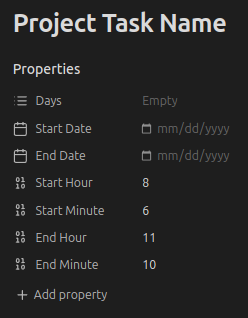
To use the ‘base’ file, a note must have these properties:

where ‘Start Hour’ and ‘Start Minute’ must be filled in while ‘End Hour’ and ‘End Minute’ is mandatory. It uses 24-hour clock system with ‘Start Hour’ and ‘End Hour’ must be 0 to 23 and ‘Start Minute’ and ‘End Minute’ must be 0 to 59.

To use the base, go to ‘Time Window’ and change the string “Window Time Start, Window Time End” where it works as follows:

“00:00, 23:59” or “23:59, 00:00”

If the logic doesn’t work properly (especially the ‘isOverlap’ behavior is as intended or not), please do update here and thanks in advance!