Expected result
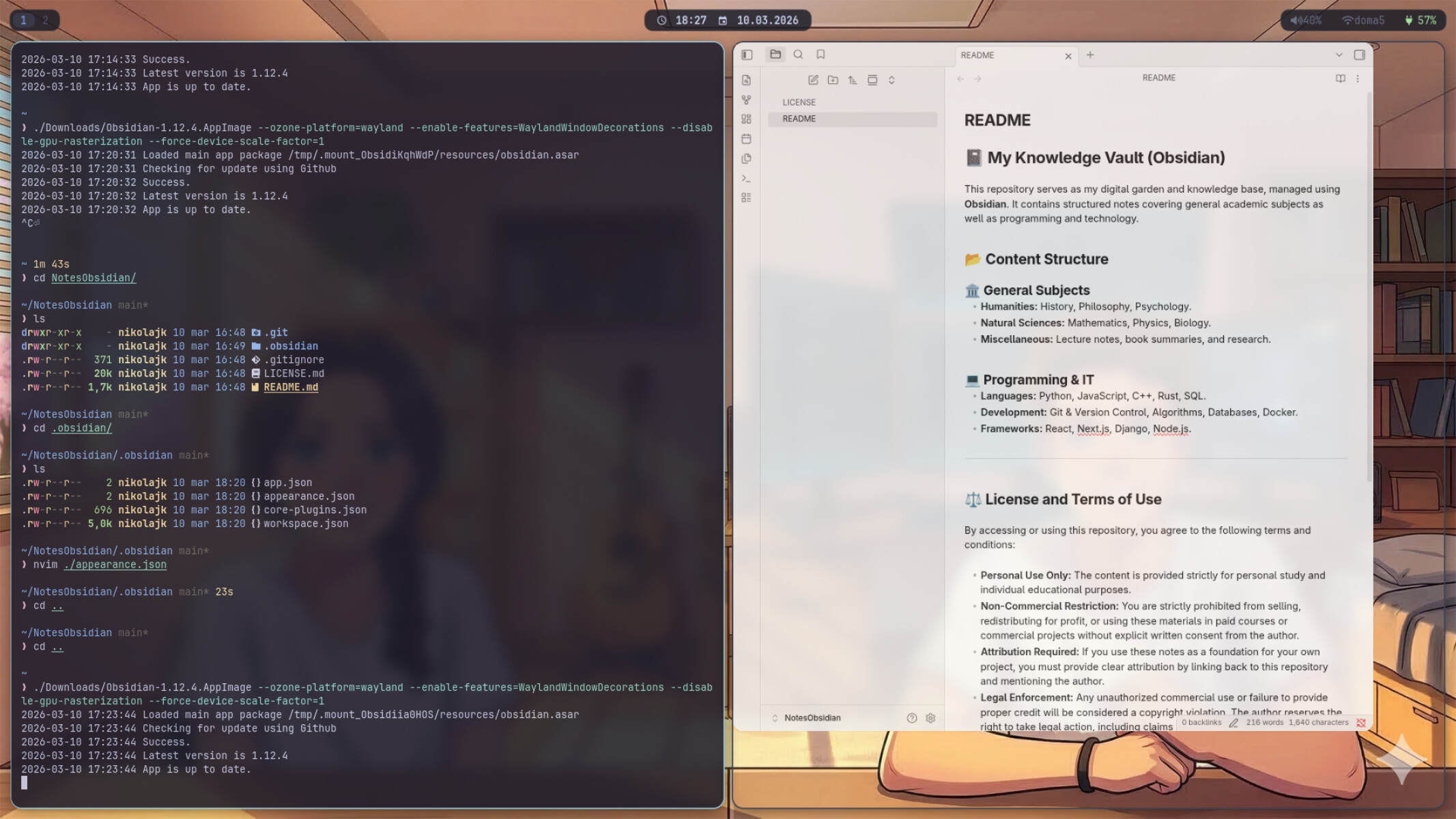
I am using swayfx and the obsidian looks like this I installed it as an appimage also from the pacman and still same issue
here is my config if it is help
# Default config for sway
#
# Copy this to ~/.config/sway/config and edit it to your liking.
#
# Read `man 5 sway` for a complete reference.

### Variables
#
# Logo key. Use Mod1 for Alt.
set $mod Mod4
# Home row direction keys, like vim
set $left h
set $down j
set $up k
set $right l
# Your preferred terminal emulator
set $term foot
# Your preferred application launcher
set $menu fuzzel

# Predvolený font pre Sway (lišty, texty)
font pango:JetBrainsMono Nerd Font 11

### Output configuration
#
# Default wallpaper (more resolutions are available in /usr/share/backgrounds/sway/)
output * bg /usr/share/backgrounds/sway/Sway_Wallpaper_Blue_1920x1080.png fill

### Key bindings
# Basics:
    # Start a terminal
    bindsym $mod+Return exec $term

    # Kill focused window
    bindsym $mod+Shift+q kill

    # Start your launcher
    bindsym $mod+d exec $menu

    floating_modifier $mod normal

    # Reload the configuration file
    bindsym $mod+Shift+c reload

    # Exit sway (logs you out of your Wayland session)
    bindsym $mod+Shift+e exec swaynag -t warning -m 'You pressed the exit shortcut. Do you really want to exit sway? This will end your Wayland session.' -B 'Yes, exit sway' 'swaymsg exit'

    bindsym $mod+Shift+p exec systemctl poweroff
    bindsym $mod+Shift+r exec systemctl reboot

# Moving around:
    bindsym $mod+$left focus left
    bindsym $mod+$down focus down
    bindsym $mod+$up focus up
    bindsym $mod+$right focus right
    bindsym $mod+Left focus left
    bindsym $mod+Down focus down
    bindsym $mod+Up focus up
    bindsym $mod+Right focus right

    bindsym $mod+Shift+$left move left
    bindsym $mod+Shift+$down move down
    bindsym $mod+Shift+$up move up
    bindsym $mod+Shift+$right move right
    bindsym $mod+Shift+Left move left
    bindsym $mod+Shift+Down move down
    bindsym $mod+Shift+Up move up
    bindsym $mod+Shift+Right move right

# Workspaces:
    bindsym $mod+1 workspace number 1
    bindsym $mod+2 workspace number 2
    bindsym $mod+3 workspace number 3
    bindsym $mod+4 workspace number 4
    bindsym $mod+5 workspace number 5
    bindsym $mod+6 workspace number 6
    bindsym $mod+7 workspace number 7
    bindsym $mod+8 workspace number 8
    bindsym $mod+9 workspace number 9
    bindsym $mod+0 workspace number 10

    bindsym $mod+Shift+1 move container to workspace number 1
    bindsym $mod+Shift+2 move container to workspace number 2
    bindsym $mod+Shift+3 move container to workspace number 3
    bindsym $mod+Shift+4 move container to workspace number 4
    bindsym $mod+Shift+5 move container to workspace number 5
    bindsym $mod+Shift+6 move container to workspace number 6
    bindsym $mod+Shift+7 move container to workspace number 7
    bindsym $mod+Shift+8 move container to workspace number 8
    bindsym $mod+Shift+9 move container to workspace number 9
    bindsym $mod+Shift+0 move container to workspace number 10

# Layout stuff:
    bindsym $mod+b splith
    bindsym $mod+v splitv
    bindsym $mod+s layout stacking
    bindsym $mod+w layout tabbed
    bindsym $mod+e layout toggle split
    bindsym $mod+f fullscreen
    bindsym $mod+Shift+space floating toggle
    bindsym $mod+space focus mode_toggle
    bindsym $mod+a focus parent

# Scratchpad:
    bindsym $mod+Shift+minus move scratchpad
    bindsym $mod+minus scratchpad show

# Resizing containers:
mode "resize" {
    bindsym $left resize shrink width 10px
    bindsym $down resize grow height 10px
    bindsym $up resize shrink height 10px
    bindsym $right resize grow width 10px

    bindsym Left resize shrink width 10px
    bindsym Down resize grow height 10px
    bindsym Up resize shrink height 10px
    bindsym Right resize grow width 10px

    bindsym Return mode "default"
    bindsym Escape mode "default"
}
bindsym $mod+r mode "resize"

# Utilities:
    bindsym --locked XF86AudioMute exec pactl set-sink-mute \@DEFAULT_SINK@ toggle
    bindsym --locked XF86AudioLowerVolume exec pactl set-sink-volume \@DEFAULT_SINK@ -5%
    bindsym --locked XF86AudioRaiseVolume exec pactl set-sink-volume \@DEFAULT_SINK@ +5%
    bindsym --locked XF86AudioMicMute exec pactl set-source-mute \@DEFAULT_SOURCE@ toggle
    bindsym --locked XF86MonBrightnessDown exec brightnessctl set 5%-
    bindsym --locked XF86MonBrightnessUp exec brightnessctl set 5%+
    bindsym Print exec grim -g "$(slurp)" - | wl-copy

# Status Bar:
bar {
    swaybar_command waybar
}

include /etc/sway/config.d/*

for_window [app_id="obsidian"] floating disable
# === SwayFX Visual Effects

# Priehľadnosť: Aktívne okno 99%, Neaktívne 80%
# Nastaví základnú opacitu pre všetky okná na 0.99 (aktívne)
for_window [class=".*"] opacity 0.85
for_window [app_id=".*"] opacity 0.85


blur enable
blur_passes 2
blur_radius 4
blur_xray disable

shadows enable
shadow_offset 0 5
shadow_color #0000007F

default_border pixel 2
default_floating_border pixel 2
smart_borders off
corner_radius 15

gaps inner 10
gaps outer 5

client.focused        #88C0D0 #88C0D0 #ECEFF4 #88C0D0
client.unfocused    #3B4252 #3B4252 #D8DEE9 #3B4252
client.focused_inactive    #3B4252 #3B4252 #D8DEE9 #3B4252

output eDP-1 scale 0.9

exec_always ~/.config/sway/wallpaper.sh

# Vypne požiadavky aplikácie na vlastnú veľkosť
for_window [app_id="obsidian"] floating disable, resize set 100 ppt 100 ppt
```