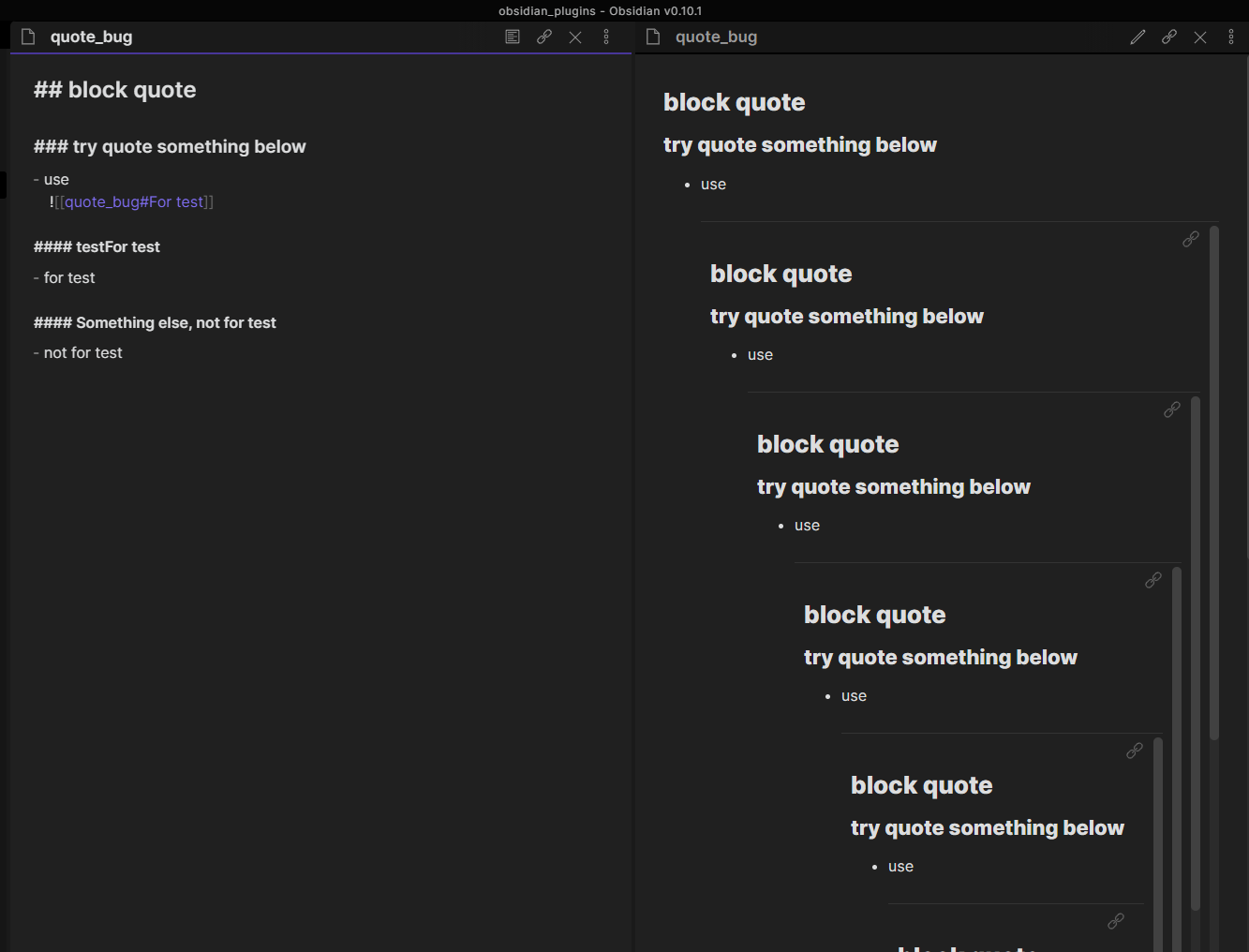
Sorry for making the title confusing… I have to explain it by code and an example…
Some sort of bug, but not exactly. May cause a crash while running the code.
Steps to reproduce
Try to create a new note called “quote_bug”, then copy and paste the following content:
## block quote

### try quote something below
- use
    ![[quote_bug#For test]]

#### For test
- for test

#### Something else, not for test
- not for test
- The idea is to quote the “#### For test” and “- for test” parts.
- Ctrl+click to turn on the preview side by side.
- Everything looks normal so far.
- Now edit the “#### For test” part (e.g., add some random characters, such as “#### testFor test”)
- Then use the mouse to click on the pane being edited (basically any content).
What you will see in the preview pane shows a recursively blockquoted block.
Expected result
It makes sense because the title/header that being linked was edited. No corresponding “link/content” for it to stick to. So it starts to quote itself over and over. While editing a long note, this can be a disaster, which leads to a software crash.
Actual result
Environment
- Operating system: Windows 10
Additional information
Sometimes you want to quote a block in the same note. And sometimes you will edit the header. Maybe set up some limitation of “the number of times that can quote” or check/update the link right before reloading the content.
The behaviour, while odd, is correct because if you don’t get a hit on the header, we embed the whole file. Which is what is happening here.
We limit the depth of embedding to limit these weird cases of inceptions.
This will eventually get fixed once we implement a proper header rename propagation.
Did this actually cause a crash for you or just this odd inception effect?
I can understand why this is happening. And it makes 100% sense unless extra constraints are added to the logic of the software.
It caused a crash once (with a note of around 3k characters). After reloading for a while, the whole window stopped responding.
Perhaps we should avoid embedding if there is no hit and it’s the same file.
Some thing potentially can happen with block reference. But it’s less likely since you change the text not the block id
No hit possible solutions:
- As you suggested, avoid embedding (maybe with a warning of no hit)
- Qoute the block only once (Not so ideal. E.g.: if you “accidentally” quote a note with a “no hit” quote, similar to this case. But this is an extreme case)
- Limit the buffer (not sure the term is correct here) of quoting. Such as only show 1k characters within a quoted area. I guess this may leads to some other complains.
- Update the link once the title got edited (right before a reload), just like what happens after you rename a note with references to it. Will increase the complexity of the code.
Will update if I got any better idea.
4 is planned feature. We’ll think about the others.