I’ve been using Obsidian for a long time now, and in my spare time, I’m writing a fantasy novel. As my world grew more complex, I found myself struggling to keep track of all the locations and regions I was creating. I searched for a plugin that would allow me to design world maps directly within Obsidian, but unfortunately couldn’t find anything that met my needs.
So I decided to build my own solution – and I’d love to share it with you!
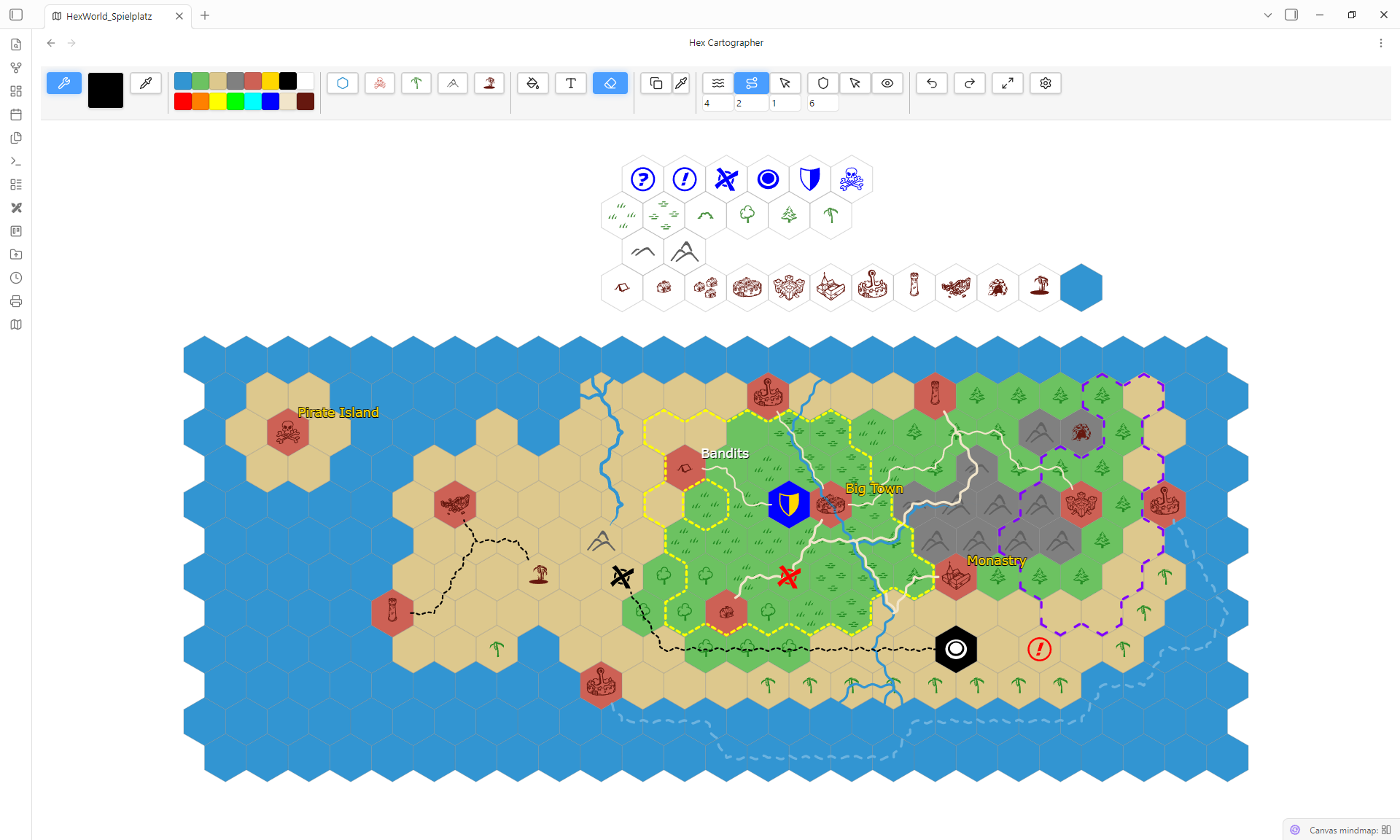
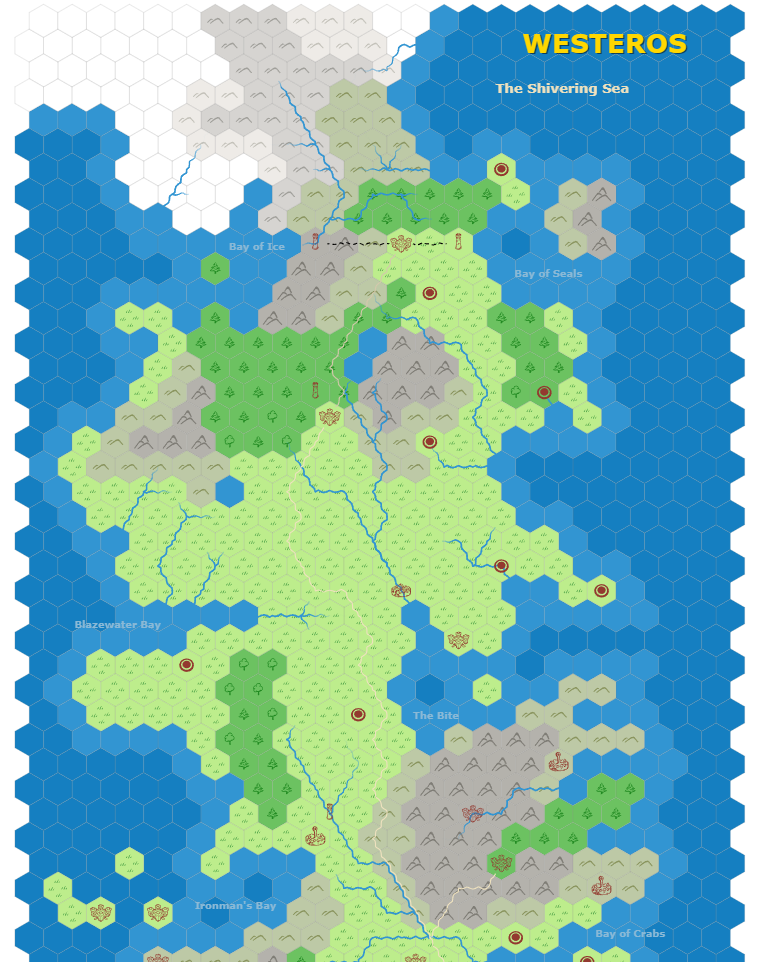
Hex Cartographer is a powerful addon for the Obsidian Markdown Editor that enables you to create detailed hex maps for your fantasy worlds.
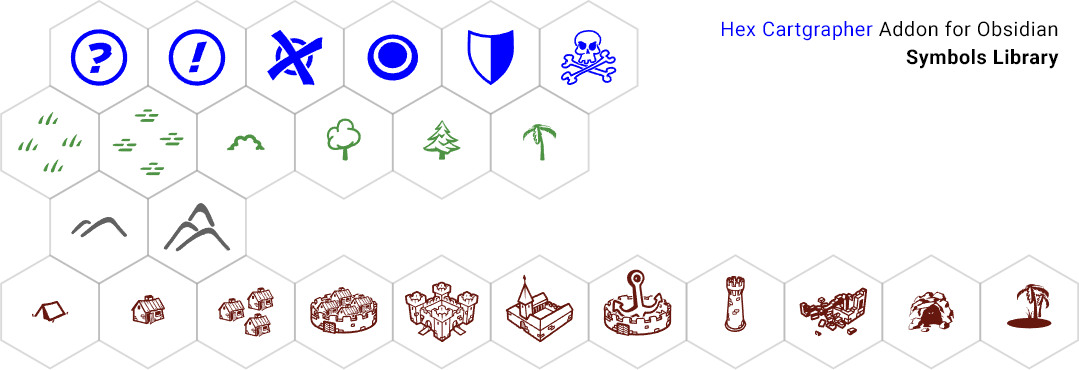
Create unique landscapes with colored hex tiles and an extensive collection of lovingly crafted symbols (by mysefl). Let your creativity run free: Define diverse terrains and ground types, connect locations with winding paths or meandering rivers, add labeled regions, and mark borders between kingdoms.
Your finished maps can be easily printed or exported as high-resolution images – perfect for RPG game masters, fantasy authors, and anyone creating their own worlds.
The plugin is still awaiting official approval, but if you’d like to try it out or take a look at the code, you can find it here: Hex Cartographer on GitHub
I’d really appreciate any feedback, suggestions, or bug reports.
ability link some hex tiles in one map to another map, eg. Country>city>house>cabinet (just yet another link, no a tree hierarchy)
Currently your map design look simple but nice. I really like the drawings you made for your tiles.
If you’re curious/interested to see other designs, then check out Battle for Wesnot, they use a kind of dynamic tile set, where the hex content changes if you paint the same tile content to multiple tiles in the same area.
Other resources could be cartography brushes, you can find some for Gimp, Krita, probably also Ps: usually you can find such resources online on DeviantArt.
It’s great to hear you like the design. Currently, you can already link any text on the map to any .md file in your vault.
Regarding your ideas for linking hex tiles and creating connections between maps (e.g., Country > City): Thank you! I’ll look into those and see how difficult they are to implement while keeping the UI clean.
Keeping the plugin simple and readable is a priority for me. Since I develop this in my spare time, creating custom illustrations is quite time-consuming. Additionally, to keep the plugin in the official Obsidian community list, I have to follow specific guidelines regarding how the API handles assets and folders. Additional folders and content like bitmaps are not allowed, as I know.
Regarding Battle for Wesnoth: I’m an artist myself with over 30 years of experience in digital art and the game industry, so I always create my own assets from scratch. However, the “dynamic tile set” logic you mentioned sounds very interesting from a technical/coding perspective!
If you have any specific links or documentation on how they handle those transitions or the dynamic painting, feel free to share them. I’d love to see how they solve that.
Sounds good!
Linking is one of the fundamental aspects of Obsidian, so my questions.
Some more brainstorming:
if hex tiles display some hint like a *, if linked with notes .
if hex tiles display a help bubble on hover with the name of the linked note.
if tiles have more than one event happening, we could add --- (three minus in between events) to the linked note, to subdivide various events in “a note / a tile”
I perfectly understand and subscribe your statement!
My intention was to suggest sources for inspiration. Inspiration can be misleading or deviate from our goals, if we have already better ideas. So resources are always a double edged sword: still, sometimes it’s a good practice to use placeholders to take off effortlessly.
Simpler is more functional still I’d prefer a more painterly look, but this is secondary and goes already into details. If you’re interested in an artistic exchange, feel free to pm me.
Indeed! I just mentioned wesnot bc its open source, maybe a good research to understand technical aspects. Also, to create quickly layouts, cartography brushes are very useful.
As soon as your plugin will be available in community plugins, I can tell you more.
I guess. The best is, you take a look at my addon first before we talk about new ideas.
But it can take months until it’s approved for the official list. The obsidian team is overloaded with new Addons.
If you don’t want to wait, install it manually. There is a manual how to do it on my git website.
And maybe one more point: all ideas have also have to work on mobile devices. So there are a lot of things to keep in mind, when developing an app. And every idea have to be checked if it makes sense or it is overloading an app. I try to keep it light weight and simple to use. Sometimes it’s better to drop ideas instead to make an app complex.

 And every idea have to be checked if it makes sense or it is overloading an app. I try to keep it light weight and simple to use. Sometimes it’s better to drop ideas instead to make an app complex.