Plugin/Theme Disclaimer
Is this project open source? Yes
Is this project completely free? Yes
Is this project vibe-coded beyond the author’s ability to comprehend how it works? Yes
Community Directory: Local Sidekick
GitHub Repo: obsidian-sidekick
Hey all, sharing a plugin I vibe-coded largely to meet personal needs for my offline travelling and LLM addiction. The idea is, coding IDE agent chat sidebars are great so why not have them in Obsidian, and better yet for local LLM agents for entirely offline Obsidian musings. So here it is, Local Sidekick
Local Sidekick
NOTE this is a early stage Minimal Viable Product (MVP). It’s essentially just a UI sidebar which neatly adopts standard Obsidian Markdown rendering and the user theme whilst displaying an agent chat just like VScode/copilot agent sidebar chats. It has recent chat sessions, vault file searching and referencing with @ symbol, minimal tool usage (restricted by default for safety but can be customised), pdf parsing, web search, chat export and reviewed file editing etc. In other words, most of what you’d expect from your equivalent coding agent IDE. It’s all wired through Ollama and the Pi agent harness for maximum customisability so you can max it with custom prompts and skills via Pi as much as you want.
Please crack at it, break it, criticise it and tell me what you think. If you have any feature requests / ideas, or are interested enough to review my mostly vibe-coded js code then holla! Meanwhile, I’ll keep updating it gradually and reporting back here.

Local Sidekick seamlessly uses your Obsidian theme for its UI, supporting dark and light mode. It can be launched from the command palette or from the small AI agent icon on the left toolbar. Doing so will open the interactive dashboard as a tab in the right hand sidebar. An agent status panel at the top of the sidebar gives real time information on the local models being used alongside interactive buttons to find local models. Below a new chat can be started from an interactive prompt box with model selection or a recent chat from session history continued.
Features
- Local model workflow through Pi and Ollama.
- Persistent chat sessions with a history landing page.
- Compact model rail with discovered Pi/Ollama models and capability badges.
- Markdown and math rendering through Obsidian’s renderer.
- Vault file mentions with
@, including Markdown, text-like files, attachments, and best-effort PDF text extraction. - Prompt context helpers:
@search(query)for local vault search.@semantic(query)for lightweight related-note search.@vault-indexfor filenames and top headings.@linksor@links(query)for conservative internal link suggestions.@cmd(command)for exact allowlisted local commands.@url(url)for optional HTTPS web fetch context from explicitly allowlisted hosts.
- Reviewed Markdown edit proposals with visible diffs and approval before write.
- Chat export to Markdown, defaulting to a
Chats/folder in the vault. - Obsidian command palette actions for opening the sidebar, exporting chats, checking Pi/Ollama, and suggesting internal links.
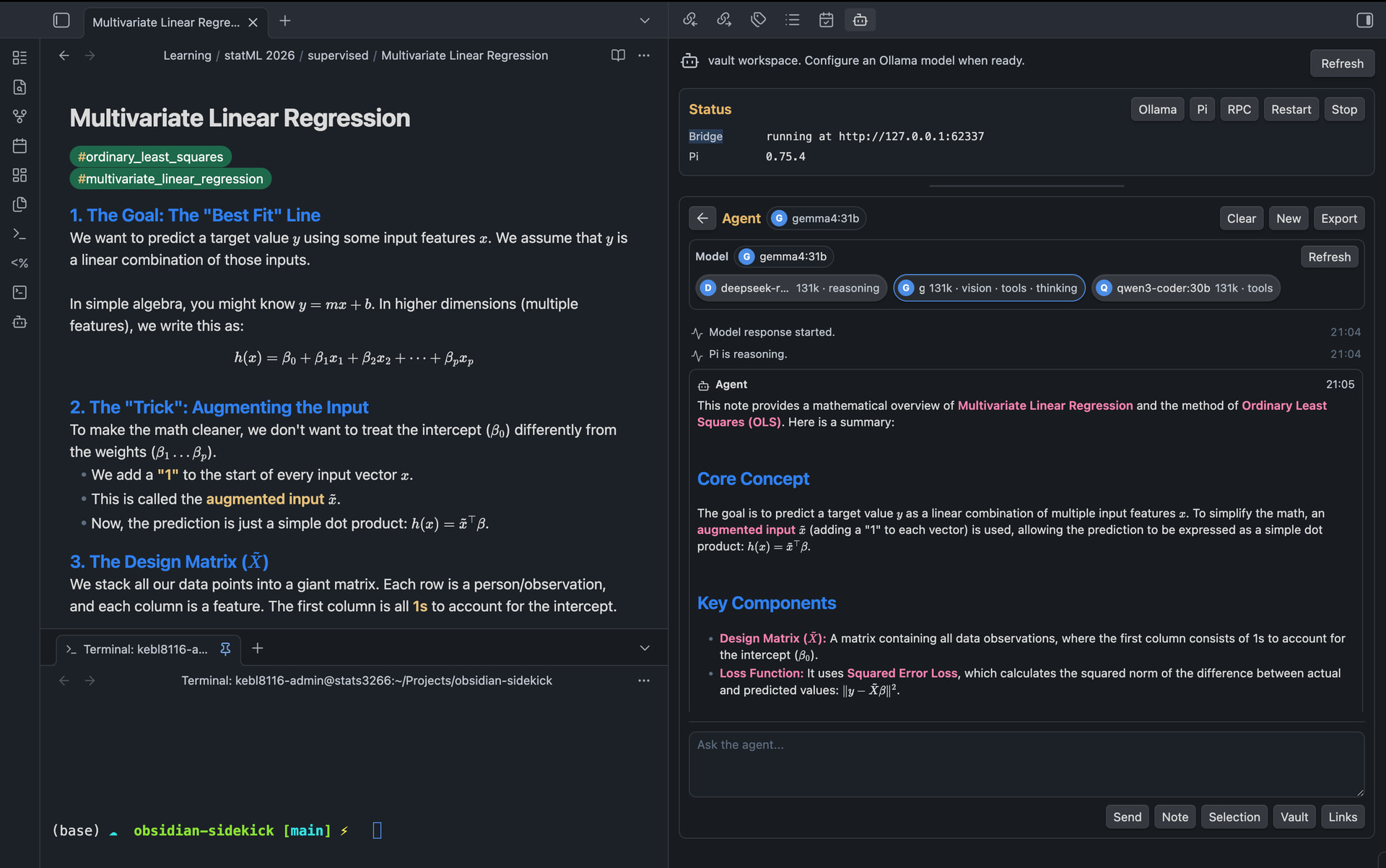
Chat session agent reply streams are rendered in markdown with your Obsidian theme, handling math and standard formatting. For a full Obsidian IDE experience, use the terminal plugin alongside this so you never have to leave Obsidian.