Paste codeblocks as formatted

Pasting markdown pages from a site like Github that include headings, paragraphs/text, and codeblocks correctly pastes everything as formatted except for the codeblocks.

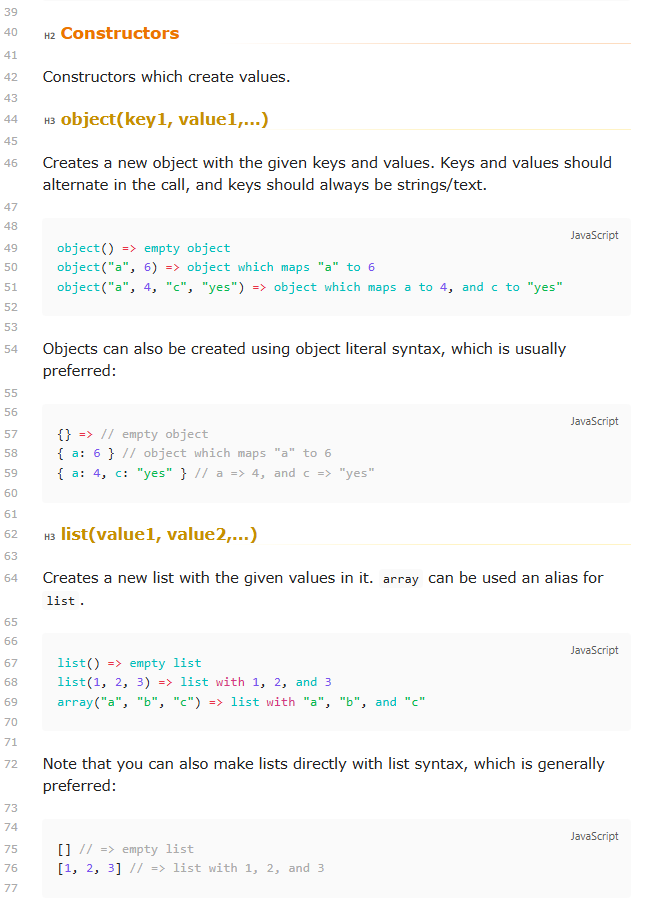
Example - the original page looks like this:

Objects can also be created using object literal syntax, which is usually preferred:

{} => // empty object
{ a: 6 } // object which maps "a" to 6
{ a: 4, c: "yes" } // a => 4, and c => "yes"

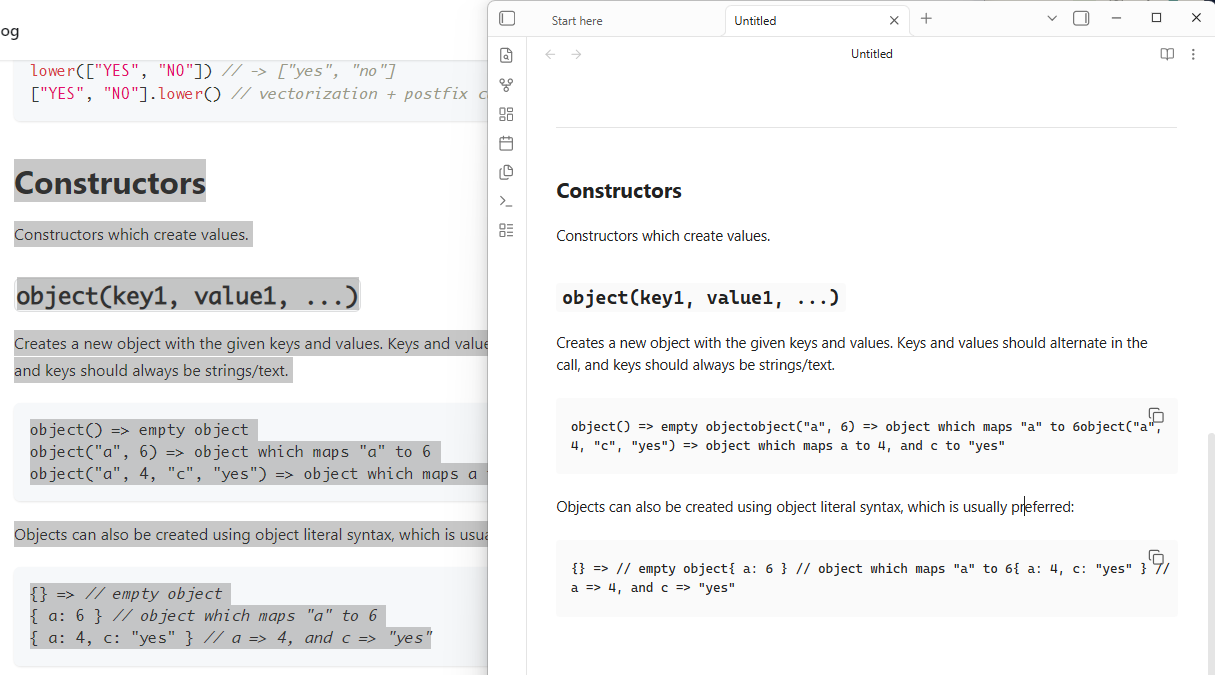
When pasted into Obsidian (or The Sandbox) it looks like this:

Objects can also be created using object literal syntax, which is usually preferred:

{} => // empty object{ a: 6 } // object which maps "a" to 6{ a: 4, c: "yes" } // a => 4, and c => "yes"

FIY: For some reason pasting here in the forum DOES preserve the codeblock formatting, unlike pasting in the Sandbox)

What I’m trying to do

I’m trying to learn coding, and am pasting many pages of text that include codeblocks, but without the formatted codeblock it’s too confusing to learn. If it helps I’m almost certain codeblocks within a page with other text were pasted correctly last year.

Things I have tried

What works is to copy/paste each codeblock individually, using Ctrl/CMD-shift-v

Unfortunately, that is not helpful when there are more codeblocks than text paragraphs in the source.


original source I’m trying to copy/paste: Datacore helpfile: Functions | Datacore
Can confirm in a quick test. e.g.

It looks like new lines in the pasted code blocks are being ignored. I tried copying from Edge, Firefox, and Vivaldi (all on Windows) with the same result.


EDIT: Using the Obsidian Web Clipper to clip the page looks to preserve the newlines in code blocks and adds in their language as well:

You could give that a try for now.

Another workaround while this is sorted: copy from GitHub’s raw/markdown source when possible, not from the rendered page. For docs pages, the rendered HTML often puts code in nested spans, and Obsidian’s rich paste path seems to preserve the surrounding paragraphs but loses some newline boundaries inside the code element. Raw Markdown pasted as plain text keeps the fences/newlines, so you can then let Obsidian render it normally. If you can reproduce it in Sandbox with no plugins, it is probably worth filing as a bug with the exact source page plus OS/browser/Obsidian version.

Indeed web clipper does work. Thanks.
Should I mark this as a solution when it is a work-around?
I’d really like to not have to rely on web clipper.

Where can I get the ‘raw’ version of the documentation pages?

I’ve done it with code before, where there is an option in the upper right corner of an example or code block, but there is no such option that I can see for the acual documentation.

Just wanted to note another potential workaround for this issue is to try using the “Paste and Match Style” option (it’s right below ‘Paste’ in the ‘Edit’ menu).

Default keyboard shortcut for this is usually:
cmd + shift + v (macOS) or
ctrl + shift + v (Windows) hopefully I remembered that one correctly, it’s been a while since I used Windows.

I don’t know for sure that this always works reliably, but I know I have used it multiple times to preserve line breaks when copying code blocks from my browser, and I am pretty sure that includes copying stuff from GitHub. I can double check in a little while to confirm.

I tried copying and cmd/ctrl-shift-v the other day; with this particular site the new lines are preserved correctly doing that (:+1:), but the code blocks are stripped out just pasting the code as regular text(:-1:). e.g.

Creates a new object with the given keys and values. Keys and values should alternate in the call, and keys should always be strings/text.

object() => empty object
object("a", 6) => object which maps "a" to 6
object("a", 4, "c", "yes") => object which maps a to 4, and c to "yes"


Objects can also be created using object literal syntax, which is usually preferred:

{} => // empty object
{ a: 6 } // object which maps "a" to 6
{ a: 4, c: "yes" } // a => 4, and c =>

The web clipper seems the way to go for preserving everything and the easiest IMO.

Ah, yeah I think I missed that because (if I remember correctly) I was creating the code blocks manually first and then pasting the code block text into those.

Re-reading, I see OP did actually know about the “paste and match style” trick and the issue was they wanted to paste ALL of the page content (including code blocks) not just the code block content. Sorry about that! This is what I get for reading and replying before I’ve had my tea. :wink:

So while cmd/ctrl + shift + v works great for quickly pasting properly formatted text into a pre-existing code block in a note, I agree the web clipper is probably the easiest/best solution for OP’s particular needs.

Oh also: This reminds me, I just happened to stumble across and save this the other day! I don’t know if this would be helpful at all for you OP, but there are 3 web clipper templates here designed specifically for GitHub: web-clipper-templates/templates at main · obsidian-community/web-clipper-templates · GitHub

It sounds like using the web clipper does already solve your issue by default, but wasn’t sure if there was other useful stuff in these you might find beneficial.

I most certainly appreciate webclipper, and will definitely check out the templates, but I’m still not inclined to select webclipper as a solution rather than a workaround.

When it comes to html sites I expect there to be a whole lot of crap, so I usually use Ctrl+Shift+V to paste and then spend some time “fixing” the paste. But when I’m on a Markdown page, I just assume everything works using a simple copy/paste.

Of course, it would not be the first time my assumptions were off.