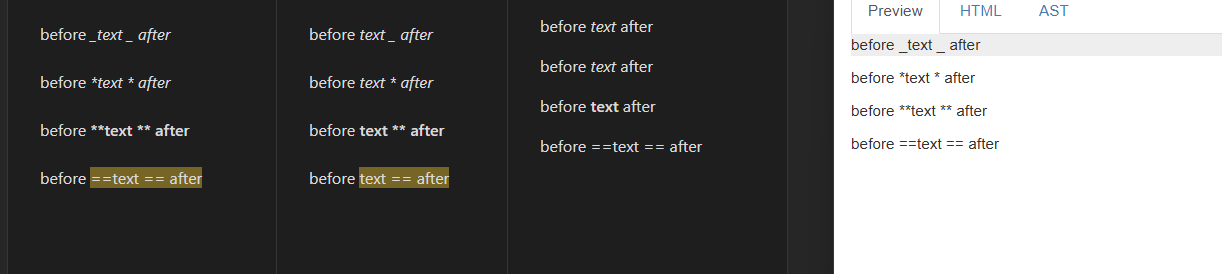
Both Editor(s) (source mode & live preview) and reading mode do not handle correctly markdown markers for bold, italic, highlight, etc when spaces (whitespace) between the text and the marker are present.
before _text _ after

before *text * after

before **text ** after

before ==text == after
Source | Live Preview | Reading | Reference Implementation
Both editor(s) and reading mode detect the text within the markers as bold/italics/etc. They should not, the markers HAVE to be attached to a letter to work.
Live Preview hides the first marker but not the second. This is a byproduct of 1.
Source mode (and LP) incorrectly interpret the text after the last marker also as bold/italics/etc. It’s not. This is also a by product of 1 and this other feature.
Also, in this context, punctuation marks (. ! [ ] ( ) etc) should be handled like spaces. So this bug extents to those cases as well:
before*text*after (no punt)

before*text.*after

before**(text**after
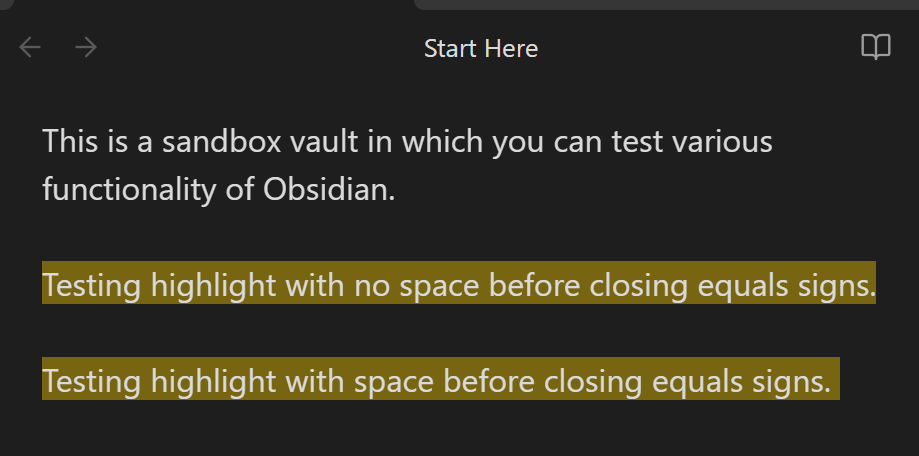
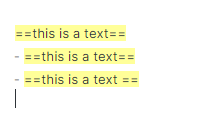
Created highlighted text by enclosing with “==”.
Create another section of text enclosed with “==” but with an extra space before the closing "==
".
Did you follow the troubleshooting guide? [Y/N]
Y
Expected result
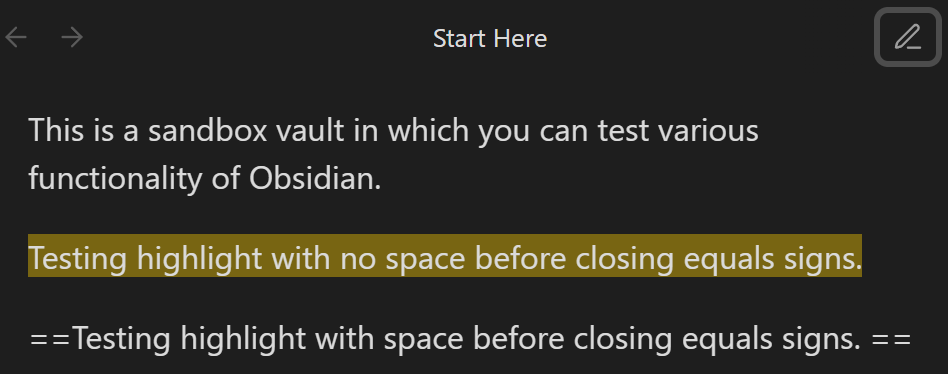
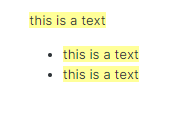
Highlight behavior is the same in editor view and reading view.
Actual result
In editor (live preview), text between “==” is highlighted, even if there are extra spaces.
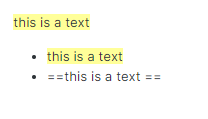
In reading view, text between “==” is not highlighted if there are extra spaces.
Same occurs in sandbox mode.
Environment
SYSTEM INFO:
Obsidian version: v1.9.1
Installer version: v1.6.7
Operating system: Windows 11 Pro 10.0.26100
Login status: logged in
Language: en
Catalyst license: insider
Insider build toggle: on
Live preview: on
Base theme: light
Community theme: Border v1.12.11
Snippets enabled: 2
Restricted mode: off
Plugins installed: 14
Plugins enabled: 10
1: Paste URL into selection v1.7.0
2: Smart Typography v1.0.18
3: Natural Language Dates v0.6.2
4: Settings Search v1.3.10
5: Recent Files v1.7.4
6: Text Format v3.1.0
7: Style Settings v1.0.9
8: Tag Wrangler v0.6.4
9: Local Images Plus v0.16.3
10: Tasks v7.19.1
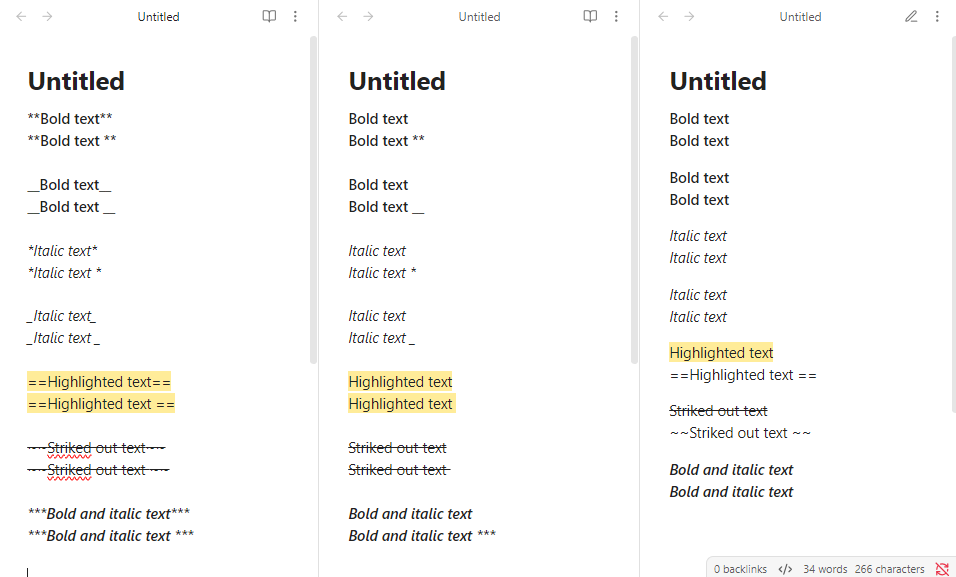
Both the editing and reading views should correctly compile the syntax, rendering the characters surrounded by asterisks in italics.
Actual result
The editing view does not correctly render the characters surrounded by asterisks in italics (see snapshots below).
Environment
SYSTEM INFO:
Obsidian version: v1.6.5
Installer version: v1.5.12
Operating system: Darwin Kernel Version 23.3.0: Wed Dec 20 21:30:44 PST 2023; root:xnu-10002.81.5~7/RELEASE_ARM64_T6000 23.3.0
Login status: logged in
Catalyst license: none
Insider build toggle: off
Live preview: on
Base theme: adapt to system
Community theme: none
Snippets enabled: 0
Restricted mode: on
This issue also happens to other formats like boldface and links.
In some languages (e.g., Chinese), writing characters and punctuations in bold without spaces around them can be natural, so this issue can be annoying.
Input some text that includes a mix of letters and symbols.
Use ** or * to format the text as bold or italic, according to the following specific rule:
**<another symbol><text>**
<another symbol>, such as .()^…
Did you follow the troubleshooting guide? [Y/N]
Y
Expected result
The <another symbol><text> portion mentioned above should be rendered as bold or italic in Live Preview and Source Mode.
Actual result
This portion of the text is not rendered as bold or italic. Instead, the text that follows this portion is formatted as bold or italic.
Environment
SYSTEM INFO:
	Obsidian version: v1.9.12
	Installer version: v1.9.10
	Operating system: Darwin Kernel Version 25.0.0: Thu Aug 14 22:03:54 PDT 2025; root:xnu-12377.1.8~5/RELEASE_ARM64_T8122 25.0.0
	Login status: logged in
	Language: en
	Catalyst license: insider
	Insider build toggle: on
	Live preview: on
	Base theme: adapt to system
	Community theme: none
	Snippets enabled: 0
	Restricted mode: on

RECOMMENDATIONS:
	none
Additional information
This bug only occurs in Live Preview and Source Mode. It does not appear in Reading Mode.
This bug only occurs in bold and italics. It does not appear in inline math, inline code, highlight, or strikethrough.
It took me 30 minutes to find this issue, and I was even more astonished to see that it has been open for more than 4 years. How is Obsidian even so established with such obvious UX-diminishing bugs? I get that its hackable, but how can this be still an issue? Sorry for the rant but I expected a bit more robustness.