Hi there,
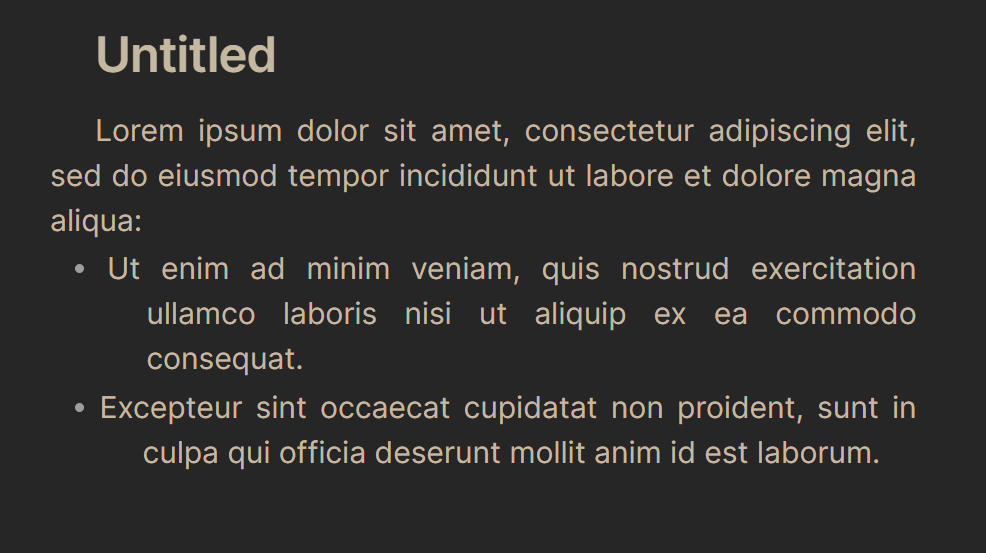
How can I indent the first line of paragraphs, with bullet points moving accordingly?
I’m using this code:
.markdown-source-view {
  text-indent: 1.5em;
}
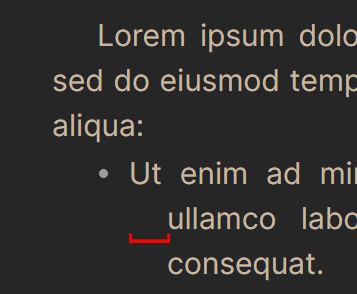
But it does not indent the bullet points (list items’ first line):
Hi there,
How can I indent the first line of paragraphs, with bullet points moving accordingly?
I’m using this code:
.markdown-source-view {
text-indent: 1.5em;
}
But it does not indent the bullet points (list items’ first line):
I think you mean this one. Add it to what you already have:
.markdown-source-view {
  --list-indent-editing: 1.5em;
}
But if you mean this one too, then, well, add it as well, and adjust the numbers until getting the indentation you want:
.markdown-source-view {
  --list-indent: 1.5em;
}
Thanks. This moved the bullet points just below the starting point of the paragraph. But from the second line onwards, there is more indentation (in editing mode). How to fix that?
I’m not sure what you want the final to look like, but would isolating the elements help, so you can set some indentations separately?
This indents first lines like you were initially doing, but it excludes lists:
.markdown-source-view .cm-line:not(.HyperMD-list-line) {
	text-indent: 2em;
}
You can exclude other things too, such as headings, by adding them to the :not() list:
.markdown-source-view .cm-line:not(.HyperMD-list-line, :has(.cm-header)) {
	text-indent: 2em;
}
And then separately, you can change the list indentation, if you want:
.markdown-source-view {
	--list-indent: 1.5em;
	--list-indent-editing: 1.5em;
}