Use case or problem
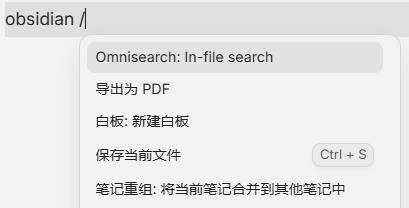
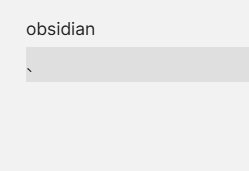
In Obsidian, the default trigger key for the command palette is / (forward slash). However, when I press the / key while using a Chinese input method, the output is actually a Chinese comma (、), and the command palette does not appear. I have to first press Shift to switch to English input mode, then press / again to open the command palette.
This switching action seems trivial, but repeating it dozens of times a day creates a noticeable friction in the user experience.
Proposed solution
Reference: Feishu / Lark
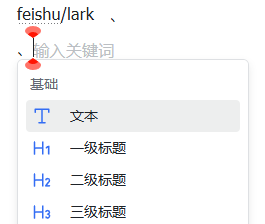
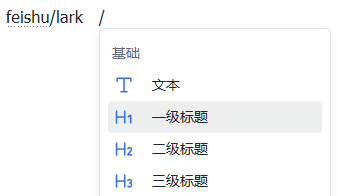
Feishu (Lark) documents handle this elegantly: in Feishu, regardless of whether you’re in Chinese or English input mode, pressing either / or 、 (Chinese comma) immediately opens the command menu. Users don’t need to think about their input method state at all — the experience is seamless.
Current workaround (optional)
Option 1 (Recommended): Allow both / and 、 to trigger the command palette. When the user presses the Chinese comma key, Obsidian treats it as equivalent to / and opens the command palette directly.
Related feature requests (optional)
Option 2 (More Flexible): Add a setting option that allows users to customize the command palette trigger key. For example, users could set it to 、, ` (backtick), or any other key, giving them flexibility based on their input method and keyboard layout preferences.
Technical Feasibility
From a technical standpoint, both options require very minimal changes. Obsidian’s key listener logic simply needs to:
-
For Option 1: Add a check for the Chinese comma key (KeyCode 188, which outputs
、under Chinese input methods) alongside the existing/key check (KeyCode 191). -
For Option 2: Add a key binding input field in the settings interface.
The implementation effort is small, but the improvement for Chinese users (and all users of non-English keyboard layouts) would be significant.
Expected Benefits
-
Chinese users can quickly open the command palette without frequently switching input methods.
-
No impact on English users —
/continues to work as usual in English input mode. -
Improves Obsidian’s usability and reputation in the Chinese community (one of the largest user bases worldwide).