Steps to reproduce
- Open any Markdown file with headings.
- Open the Outline core plugin pane.
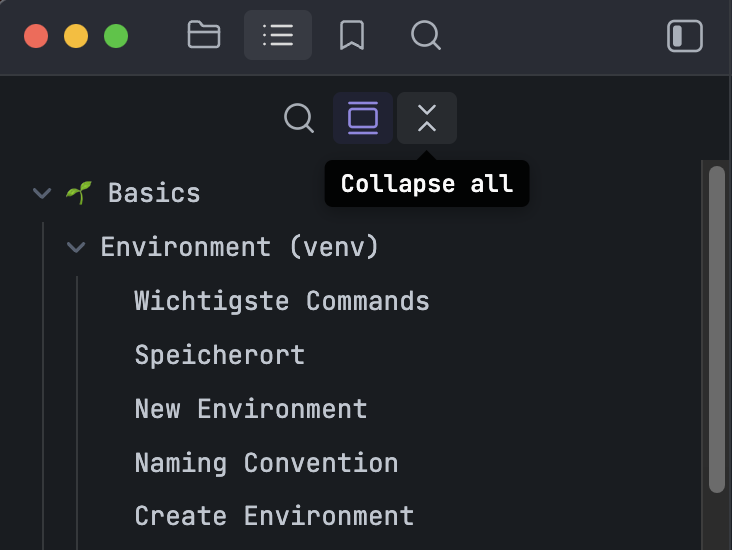
- Observe that all headings are expanded by default.
- Click the toggle icon in the Outline header (which incorrectly shows “Expand all” even though everything is already expanded).
- Collapse all headings using the same toggle.
- Switch to another file tab, then switch back to the previous one.
- Observe that all headings are expanded again.
Did you follow the troubleshooting guide? [Y/N]
- Tested in the sandbox vault: Y
- No community plugins, no CSS snippets, default theme: Y
Expected result
- The Outline should load in a collapsed state by default when opening a file.
- The toggle icon should correctly reflect the current state:
- When everything is expanded → show “Collapse all”
- When everything is collapsed → show “Expand all”
- Collapsed/expanded state should persist when switching tabs.
Actual result
- Outline always loads fully expanded.
- The toggle icon incorrectly shows “Expand all” even though everything is already expanded.
- After collapsing all and switching tabs, the Outline resets to fully expanded again.
Environment
SYSTEM INFO:
	Obsidian version: v1.10.2
	Installer version: v1.6.7
	Operating system: Darwin Kernel Version 25.0.0: Wed Sep 17 21:41:50 PDT 2025; root:xnu-12377.1.9~141/RELEASE_ARM64_T6030 25.0.0
	Login status: logged in
	Language: en
	Catalyst license: insider
	Insider build toggle: on
	Live preview: on
	Base theme: adapt to system
	Community theme: Things v2.1.20
	Snippets enabled: 0
	Restricted mode: off
	Plugins installed: 16
	Plugins enabled: 12
		1: Settings Search v1.3.10
		2: Automatic Table Of Contents v1.7.3
		3: Code Editor Shortcuts v1.14.0
		4: Style Settings v1.0.9
		5: Templater v2.16.1
		6: Nuke Orphans v1.2.5
		7: Home tab v1.2.2
		8: Advanced Tables v0.22.1
		9: Quick Tagger v2.2.3
		10: Pixel Perfect Image v1.0.22
		11: Go To Heading v0.2.2
		12: Kanban v2.0.51
Additional information
- The issue persists consistently across different vaults and files.
- Screenshots:
Hoping to see this one fixed soon. Thank you.