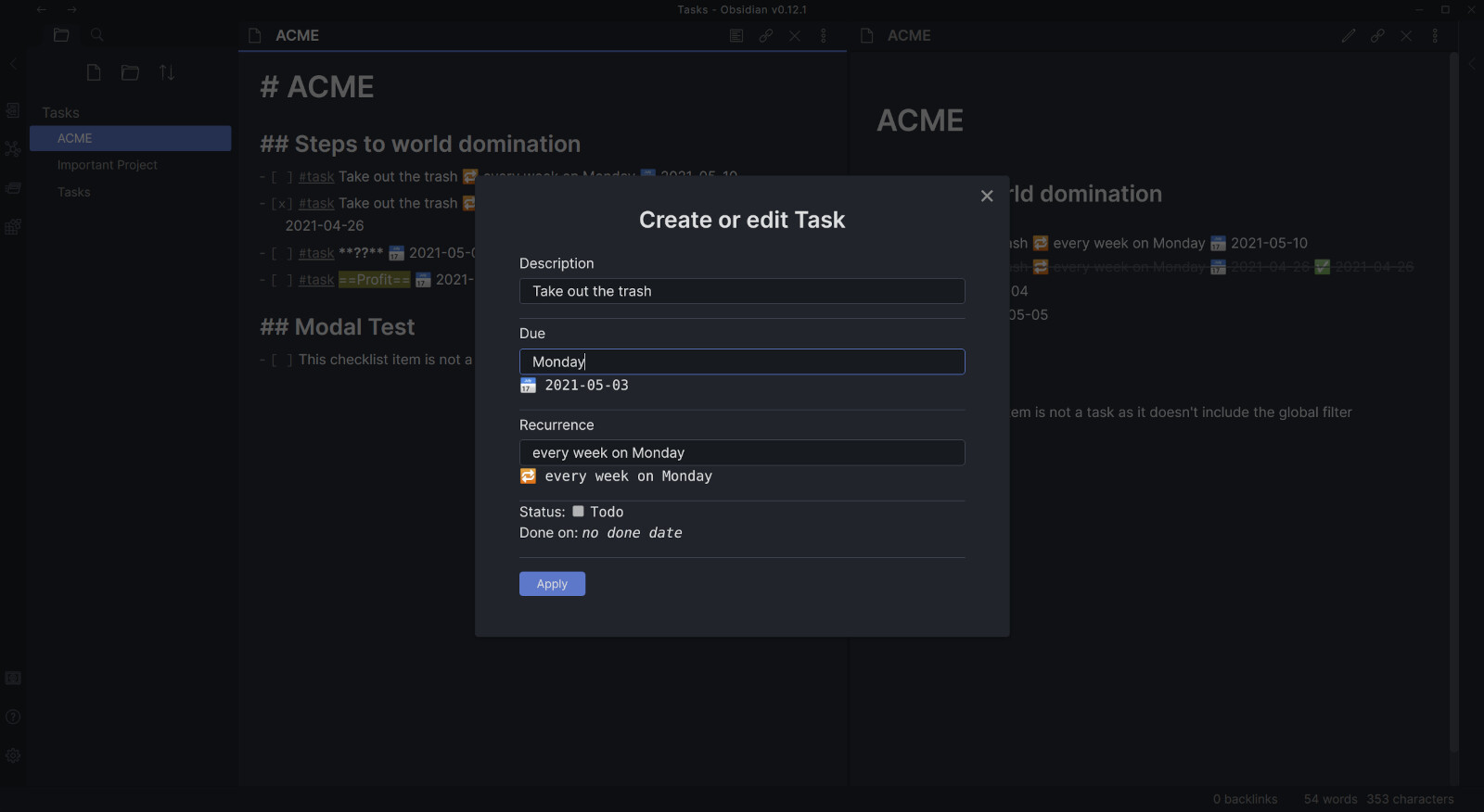
I have not tested the new release extensively. I will do that in the coming weeks.
Please note that I decided to move from - TODO to - [ ] #task. You are flexible with the tag that you want to use. In fact, it doesn’t have to be a tag at all. Any string would work. And if you don’t want to differentiate checklist items by task or no-task, you don’t have to set anything at all.
Please also see the release notes for migration support and the updated readme. If you need more help, you can also ask here.
Sorry for the trouble. But I think this is overall better and I wanted to make the change rather sooner than later.
From the readme (check the project readme for more info and examples):
Tasks can be recurring. In order to specify a recurrence rule of a task, you must append the “recurrence signifier ” followed by the recurrence rule. For example: 🔁 every weekday means the task will repeat every week on Monday through Friday.
When you toggle the status of a recurring task to anything but “todo” (i.e. “done”), the orginal task that you wanted to toggle will be marked as done and get the done date appended to it, like any other task. In addition, a new task will be put one line above the original task. The new task will have the due date of the next occurrence after the due date of the original task.
Take as example the following task::
- [ ] take out the trash 🔁 every Sunday 📅 2021-04-25
If you mark the above task “done” on Saturday, the 24th of April, the file will now look like this:
-   [ ] take out the trash 🔁 every Sunday 📅 2021-05-02
-   [x] take out the trash 🔁 every Sunday 📅 2021-04-25 ✅ 2021-04-24
Is it possible to have reccuring rules be based on when the task was done rather than the originally scheduled point in time. This is pretty useful for not-that-important tasks one my procrastinate every now and then and where the next occurence makes more sense scheduled relative to last time the task was done rather than planned (cleaning the dishwasher, descale the coffee machine etc.)
Maybe it’s already possible but I can’t test it as I have to wait for Obsidian 12 to be available for non insiders.
Note that with the current implementation you cannot query „includes prio 1 OR prio 2“. All filter lines are „AND“. Instead, you would have multiple task blocks below each other (description includes #prio1, then another ```tasks with description includes #prio2, and so on).
You could do something like the following to get all your prio 1 work tasks:
```tasks
description includes #prio1
description includes #work
```
It includes a command for a modal to edit your tasks in the editor more conveniently. Includes due dates like “Monday”, etc. You can of course bind the command to a hotkey.
I haven’t tested it much. You can help by trying it out and letting me know what’s wrong
This plugin is incredible. Thanks for your work on it. Now that Obsidian 0.12.0 supports characters other than “x” in the todo, is it possible to query for those? I can imagine use cases for filtering tasks with [!] or [?].
I am also thinking “delegated” and “skipped”. Maybe there could be more?
Anyway, right now you can put any character you want between the brackets. From “Tasks”’ point of view they will be “done”, but maybe it contains additional semantic information for you. You could pair it with @death.au ’s nice checkbox CSS snippet (scroll to the bottom): GitHub - deathau/obsidian-snippets
I will ask for it to be added once obsidian 0.12 is „public“. After that it will still take a while to get reviewed and I will need to address the feedback from the review.
Awesome plugin. Exactly what I’ve been wishing for. Thank you. Would love to have a group by note function so the note title becomes the subheading under which the respective notes are listed.
I’m not completely sold on kanban. More something to create a task on the fly as I’m creating/editing and be able to see lists to tick off. To me that is perfect. But I’ve been forced to renew my trello account. I hoping that what you are creating could mean me slowly moving away from it
So I want to create a task within any note I’m busy with. It will fuel my workflow into overdrive
 ” followed by the recurrence rule. For example: