Do you happen to have the sync logs for the time, or the copies of the bases file versions that were edited?
I do, I believe I have all of that. Do you want me to attach here?
If you are comfortable with it, else you can email to [email protected]. 
Here you go, let me know if I can provide more information.
The file tasks-defaults-1302.base was the latest file modified on desktop on 11/26 13:02.
The file tasks-defaults-iphone-overwrote-a-1659 is what the iphone overwrote when I opened the iphone app apparently on 11/26 16:59. (I didn’t notice until I went back to the desktop the following day, and saw my edits were gone)
iphone-sync-issue.zip (2.5 KB)
Thanks for the logs. We’re reviewing them. It is the holiday season so we’re going to be slower until the new year, as a heads up.
I had been suspecting sync problems in my daily notes for some time, and just yesterday I caught Obsidian red-handed. I was sure I wrote down something on the Mac but it wasn’t there on the iPhone.
The version history shows that the first iPhone Obsidian start on the day resulted on an “Empty content”, negating the +40 revisions that at that point had accumulated on the Mac. See screenshot.
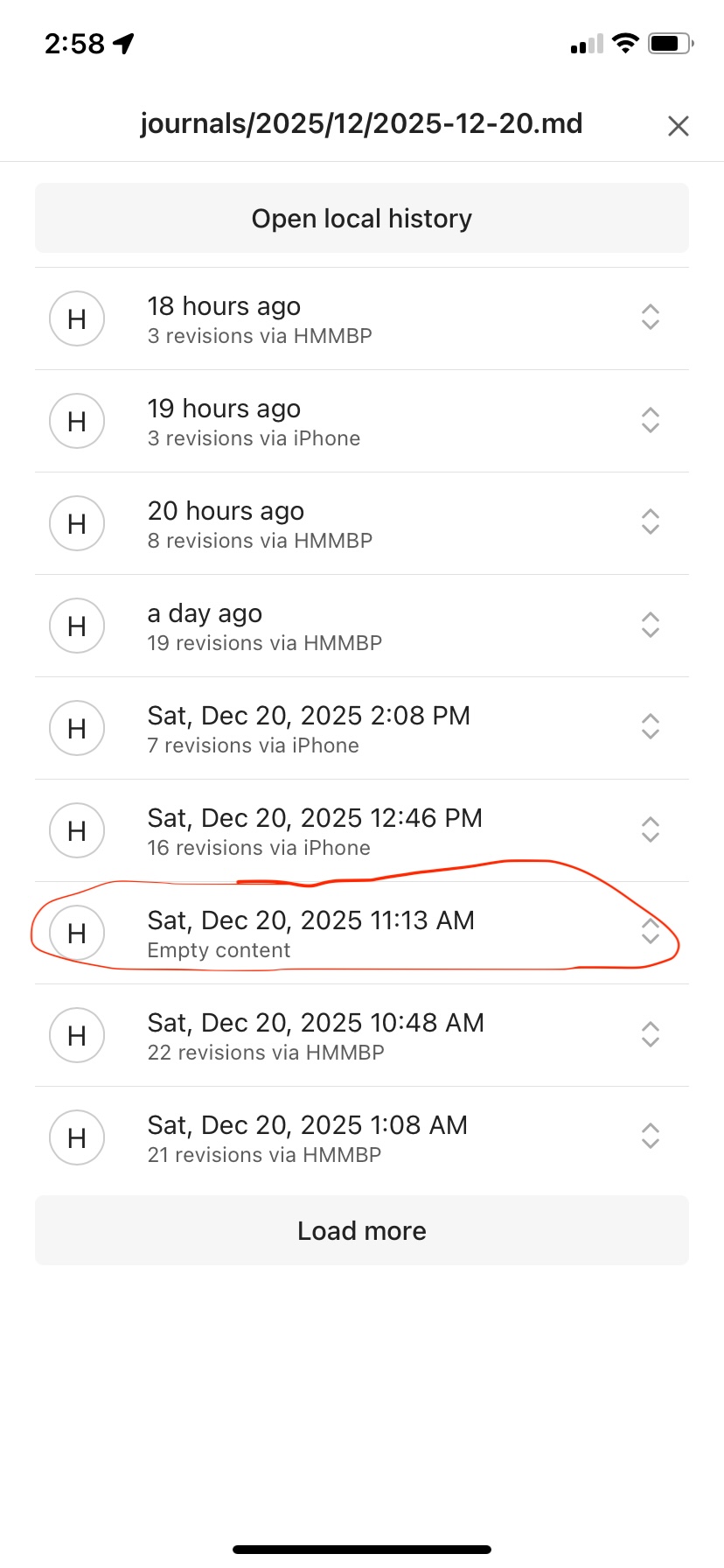
My suspicion: since this is the first time I opened Obsidian on the day on the iPhone, maybe the problem is that, while the sync is happening, Obsidian creates and opens the daily note (because of its core Daily notes plugin). A race condition between the syncing of the existing Mac’s daily note vs the creation of the iPhone’s empty daily note would explain this result.
Logs: Unfortunately the sync log seems to already be gone for yesterday, and I don’t see any way to make it last longer for next time. (If I notice the iPhone sync problem while I’m on the run, it can be hard to make time to gather evidence at the moment, so having a longer-lasting log would be helpful)
iOS 18.7.2
iOS Obsidian 1.10.6 (256)
MacOS 26.2 (25C56)
MacOS Obsidian 1.10.6 (Installer 1.5.12)
Using only Obsidian Sync, nothing else.
There is a feature request for that which you can comment on or press the heart button: Obsidian Sync: Persistent / Save Sync logs for debugging.
So as I said, I had been suspecting data loss for some time. I thought now I’d check how many times Obsidian has actually deleted my desktop data when syncing to the phone just as I described - so maybe I could get an idea of how frequent it is and even save stuff from past versions that are still within the history.
That should be relatively easy to detect by looking at the sync logs.
But the sync logs are deleted daily! And as that feature request says, this is rather uncommon…
Wow, suddenly I’m scared. I gave up on Logseq (and gave them a good amount of unkind words) because of the obvious data loss issues. Now I find data loss in Obsidian - and (conveniently?) I can’t check how pervasive it is. And this issue has been open for 1.5 years.
So now I’ll have to keep an eagle eye on the sync? That undermines everything.
A few weeks ago I had contacted Support direct to alert them to a sync failure on a Windows/Android combo. The phone was killing page content that was being created on the PC. IN FRONT OF MY EYES. 
Advice was taken to change settings to the less convenient ‘create a duplicate conflict file’, and extend the duration of the built-in page change history (a lifesaver!  )
)
TODAY that bug is apparently still a problem, thought I was losing my mind but the change history PROVED that uncommanded deletions were taking place. This time an entire FOLDER was gone. 
Now given the Day  it is theoretically possible that I made a keyboard error. But I’m feeling lucid, so I don’t think so… These sync issues are a bomb regardless of the platform. If the system can’t operate in a FAIL-SAFE manner then it has a fundamental design flaw.
Granted coding cross platform must be a nightmare so kudos to the devs who do this… 
Last night I had some similar behaviour ( Obsidian Sync repeatedly restoring deleted files - #30 by Pixionus ) and this morning I was testing some thing and saw a deleted directory repeatedly come back on the computer I deleted it on. Come to find out on another computer the directory had a zip file, and Obsidian was struggling with that file. I moved the file and while the archives integrety was upheld after the move, and the directory would stay deleted when deleted from the problem computer, the zip would corrupt in synch.. Synch is still buggy and I there are all sorts of problems around logging, and I just wasted my weekend working on an enormous recovery of mixed up states with empty directories, partial synchs, folders returning from the dead, etc when I intended to be actually working on my real projects. I wish they had made sure they were managing the sync like a prod grade distributed database before moving on to bases…
I have had this same problem! I am using Obsidian Sync. Several times, when I have opened Obsidian on my iPhone, I notice later in the Activity Log that it has overwritten and deleted large sections of previously edited notes. Thankfully, I have been able to recover and restore the note(s) through the Version History of Obsidian Sync. It seems that this only occurs on notes that are open in the Obsidian app on the iOS device. This is a significant problem and one that I would like to see resolved. It makes me hesitant to even open Obsidian on my iOS devices. Hopefully this can be fixed so that it will not occur in the future. Thanks!
The issue may happen when there are multiple independent changes to a note.
For example we begin with Note A that is synchronized in both device 1 and device 2.
If device 1 and device 2 both independently make changes to note A, without having the possibility to synchronize in between, then the automatic merge algorithm can produce undesirable outputs.
However, there is no way really to fix this, because when there are multiple conflicting changes, only YOU (the user) know what’s right. No algorithm can merge them correctly.
There are currently two way to go about this:
- You either let the automatic merge algorithm attempt. If it fails, you can manually look in the previous versions of Note A which are in the sync version history and file recovery version history.
- Disable the automatic merging in case of conflict (We have recently introduce this). In this case, every time there is one of these “merge conflict with independent edits” an additional
Note A-conflictwill be generated and you have to manually review itNote AandNote A-conflictfor changes.
I am asking anyone who is experiencing the issue in this thread to switch to the new “create conflict file” option and let me know what happens.
If after enabling the new “create conflict file” option, you experience conflict files being created even when NO editing has been done on multiple devices, please go here and provide the requested info.
Because Sync only notifies about conflicts in its activity log which is cleared when the app restarts, I suggest also bookmarking a search for File:"conflicted copy".
Thank you! This is very helpful. I have changed the sync setting to “Create conflict file.” My recollection is that NO editing had been done on the file that was viewed on my iOS devices (iPhone and/or iPad). But, will have to monitor what takes place going forward with the new setting and report back. Thanks for the help! Obsidian is an outstanding resource!
This happened to me yesterday, on latest MacOS + iOS. I will add 1 new piece of information which I don’t believe has been mentioned so far:
- It wasn’t only sync conflicts within files that occurred. In addition to that, I had deleted a number of notes and images on my computer earlier in the day, and when I opened the mobile app later, those deleted files (which were still in the iPhone’s local vault) were actually RE-CREATED on the desktop.
There’s another bug report for that (or at least for behavior like that): Obsidian Sync repeatedly restoring deleted files.
Thanks, to be clear, both happened in the same sync: data loss in notes as well as deleted files getting restored.

it’s not obliviously wrong. You may have intentionally deleted the contents of the note. In that case, the empty note being pushed is correct.
I assume you didn’t intentionally do that, but just seeing the note is empty so something surely went wrong is not correct.
Kindly enable the “conflict file creation mode” and see if you also fall into the bucket of this other BR or your problem is solved.