Just chiming in with my experience with this issue as well. I’ve been experiencing this for about five months with Obsidian Sync. Primary platforms being synced are iOS, Linux, and Windows. On my iPhone, it is not linked to iCloud.
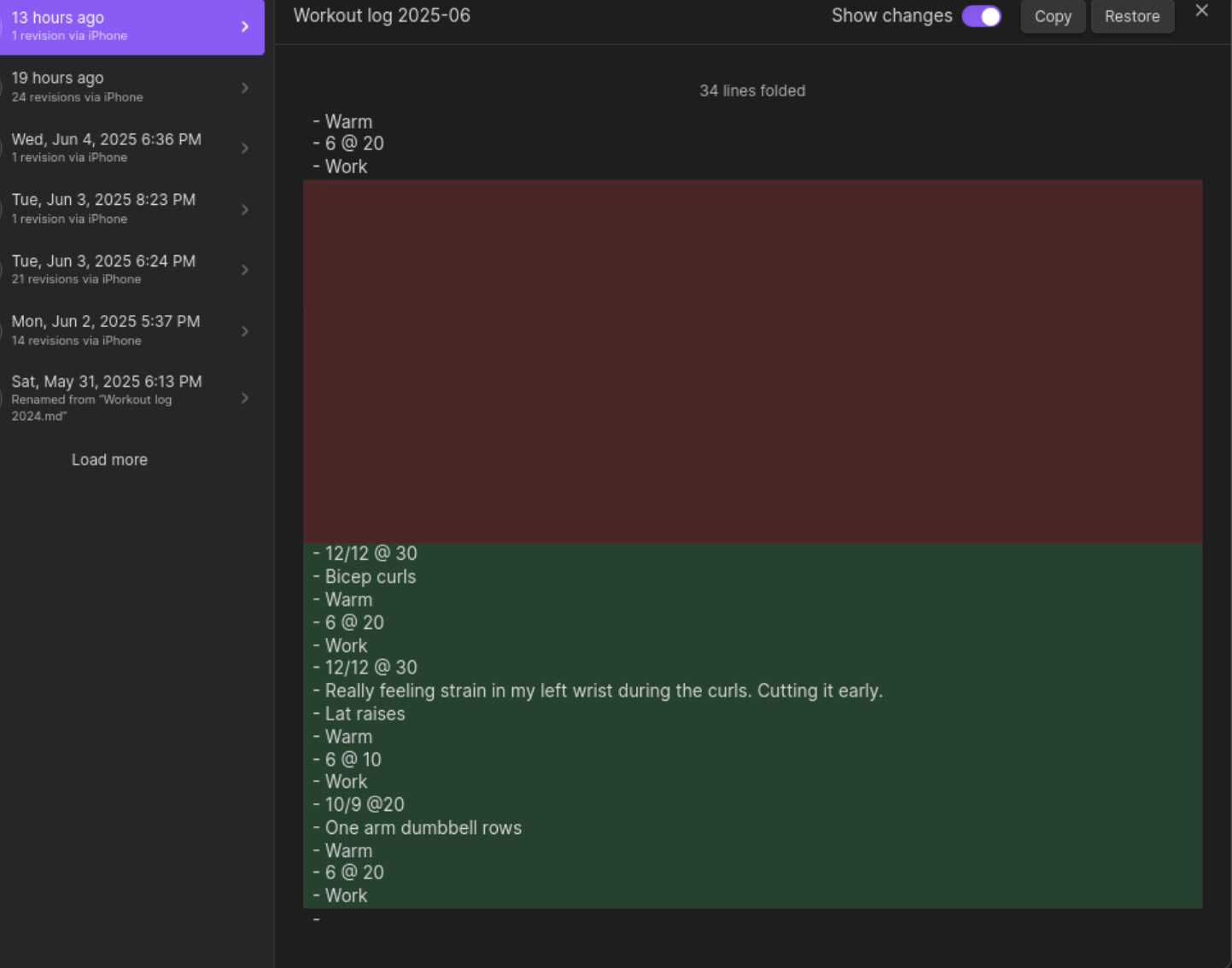
This morning, I saw that I had some duplicate sections in a note I edited around 6pm yesterday. The strange thing was that the duplicates are documented as having been pushed around 11pm by my iPhone. Both my Windows and Linux machines were fully shut down.
I unfortunately don’t have sync logs of the iPhone’s 11pm push (unless there’s a way to see historic sync logs that I’m not aware of), but there is a version history entry for the issue.
It was simple to revert, but this is a fairly consistent issue I’ve had for months and it’s begun to make me uneasy as I’m not sure where this duplication has happened in other files I haven’t checked recently.
Other than this issue, sync is perfect for me. Let me know if there’s any additional info I can provide.
I’ve had a couple more instances lately. The most recent one involved data loss, possibly a first for me. The pirate book entry is just straight up deleted. Also unusual, the other part of the file has duplication within a single line (I’ve seen that before but very rarely). I rolled these changes back and have now closed Obsidian on my laptop to see if that will help.
Manually checking the merge error log, I caught one of these duplicates today even tho the vault has been closed on my laptop. (Obsidian was still open in another vault but that shouldn’t matter.)
I had no idea about this thread but sent an email to support and was asked to take a look and share what I emailed in. This thread captures what I have been experiencing. I am getting near the end of my rope. I very much appreciate Obsidian and the team. I also believe that in 2025 it is reasonable to expect that sync is a solved problem. I will allow some time for a fix but this really erodes usability and can’t go on.
For some time now I have had issues with things getting truncated or duplicated or just otherwise compromised across devices.
I use Obsidian + sync across 4 total devices: 2 PCs, 1 iPhone 16 and 1 iPad Air. Prevent device sleep is enabled on the iPhone and iPad. PCs are generally left on. Obsidian is generally left open on various devices but not always. I am a heavy outliner (via plugin) but apart from that it’s generally vanilla Obsidian.
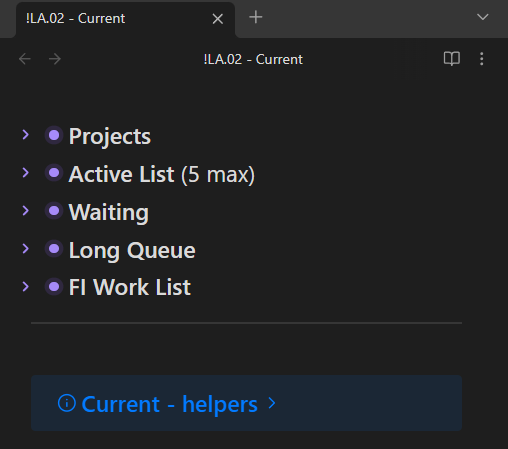
An example of the kind of thing that happens: Right now when I open my note !LA.02 - Current on PC 1, I see the following (as it should be)…
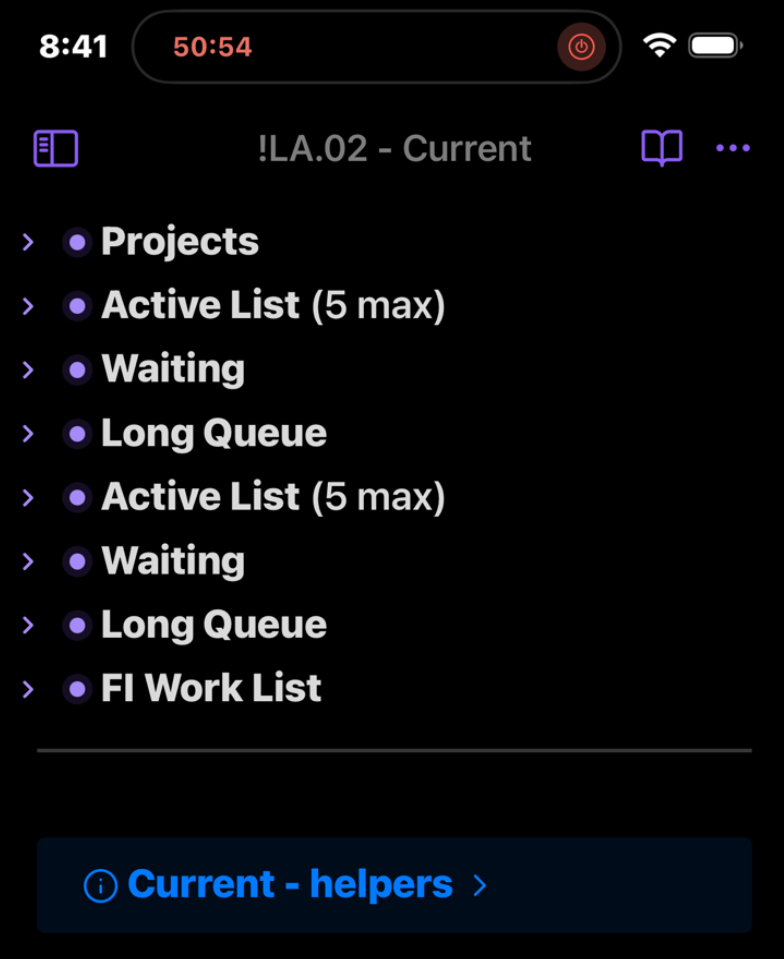
…yet when I open the same note on iPhone I see the following:
So sync has somehow duplicated content in the file…but not really, because when I expand those bottom repeated headings, the content is different.
This might be chalked up to a merge conflict of some kind, but none are reported. Also, I can add more content on iPhone to one of the top headings (pre-duplication) and it syncs to the desktop without showing the duplicated areas. In other words sync seems to be maintaining two versions of the file that still quasi-sync yet show up very differently on 2 devices. How can this be? It does not inspire confidence in data integrity, that is for sure.
And that is just one example of the kind of thing that happens. More frequently, I will add a bullet to a list in phone, it syncs, then when I go to desktop, it syncs, but I only see part of the text that was entered - it gets truncated or merged with a previous bullet or somehow otherwise distorted.
I love Obsidian but this has become a daily papercut and is killing the experience. I am willing to try anything at this point.
I’m experiencing this issue on the latest Insider build. I use a MacBook, iPad, iPhone and Windows PC. Sync needs to “just work” - I can’t use a “second brain” type application if I can’t trust that it won’t mess up my data. I’ve been a paid sync user pretty much since it was introduced but seriously considering moving away from Obsidian completely because of this.
I agree with this unfortunately. I noticed that over the last two months I have almost completely stopped using obsidian, and it’s been because I subconsciously switched to using google docs because I would trust that whatever I wrote and synced would still be there later.
So technically I have already moved away from using Obsidian even though I still paid the last couple months of subscription. If this bug got fixed though I would leap back in!!
I’ve somehow managed to avoid having sync issues recently by deleting the vault on my iPhone and recreating it, and trying to sync more frequently (multiple times a day). I also changed it so the default display mode on my phone is reading view instead of live preview editing, in an effort to make it so Obsidian would not detect edits while it was syncing. I don’t know if Obsidian checks what mode it’s in before detecting edits, but I figured that was worth a shot.
Hopefully this helps somebody, whether it be the team trying to figure things out or other users who are having the same issue.
Just a quick update: I have experienced Sync duplicating part of a file again since I wrote my previous reply, so it doesn’t prevent the issue entirely.
I saw in the newest release (1.9.7) that one of the bullet points is
Sync: Added new “Conflict resolution” setting. Choose how Obsidian handles file conflicts when syncing: Merge (default) or create conflict file.
Is the root of this issue that Obsidian is merging the files and the merge is incorrect? If so, it sounds like a conflict file is a good start to resolve this issue (preventing this at all and letting us review is a huge win).
I’d love to get other feedback to make sure I was understanding this correctly. I don’t have a Catalyst license, but I’ll buy one to test out this fix if this is a possible solution.
I just want to +1 this. I am using Obsidian on iOS 18.6.1 and Windows 24H2. I’ve been seeing this issue sporadically since I started using Obsidian about a year ago. Snippets of notes will be duplicated, sometimes right after the duplicated section, sometimes further down the file. It has mostly been a minor nuisance that I’ve lived with but it really tarnishes the experience and I would have to caveat and recommendation of Obsidian. Having to say “Well I love this software but it might randomly duplicate text” will sound really silly. So far I don’t believe I have ever lost sections of files but I am a little nervous about it.
It does seem to happen when I have had the desktop and mobile versions both open recently. However, it will affect files I edited on one device and didn’t even have open on the other, which seems really strange.
I use a couple of community plugins. Text Format and Style Editor.
I too have this issue and it’s becoming extremely frustrating
I have a lot of checklists … I used to feel confident checking something off - but now I need to check it off, and then go scanning my file for duplicates to make sure the same task doesn’t exist somewhere else.
We are paying a pretty high price for the sync service and the product has been pretty low quality with this continuous sync/duplication issue.
I think it’s grounds for refunds to be issued - why should we be paying for a broken product with issues like this that have been round for so long and not addressed.
Is the obsidian dev team even taking this issue seriously?
It can’t be that hard to reproduce given the high frequency of occurrence and the wealth of information that users have provided on the issue.
Until the issue is fixed, it definitely helps to enable creating conflict files instead of automatically merging conflicts. Thanks to the developers for adding that feature.
The new option to create a conflict file instead of trying to merge is in the public release now. I switched to it, and after a while of no news, I forced a conflict. The conflict appeared in the log, but as with the merges, Obsidian didn’t notify me.
The lack of notification makes conflicts worse no matter which conflict system is used. Problems happen silently and may go undiscovered for a long time, and it’s hard to feel confident about the state of my files. With notifications, conflicts would still be a problem but at least I could tend to them promptly and feel more secure in general.
I agree with this. I’d love to get an unmissable notification for every merge conflict so I can deal with it immediately.
For now, I found that the filename pattern for the merge conflict files is <original-filename> (Conflicted copy <device> YYYYMMDDHHMMDD).md. (Is this pattern documented somewhere? Will it be stable going forward?)
Based on this, I added a pre-commit hook to my Git repo that rejects a commit when it contains a file with “(Conflicted copy” in the name. This hopefully ensures that I’ll catch the merge conflict at the next commit (usually at the end of the day for me), even if I miss the conflict file in the file list.
In case anyone's interested, here's my pre-commit hook script:
#!/bin/bash

# Pre-commit hook to prevent committing merge conflict files created by Obsidian
#
# Usage:
#
# - Save this as `.git/hooks/pre-commit`
# - Then make it executable: `chmod +x .git/hooks/pre-commit`

filename_pattern="(Conflicted copy"

# Get list of staged files
staged_files=$(git diff --cached --name-only)

# Check for merge conflict files
conflicted_files=$(echo "$staged_files" | grep -i "$filename_pattern")

if [ -n "$conflicted_files" ]; then
    echo "❌ COMMIT REJECTED: Found files with '(Conflicted copy' in filename:"
    echo
    echo "$conflicted_files"
    echo
    echo "Please resolve these sync conflicts before committing."
    exit 1
fi

# No conflicted files were found
exit 0
Yeah, the notification should be the kind you have to manually dismiss, not the kind that disappears automatically. Back when it worked, I think it disappeared automatically (or maybe I’m confusing it with the notification for when changes have happened outside Obsidian, if that’s a different one).
I’ve bookmarked a search for file:"conflicted copy", which is easier to check than the Sync log’s “Merge conflicts” filter, but I still have to check it manually.
I just hit this (or a similar syncing issue) — in this case it affected a canvas, and it was data loss — a portion of work I had done was wiped out. I was lucky enough to come back to it the next day and realize what had happened, but the fact that data can silently disappear is very concerning.
Notably, I never edited the file on my iPhone; in fact, I never even opened it on my iPhone. So why is a stale copy of it getting pushed?
As with others here, I keep Obsidian open all the time on my desktop. I use Obsidian on my iPhone sporadically. Every time I’ve seen a syncing problem it has been related to a push from my iPhone, and almost always it is like this: on a file I’ve never touched from my iPhone.
FWIW, I’ve found the conflict file option has worked well. Only used on plain text files (not canvas or bases). It still could use some usability improvements, like better alerting or a merge view, but my data duplication has been solved by it, so far.