Obsidian Mistakenly Deletes Another File

I have no clue how it happened. I rarely turn my mac off and Obsidian might have been open for 3 - 4 months.

Last week I noticed one of my very important docs were missing.

Today I attempted to Delete A.md.

It deleted B.md! It moved it to the trash.

Any further effort to delete A.md, it just replaced B.md in the trash bin with B 2.md, B 3.md , etc.

I restored B.md and removed it from trash.

Attempted to Delete A.md again. It deleted it, but COMPLETELY. IT DID NOT GO TO TRASH FIRST.

This only happened with that particular A.md file.

After A.md was gone, things seemed to be normal again.

I suspect thats how the doc from last week went missing, and I had already flushed out my trash by the time I realized it was missing.

Maybe it is fixed by now, I haven’t updated obsidian in a while, but this is FUCKED. It is absolutely unfathomable to me that this can be a thing in a launched software at any point at any version. I might move away from obsidian, I simply can’t trust it anymore.

Since I don’t know how to reproduce, this might not be very helpful and seem more like a rant and it probably is, but if there are other reports of this, know that something is going on.

I use an M3 Max MacBook Pro.

My vault folder is in the iCloud directory.

0 community plugins.

Debug info:
SYSTEM INFO:
Obsidian version: 1.12.4
Installer version: 1.6.5
Operating system: Darwin Kernel Version 25.0.0: Wed Sep 17 21:38:50 PDT 2025; root:xnu-12377.1.9~141/RELEASE_ARM64_T6031 25.0.0
Login status: not logged in
Language: en
Insider build toggle: off
Live preview: on
Base theme: adapt to system
Community theme: none
Snippets enabled: 0
Restricted mode: off
Plugins installed: 0
Plugins enabled: 0

RECOMMENDATIONS:
none
I can’t say whether such a bug exists in Obsidian — at least I’ve never encountered one myself, nor have I come across anything similar in the forums.

My vault folder is in the iCloud directory.

This could also be the issue.

The main point I want to make is: whatever software you use, if the files are important, make backups.

2 Likes

First of all, download and reinstall Obsidian. Your installer is wildly ancient.

Are your iCloud files set to always downloaded? If MacOS is offloading them to the cloud on one or more of your devices, then almost certainly the problem is with iCloud, not Obsidian.

+1 to backups. Cloud syncing is not a sufficient backup solution.

That said, if it moved another file to the trash, there might be a bug. Not saying that’s not possible. But those other steps would be important too.

1 Like

I don’t recall hearing of a problem like this before. I’d restart the device in case it’s a random system glitch.

What exact steps are you using to delete the file? Do A and B have any similarity in their name or location? (That shouldn’t matter, but maybe somehow it could.) Is there anything unusual about either file?

As others have said, it’s important to have a backup system for any files you care about (not just ones in Obsidian). Obsidian has a friendly backup help page that can get you started.

2 Likes

Also, are you referring to the system trash in MacOS, or Obsidian’s trash folder?

1 Like

Just right click, delete from context menu, press delete on the popup.

No similarity in name, both in root

Nope, Had created both using obsidian itself a few days back.

System trash in MacOS. I did not know Obsidian has a .trash directory. I found B.md there! That makes it less scary.

It always moves them to MacOS trash. But this one file went in the .trash in the process I had explained… Any idea whats going on? Is the .trash some sort of fallback in case it can’t move the file to system trash? How is this implemented?

A few months back I was thinking of just version controlling it and running a script which commits and pushes to a repository when it detects changes, and having full file history and diffs can be nice at times.

But I don’t really want to put this notes in github because I’m a bit paranoid about putting personal notes and info in various places, I just wanted to have 1 source of truth, in the cloud. I am already deep in iCloud for all my other data. It also always updates on my iphone too so I have the notes at all times everywhere, synced.

I might have to move the vault to some git repository then if I continue to use Obsidian. But I mean, the premise of Obsidian is that its just markdowns. very simple. Why would things break with iCloud? Of course, backing up is always a good idea but it is just more data you have to worry about, maintaining and storing.

Although to be fair I’ve also seen pretty weird bugs with icloud on mac as well.

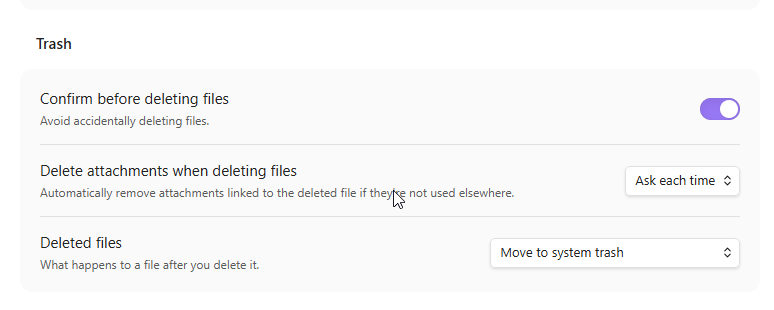
In settings->File and Links->Trash

What do you have configured there?

Same values as those in your screenshot.

Correction: A.md

Are you sure it says “Move in system trash” and not “move to Obsidian trash”?

There are many other options than uploading to some website. A single copy in a cloud tool is NOT a solid backup plan.

Even manually zipping up the folder once in a while and storing it on a hard drive somewhere is better than nothing.

2 Likes

Absolutely sure.

What happened to you is very strange. Even more so since you are not using any plugins. I am puzzled and we haven’t had any other case such as this.

We’ll think about it.

Yep. This is what I do. iCloud + weekly backup to External SSD.

I’ve never so much as had a single issue with iCloud, but you never know so it’s best to be safe.

1 Like

Yup, it was so weird I literally ran to my friend in awe showing this bug to him.

Thank you for your response. I hope yall find the issue one day.

Out of all the questions and suggestions we threw at you, I see a couple that haven’t been addressed.

Simple thing to try. (Maybe it’s a weird caching issue or something.)

The potential issue here is that Obsidian expects all of its files to exist on disk, and iCloud by default can remove files to save space, leaving placeholders behind that re-download the file. When that happens, Obsidian thinks the file has been removed. I’m not exactly sure how that would cause a wrong file to be deleted, but I suppose it’s possible somehow. It could more obviously cause a deleted item to go to the wrong trash, if your trash setting isn’t default and the relevant settings file gets offloaded (thus restoring the default).

In recent versions of macOS you can set choose to keep individual files and folders (like your vault folder) downloaded instead of turning off iCloud file optimization altogether.

1 Like

No, optimization was on.

This makes sense,

Thats probably what was going on.

The same thing happened again to me a few days back with the new obsidian version, restarting obsidian, entire system, etc. didn’t help.

Maybe it makes sense to advise against people using iCloud as their vault with optimizations on.

I set the vault to be kept downloaded, I’ll reply here again if the bug occurred again.

We do.. over and over and over again almost every single week.

And the Obsidian Help page mentions it too.

Best practices

  • For macOS 14 (Sonoma) and earlier: Disable Optimize Mac Storage in iCloud settings to prevent files from being offloaded. This setting affects all iCloud storage on the device, not just Obsidian.

  • For macOS 15 (Sequoia): Right-click the Obsidian folder in iCloud Drive and select Keep Downloaded.

2 Likes