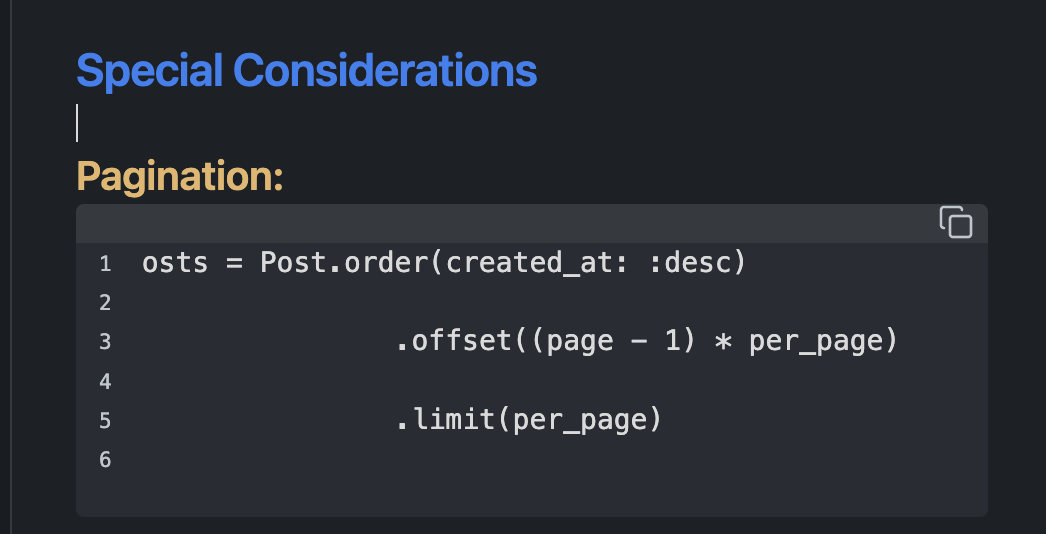
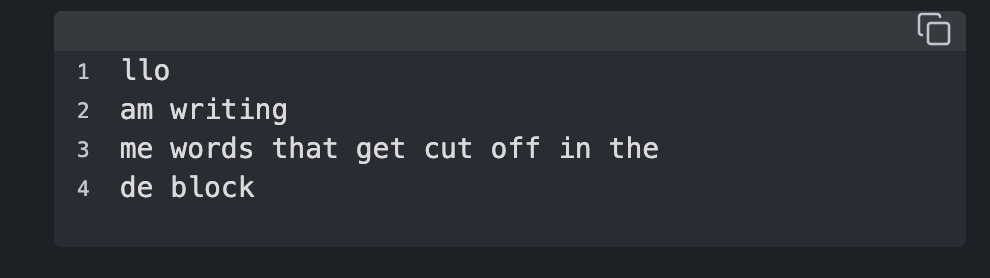
Code blocks now cut off the first two characters of each line, which they weren’t doing before.
Steps to reproduce
- Install version 1.9.12 of obsidian
- Create a code block with ``````
- Inside that codeblock, paste anything of multiple lines, plaintext or from an IDE
- Notice that the numbers obscur the writing
Expected result
The numbers will not cover it up. Checked this on a macbook pro with version 1.8.4: no issues
Actual result
Upon upgrading to 1.9.12, the issue appeared
Environment
SYSTEM INFO:
Obsidian version: v1.9.12
Installer version: v1.8.4
Operating system: Darwin Kernel Version 24.6.0: Mon Jul 14 11:30:55 PDT 2025; root:xnu-11417.140.69~1/RELEASE_ARM64_T6031 24.6.0
Login status: logged in
Language: en
Catalyst license: none
Insider build toggle: off
Live preview: on
Base theme: adapt to system
Community theme: Things v2.1.6
Snippets enabled: 0
Restricted mode: off
Plugins installed: 2
Plugins enabled: 1
1: Importer v1.6.4
RECOMMENDATIONS:
Custom theme and snippets: for cosmetic issues, please first try updating your theme and disabling your snippets. If still not fixed, please try to make the issue happen in the Sandbox Vault or disable community theme and snippets.
Community plugins: for bugs, please first try updating all your plugins to latest. If still not fixed, please try to make the issue happen in the Sandbox Vault or disable community plugins.
Additional information
The letters are still there and can be accessed by moving the cursor and adding spaces.
Here is a screenshot of the issue: