yeah, i see that also. not sure why it happens. in any case, the extra line doesn’t appear if there is a line break after the closing $$, and i think that syntax is better anyway.
I mean, in LaTeX, the double dollar delimiter ($$math$$) means that you want to have “displayed math”, which is by definition typeset in a separate paragraph, with vertical space around.
If you want inline math, use a single dollar ($math$).
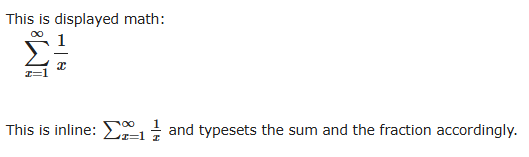
Note however that inline math and displayed math can present also small differences. Inline math is meant to be part of a line in a paragraph of text, so it minimises the vertical space needed by the math, by using smaller sum signs, integral signs or fractions.
See here an example:
This is displayed math: $$\sum_{x=1}^\infty\frac{1}{x}$$

This is inline: $\sum_{x=1}^\infty\frac{1}{x}$ and typesets
the sum and the fraction accordingly.
In case you want “big” symbols inline, you can force the displayed style, without triggering the vertical spacing, by inserting \displaystyle in the equation. Eg:
This is inline: $\displaystyle\sum_{x=1}^\infty\frac{1}{x}$
but uses "big" sum and fractions.
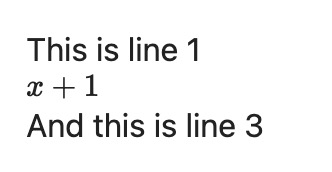
No. The issue that, based on where you place the next character after the display math, an extra blank line appears before the display math. That’s not expected behavior.
… and those two produce different results, another bug.
I think it’s against the spirit of markdown to expect users to be just-so with things like this.
Sometimes I copy markdown from sources I have no control over. You expect me to rewrite them manually each time, simply because they were not especially written in Obsidian ? that’s not what markdown is all about.
you are referring to these, correct? they are both faithfully copy-pasted and they render in exactly the same way for me, on Windows. if for some reason these are not copy-pasting faithfully for you, perhaps instead of manually correcting them you can use a markdown linter to fix it.
as i mentioned before, i do see the extra line when using the unsupported syntax. however it essentially never comes up for me in my usage of obsidian.
Elostinbase - You’re right. My point is that subtle changes in whitespace cause surprising changes in the output.
Go back up a line and add a single “space” after the closing dollar sign. For me, that creates an extra blank line between the display math and the lower text line - and there’s no logic to it. Maybe I just added this extra space by force of habit, and it’s not-visible.
I expect a markdown renderer to generally ignore meaningless whitespace.
And when I type, it’s quite common for an extra space to appear after I add a display math fragment. I don’t like having to constantly tidy up whitespace. It’s pointless.