-
Author of the workflow: @abopp
-
Short title: Using spaced repetition and temporal tags to develop your conceptual notes
-
Reviewing Notes
-
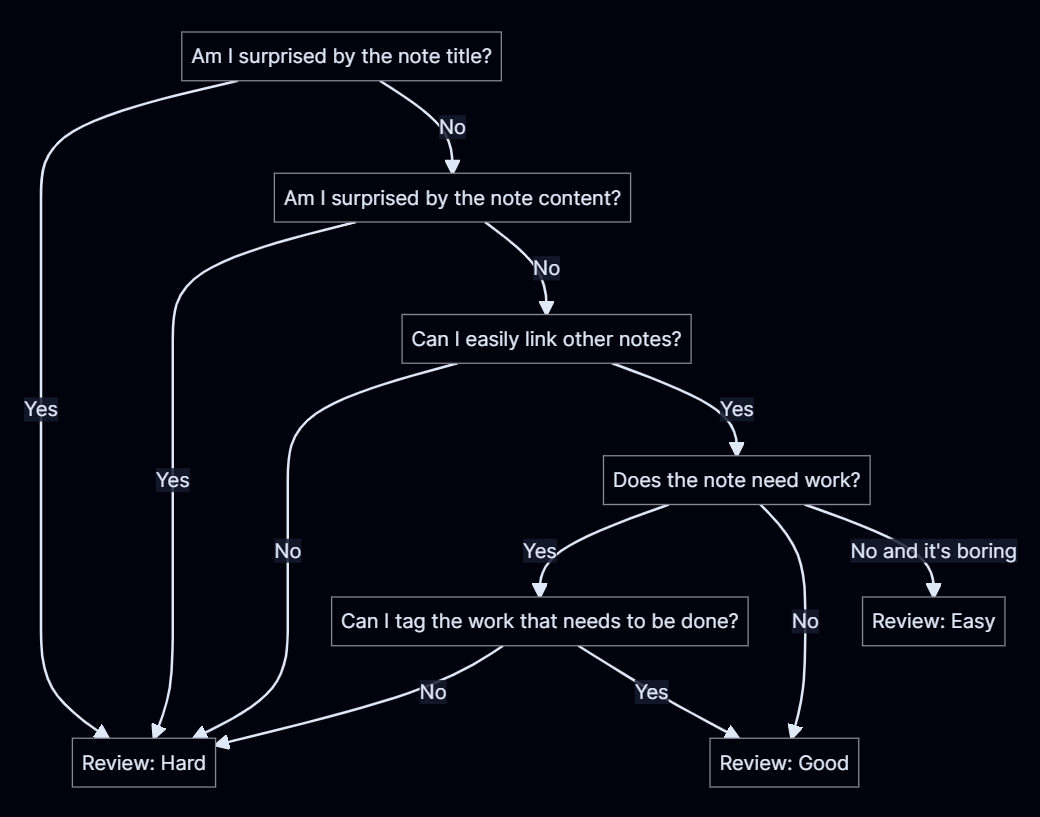
Spaced repetition is a tool that will help make connections between ideas, review concepts, and maintain notes. It has helped me more easily find connections between notes and use those connections to find new ideas. The basis of this workflow is the Spaced repetition plugin, and a classification of notes (either a folder or tag) that are conceptual. The idea of review isn’t pure memorization, it is ease of connection. You don’t need to be able to quote your note titles or their content (though this will help you do that) but you do want to be able to remember notes in context. The connections you make in Obsidian are doubly effective as they help you remember that concept, and make a dynamic connection in Obsidian. This process can be extended to include maintenance on your notes through a task and status system. As you review, you can create tasks with work items for you to come back too, which will allow you to review easily without getting stuck making changes. Status will help you find the notes that need to be planted, are currently growing, or are mature. For this I use two tags, #TO (#TO/DO, #TO/EXPLORE, #TO/TEND) and #EVER (#EVER/SEED, #EVER/SPROUT, #EVER/GREEN). These tags allow me to leverage all of Obsidian’s features for tags with my conceptual notes. This includes filtering searches, backlinks, and the graph view, and being able to sort and limit search queries for certain kinds of tasks. These repeated and spaced interactions with your notes, make developing ideas much more fluid.
-
Write-up
Spaced repetition process: Using spaced repetition for your conceptual notes - Obsidian Publish
Tag structure: my TO(DO) and EVER(GREEN) structure - Obsidian Publish