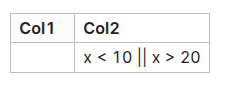
In one of the cell, try to input something containing “|”. For example, x<10 || x>20.
Expected result
A line formatted as code block, with the desired output: x<10 || x>20
Actual result
OB interprets “|” as column separator and just displays “`x<10” and discards everything behind… (not displaying “|| x>20”).
Environment
SYSTEM INFO:
Obsidian version: v1.9.12
Installer version: v1.8.10
Operating system: Windows 11 Pro 10.0.22631
Login status: not logged in
Language: en
Insider build toggle: off
Live preview: on
Base theme: adapt to system
Community theme: none
Snippets enabled: 0
Restricted mode: off
Plugins installed: 3
Plugins enabled: 3
1: Print v0.3.8
2: Mermaid Tools v1.3.0
3: Better Export PDF v1.11.0
Additional information
If I input “x<10 \|\| x>20", trying to escapge the "|", OB will lieterally output: x < 10 \|\| x > 20, which means under influence of "…`”, the "" is not escaped.
Correct solution under OB: <code>||</code>, use HTML entity.
VSC can do well with simple “\|\|”, which is simpler and follows my intuition.
```dataviewjs
dv.table(
 ["No Code Block",   "In a Code Block",    "In a Math Block"  ],
[["x< 10 || x > 20", "`x < 10 || x > 20`", "$x< 10 || x > 20$"]]
)
```
 :
: