Hi there 
I’m also studying Japanese, but at a much lower level. It’s still fun to play around with.
It’s easy to get overwhelmed since Obsidian gives you so many options. The overall rule is: “start small”. I’m giving you some ideas here, but maybe don’t try everything at once. Play around with the programme yourself, see what you want to do, then try and figure out how to do that.
Kanji
Templates are pretty straight forward in Obsidian. You can simply create a “note”, meaning a file in Obsidian and then tell the core plugin Templates (or the Community Plugin Templater) where to find that template. You can do something like this:
---
Kanji:
音読み:
訓読み
English:
Category:
  - "[[Kanji]]"
  - "[[Japanese]]"
---
By putting this in the frontmatter (now also called Properties in Obsidian) by adding --- around it, you can then use the data from this with other plugins, such as Dataview or Bases, to create lists of kanji you’ve learned, or tables like a dictionary.
Kanji Plugin
There are several Furigana plugins. However, I prefer not to use HTML tags (like <ruby>) to mark text, because I find that harder to read, especially when reading in a different program that doesn’t render the same things as Obsidian might. So I use a plugin called Markdown Furigana by Steven Kraft. This plugin hasn’t been updated in several years, but it should still work. I did modify it though, so it works for any type of text (because I’m also learning Urdu). I think my modification is just to extend the Unicode range it works for.
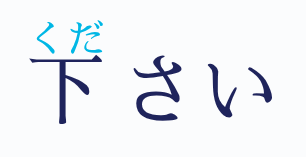
Anyway you type text {下|くだ} さい and this gets displayed as
You can of course modify the font and colour individually with CSS. I find this font to be easy to read.
Increase size of displayed Kanji
With modern screen displays the default font sizes are sometimes too small for me, so I use the plugin Dynamic Highlights to create a helper class. Normally this plugin lets you choose a Regex command and then would highlight. For instance you could choose to have all instances of the word but to be highlighted so you notice how often you use it.
I use it slightly differently. I create a new Highlighter called Japanese, select a see-through colour, and then I add the following as the Search term
(?:(?:(?:[\u3000-\u303F\u3040-\u30FF\u31F0-\u31FF\uFF00-\uFFEF\u30FB\u30FC\u309B\u309C\u4E00-\u9FFF\u3400-\u4DBF])|(?:[\uD840-\uD87A][\uDC00-\uDFFF])|(?:[\uD880-\uD884][\uDC00-\uDFFF]))[\u0300-\u036F\u3099\u309A\u309B\u309C]*)+
This captures I think all Kanji characters including most if not all of the rarer Extensions kanji.
Then in a CSS snippet:
  .cm-line .Japanese,
  ruby,
  .markdown-preview-view .Japanese {
    font-size: 3em;
  }
This increases the size of all Japanese characters in Obsidian dynamically, without having to explicitly mark it.
I find that easier to read.
Grammar
This is difficult to say since it depends on what kind of learner you are. And also what kind of structure overall you want. This is also connected to your third point, I think.
There are many different options, but personally I have an Idea folder which just means anything I quickly note down, conversations, e-mails, actual ideas, things I overheard on the radio, etc. And then you can use that later if you want to look up words and understand the grammar someone was using. You can form study notes or overall lessons from those ideas, of course, and put those in a Grammar folder, where you reflect on your ideas, or process lessons from classes, books, etc.
Flashcards
Anki is extremely popular, so it must be doing something right. I find the whole setup to be somewhat confusing though, so I’m using Spaced Repetition.
You choose a tag you want to use for your flashcards, e.g. #flashcards and then create “decks” i.e. groups, by using subtags, e.g. #flashcards/Japanese/N5 and then follow the syntax the plugin gives you e.g.
{下|くだ} さい ::: please
the triple colon ::: creates a bi-directional flashcard, as opposed to just one-directional with ::
CSS for flashcards
You can increase the size of the text including kanji in the flashcard view with this CSS:
  .sr-flashcard .sr-content {
    font-size: 5em !important;
    font-family: [choose font you like];
  }
Organization
This is a point of preference. I personally like a few folders to keep things tidy, but don’t get too strict with the structure because categories can be constrictive.
Conclusion
Start small. Rather than creating a masterful system and then only when it’s “finished” start writing/learning, do it the other way around. Start studying now, and then when you say “Hey, I wish I could do Furigana” then come back here and figure out how, in order to improve your learning