I’ve developed a plugin that addresses several community requests (including myself) for Google Keep style note viewing in Obsidian:
What Makes Mini Notes Special?
i found similar plugins that display your notes in this card view but none have fullfilled all of my personal needs, so i develped this to solve my own problem, and appearntly a lot of people’s as well!
- view your notes in a google keep-notes similar layout
- change the bg color of your notes!
- pin your most important notes
- filter your notes based on their tags
How the plugin displays your notes!
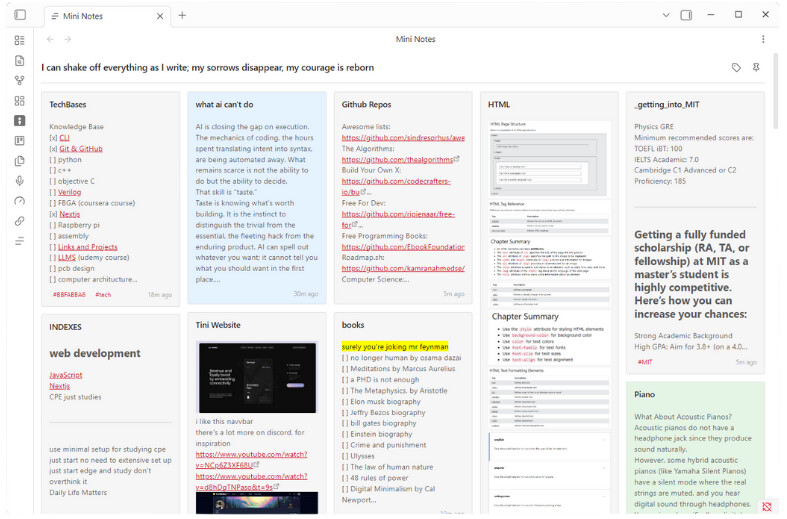
The plugin supports dark theme as well!
and mobile support.
please read the README.md for more details.
Hover on any notes to change its color or pin it!

Community Threads This Solves
- @arro asked in How do i view my notes like google keep? (May 2023) - “Dataview is difficult for me. Is there any plugin for this feature?”
- @Prokee requested in Instant Note-Taking: Lightweight Sticky Note App (Dec 2025) - “I constantly use sticky notes on Windows because they are very quick to open”
- @churnish - Grid Layout / Card View / Masonry Gallery (Aug 2025) - “Implementation could follow the successful patterns seen in apps like Craft and Google Keep”
- Note Comments / Evernote-like layout / Note thumbnails (Mar 2021) - Requesting card/gallery view to jump between notes faster
- @sunnypeter - Quick Note Taker (like a Sticky Note) (Nov 2020) - “Would it be possible to have something similar for Obsidian enabling us to take quick notes”
All these threads emphasize the same core need: quick capture with visual organization for review later.
Installation
Currently awaiting Community Plugins approval.
Meanwhile, you can try it manually:
- GitHub: Release 1.0.0 · rknastenka/Mini-Notes
- Download
main.js,manifest.json, andstyles.cssfrom the latest release - Place in
.obsidian/plugins/mini-notes/folder - Enable in Settings → Community Plugins