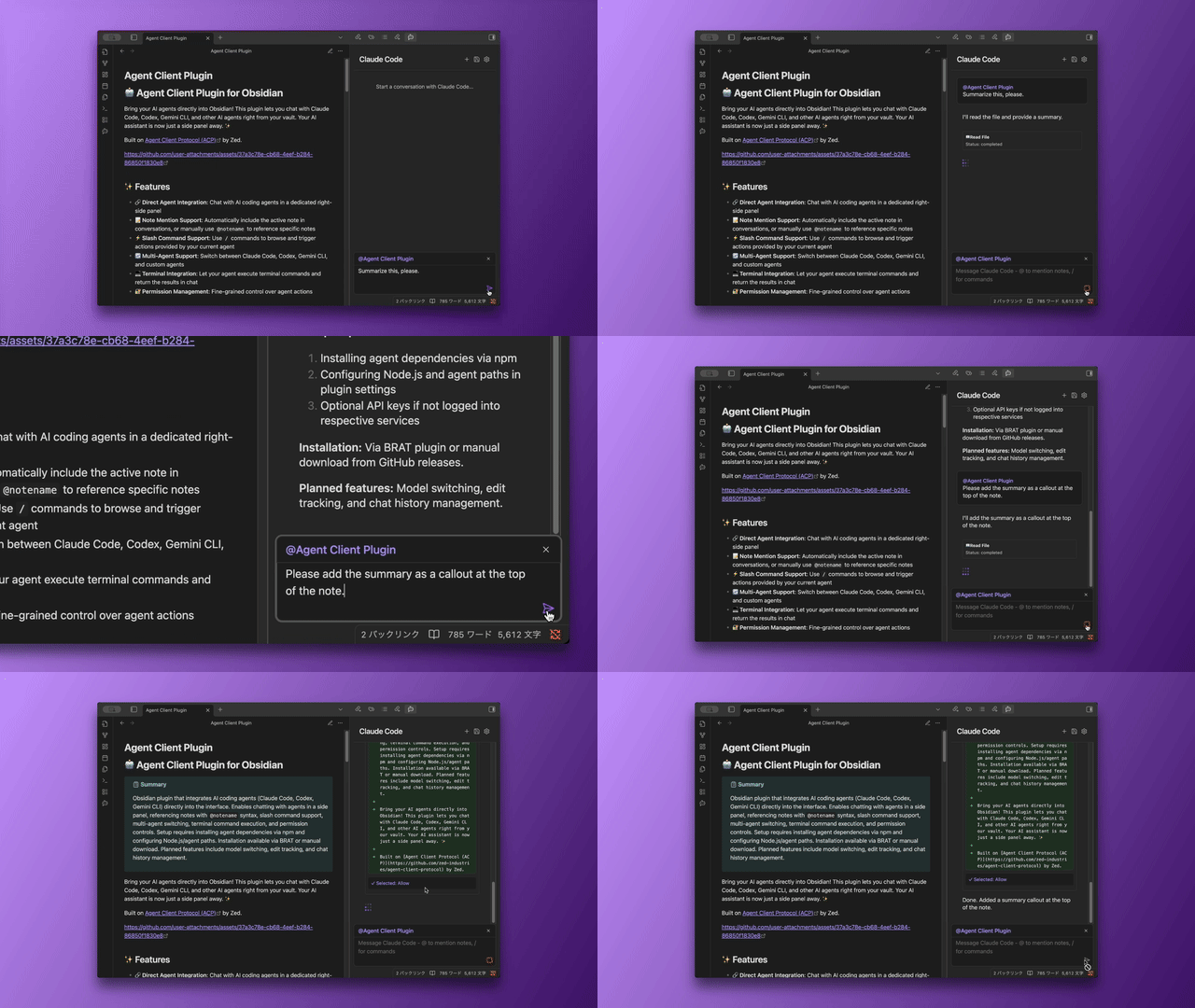
I’m excited to share my first Obsidian plugin — Agent Client, which brings AI coding agents directly into your note-taking workflow.
Background
I’ve been using AI agents like Claude Code and Codex for various tasks — from organizing research notes to automating workflows and solving complex problems. They’re incredibly powerful tools, but I found myself constantly switching between Obsidian (where I manage all my knowledge) and the terminal (where agents run). Every time I wanted an agent to help with something vault-related, I had to manually copy-paste content or explain context from scratch.
I wanted agents that could naturally understand my vault structure, reference my notes, and work alongside my existing workflow — without leaving Obsidian.
That’s when I discovered Zed’s Agent Client Protocol (ACP), which provides a clean interface for connecting to various AI agents. I decided to build a plugin around it, creating a bridge between Obsidian’s knowledge management capabilities and the power of AI agents.
What Agent Client does:
Native Agent Integration: Connect Claude Code, Codex, Gemini CLI, or any ACP-compatible agent (like Qwen Code, OpenCode) directly inside Obsidian
Vault-Aware Conversations: Use @notename or @[[note name]] to reference any note in your vault during conversations. You can even mention specific text selections
Auto-Mention Mode: Optionally include the current note’s context automatically in every message — perfect for iterative editing workflows
Keyboard-Driven Workflow: Full command palette integration lets you switch agents, start new chats, manage permissions, and cancel responses without touching the mouse
Tool Execution: Let agents execute terminal commands and use MCP (Model Context Protocol) tools to automate complex workflows
Session Management: Automatically export chat sessions as notes (on new chat or close), preserving your conversations as part of your vault
WSL Support: Full compatibility with Windows Subsystem for Linux environments
I’ve submitted it to the Community Plugin Store and it’s awaiting review.
Fair Warning
The plugin requires setting up external agent binaries (like Claude Code), which involves some command-line configuration. I’ve included setup guides in the repository to make this as smooth as possible. Once configured, everything runs seamlessly within Obsidian.
Looking Forward
I’d love to hear your thoughts and use cases! If you have ideas for features, find bugs, or just want to discuss how AI agents could better integrate with your Obsidian workflow, please share in this thread or on GitHub.
Don’t forget to star the repo if you find it useful!
Very cool! I’ve been working on solving this issue for myself.
I use OpenCode. I see slash command support, nice! What about tab to switch modes? And I’m curious about multi-session support? Could I have an instance of OpenCode running on each open tab? or multiple instances running best-of-n?
Mode switching isn’t implemented yet, but since it’s defined in the Agent Client Protocol specification, I’m planning to tackle it soon — along with model switching features, it’s high on my priority list!
Regarding multi-session support, currently only a single instance can run at a time. However, your use case sounds really compelling — running multiple instances for best-of-n comparison is a fascinating idea. I really appreciate the feedback! I’ll add this to my roadmap and hopefully have updates soon.
We’re turning Obsidian from a note-taking tool to a natural language IDE. Almost unbelievable that it’s possible now. (And to think I was using vanilla Apple notes MONTHS ago, haha). What a time to be alive!
This is awesome! I was just wishing for this and was thinking of asking Claude to have a crack at it but this is exactly what I was looking for. If I could turn off the typing effect it would be perfect. Thanks very much.
Thanks for the kind words! Glad it’s useful for you.
Just to clarify — by “typing effect,” do you mean the streaming display where text appears progressively as it’s generated? If so, adding an option to disable it sounds reasonable. I’ll look into it!
I finally got it all working with GeminiCLI - and I love it - I’d be super interested in how people are using it and what I can learn to imprve my own workflows - this is the basis of a personal agent - linking calendar tasks and potentiall messaging as well -
@RAIT-09 one thing I’d like to see is a status signal fo when the AI is processing - Sometime when I ask it for a big task it can sit there for many minutes - and I need to hover over the ‘send message’ button to see if the agent is blocked or not. It would be good to have a simple green/red signal at the top so I can glance at it quickly
As I’m typing this - it feels like maybe ther should be an option to spawn multiple threads - though I’m sure that would be a bit more of a challenge!
Hi - so I notice that if I run the CLI in a terminal I see lots more status messages about whats happening - and because different calls have different run times it would be nice to knwo whats its up to. Especially on long effort calls using tools spawning sub agent etc .. just having more visibility
I have a new request as well - I notice that exch morning when I start i have to tell it to go and lookas my new day routine - it has not memory of what we did the previousl day - there are various LLM memory tools out there …. mem0 and MemMachine seem to be the big ones … whoch would be very useful for theis tool. though maybe a big heavy to start with … but super useful …
Status visibility:
I see what you mean now. The plugin currently shows less information compared to running the CLI directly in a terminal. I’ll explore ways to surface more detailed status through ACP events.
Memory/Routine:
I feel the same pain with having to re-establish context at the start of each work session. Memory tools are definitely appealing, but as you said, integrating them directly into the plugin would be quite heavy. Since MCP (Model Context Protocol) has become a common standard for tool integration, you might be able to use a more versatile memory solution through MCP servers that Claude Code or Gemini CLI can connect to.
That said, there are things we can improve on the plugin side. For example, I’m planning to implement a Workspace feature that lets you save and quickly recall frequently used instructions and mentions. This should help reduce the repetitive setup each session. I hope to work on this soon!
I did submit it for Community Plugin review, but haven’t heard back in a while. There was a bot bug that kept flagging the same errors repeatedly - I fixed them, but it’s been quiet since then. This is my first plugin, so I’m not entirely sure what the next steps should be.
That said, I do run the same validation checks locally before every release.
Just logged in to say “thank you”, this is really helpful for those of us who already have a Claude Pro subscription or similar, while allowing us to switch between different providers.
I do hope a “project” or “workspace” mode becomes possible. There is the issue of “memory” but also of working on a defined subset of notes.
2.1k stars on GitHub. 4 likes on the introductory post including mine on 30k views. Glad devs even post here because I don’t frequent Reddit or Discord.
I mean with Custom Agents you can use plenty of requests per day with this on free tiers compared to lousy API level requests via Copilot, for instance (Gemini Flash 20 requests on free tier via Copilot plugin, 1000 via this plugin, because of difference in routing).